
Turn on suggestions
Auto-suggest helps you quickly narrow down your search results by suggesting possible matches as you type.
Showing results for
Administration & Architecture
Explore discussions on Databricks administration, deployment strategies, and architectural best practices. Connect with administrators and architects to optimize your Databricks environment for performance, scalability, and security.
Turn on suggestions
Auto-suggest helps you quickly narrow down your search results by suggesting possible matches as you type.
Showing results for
- Databricks Community
- Administration & Architecture
- Re: UC volumes not useable in Apps?
Options
- Subscribe to RSS Feed
- Mark Topic as New
- Mark Topic as Read
- Float this Topic for Current User
- Bookmark
- Subscribe
- Mute
- Printer Friendly Page
UC volumes not useable in Apps?

Options
- Mark as New
- Bookmark
- Subscribe
- Mute
- Subscribe to RSS Feed
- Permalink
- Report Inappropriate Content
12-03-2025 02:51 AM
I have to install some custom library in a Python Databricks App. According to the documentation this should be possible through UC volumes:
https://docs.databricks.com/aws/en/dev-tools/databricks-apps/dependencies#install-wheel-files-from-u...
However, the volume is never mounted inside the app:
ERROR: Could not install packages due to an OSError: [Errno 2] No such file or directory: '/Volumes/catalog/schema/volume/package_name-1.0.0-py3-none-any.whl'
Listing the root directory in the app (ls /) and showing the result with streamlit confirms that there is no directory /Volume in the app.
Is there any other way to install an app dependency without having to copy the source code or wheel into the app code?
Does anyone have any idea how to get my package installed in the app? Setting up a private repository to point pip to is not an option in this scenario.
Thanks, Nico


7 REPLIES 7
Options
- Mark as New
- Bookmark
- Subscribe
- Mute
- Subscribe to RSS Feed
- Permalink
- Report Inappropriate Content
12-03-2025 02:57 AM
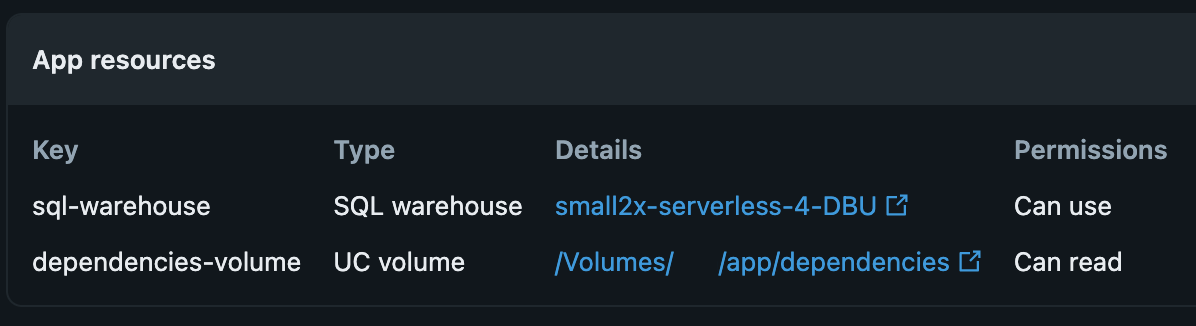
I have confirmed that the app's service principal has READ access to the volume, the whl is readable through the SDK and the app has a ressource UC volume that is referenced in app.yml and available as an env var within the app.
According to the documentation that should be all prerequisites and the installation should work:
https://docs.databricks.com/aws/en/dev-tools/databricks-apps/dependencies#install-wheel-files-from-u...

Options
- Mark as New
- Bookmark
- Subscribe
- Mute
- Subscribe to RSS Feed
- Permalink
- Report Inappropriate Content
12-03-2025 03:02 AM
Hi @nk-five1 ,
This is a known issue. It seems that UC volumes are not mounted and you cannot access them using python os module. You can read more at below thread:
The workaround for now is to use python SDK
Options
- Mark as New
- Bookmark
- Subscribe
- Mute
- Subscribe to RSS Feed
- Permalink
- Report Inappropriate Content
12-03-2025 07:12 AM
Thank you. So I guess the workaround is to pull the .whl into the app using the SDK, install it manually and only then start the actual entrypoint. Very tedious and error prone. That even makes duplicating the dependency code into the app seem like a not-so-bad alternative 😄
Options
- Mark as New
- Bookmark
- Subscribe
- Mute
- Subscribe to RSS Feed
- Permalink
- Report Inappropriate Content
12-03-2025 07:32 AM
I hope that in near future they add possibility to access volumes using plain python os module. Because as of now interacting with volumes from databricks apps is quite cumbersome

Options
- Mark as New
- Bookmark
- Subscribe
- Mute
- Subscribe to RSS Feed
- Permalink
- Report Inappropriate Content
12-03-2025 11:10 AM
The app can’t see /Volumes because the Unity Catalog volume isn’t added as an app resource and referenced via environment variables, which is required for Databricks Apps. you must add the UC volume as an app resource and reference it using valueFrom in app.yaml. Hardcoding /Volumes/... in requirements won’t work until the resource is added and permissions are granted to the app’s service principal.
The documented flow for installing wheels in Apps is: upload the wheel to a UC volume, add that volume as an app resource, bind it to an env var with valueFrom, and reference that env var in requirements.txt rather than using a literal /Volumes/... path.
Ref Doc - https://docs.databricks.com/aws/en/dev-tools/databricks-apps/dependencies#install-wheel-files-from-u...
Ref Doc - https://docs.databricks.com/aws/en/dev-tools/databricks-apps/uc-volumes
Options
- Mark as New
- Bookmark
- Subscribe
- Mute
- Subscribe to RSS Feed
- Permalink
- Report Inappropriate Content
12-04-2025 12:43 AM
@iyashk-DB wrote:The documented flow for installing wheels in Apps is: upload the wheel to a UC volume, add that volume as an app resource, bind it to an env var with valueFrom, and reference that env var in requirements.txt rather than using a literal /Volumes/... path.
This is exaclty what I did. I also tried hardcoding the path in an attempt to check that the paths are correct.
When adding the UC volume as an app ressource and referencing the ressource key with valueFrom in app.yaml, the volume is not available in the app. /Volumes does not exist in the app container. Therefore, pip cannot find the file and fails

Options
- Mark as New
- Bookmark
- Subscribe
- Mute
- Subscribe to RSS Feed
- Permalink
- Report Inappropriate Content
12-03-2025 11:25 AM

My blog: https://databrickster.medium.com/

Announcements




Related Content
- Marketplace Apps: Private Exchange Publishing, Enablement Requirements, and Review Process in Administration & Architecture
- Private listing of App Asset in Databricks Marketplace by 3rd Party Provider in Administration & Architecture
- Getting error when running databricks deploy bundle command in Machine Learning
- Getting error when running databricks deploy bundle command in Machine Learning
- UC volumes not useable in Apps? in Administration & Architecture