cancel
Showing results forย 
Search instead forย 
Did you mean:ย 
Administration & Architecture
Explore discussions on Databricks administration, deployment strategies, and architectural best practices. Connect with administrators and architects to optimize your Databricks environment for performance, scalability, and security.
cancel
Showing results forย 
Search instead forย 
Did you mean:ย 

What is the maximum number of workspaces per account on GCP

rmusti
Visitor
I found this in the docs: "you can create at most 200 workspaces per week in the same Google Cloud project" -
But that directly contradicts the 20 limit that is mentioned in resource limits docs  . But Azure has no limit, and AWS has a limit of 50. So, is it configurable?
3 REPLIES 3

bianca_unifeye
New Contributor III

The documentation mentions two different limits, and they often get mixed up.


Actual Workspace Limits on Databricks for GCP


Please be aware of the difference:

  • 20 workspaces = maximum number of workspaces an account can have on GCP.

  • 200 per week = how many workspaces you could create in a given week inside a single GCP project, but you are still capped by the overall 20-workspace limit.

This is why the numbers seem contradictory, they refer to two separate types of limits (quota vs. creation rate).


If you need more than 20 workspaces, youโ€™ll need to contact your Databricks account team to request an exception or redesign the workspace strategy.

szymon_dybczak
Esteemed Contributor III

Hi @rmusti ,

This is a bit confusing but not contradictory. Here's the important line in the docs:

"For limits where Fixed is No, you can request a limit increase through your Databricks account team."

So, below you have a table with resource limits. In that table you can see attribute called Fixed.
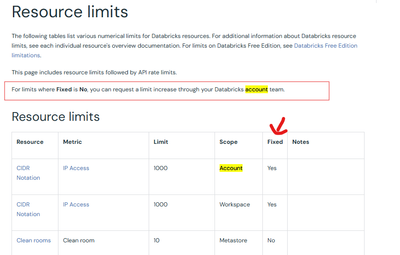
szymon_dybczak_1-1764617078133.png


Now, for Workspace resource there's a default limit of 20 workspaces per GCP account. But it's not fixed. You can request additional capacity from databricks. Once they raised your limit then you still need to meet second requirement - you can create at most 200 workspace per week.

szymon_dybczak_0-1764617008737.png


So, assuming that you need to create 1000 workspaces in your account then:

1. You need to request a limit increase in databricks

2. If they agree then you can create 1000 workspace - but not all at once. So, creating 1000 workspaces will take you 5 weeks (200 per each week)


 

Hi @szymon_dybczak ,

As you've correctly pointed out, the documentation states that "For limits where Fixed is No, you can request a limit increase through your Databricks account team." However, the column against Workspaces for Account mentions "Yes," indicating it's fixed and can't be increased.

Is the documentation outdated?