Episode 2: Reading Excel Files
Learning Databricks one brick at a time, using the Free Edition.
You can download the accompanying Notebook and Excel files used in the demonstration over on my GitHub:
Project Intro
Welcome to everyone reading. My name’s Ben, a.k.a BS_THE_ANALYST, and I’m going to share my experiences as I learn the world of Databricks. My objective is to master Data Engineering on Databricks, weave in AI & ML, and perform analyses.
Today’s Challenge
Picture this: I'm facing the following challenges when reading excel files into Databricks
- Ingesting Multiple Excel Files
- Ingesting Multiple Sheets on an Excel File
- Ingesting Multiple Files with Multiple Sheets.
Let's face it, we'll always need a solution to hand to deal with these pesky Excel reports that get generated!
Solution
For this solution, we'll leverage Python and the Pandas library.
Excel files have a limit of roughly 1 million rows (per sheet), so pandas will suffice with its single machine in-memory method of working. However, pandas can also scale to work in a distributed environment if you leverage the Pandas API on Spark. Read more about that here: https://spark.apache.org/pandas-on-spark/ - the bench marks are interesting 😊.
Notebook setup
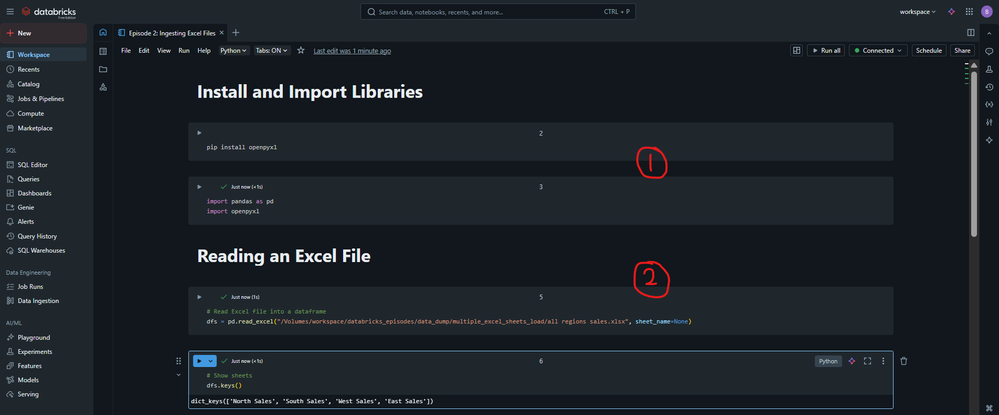
In the picture below you'll spot:
- I need to Install and Import libraries into my notebook
pip install openpyxl
import pandas as pd
import openpyxl
- In the Notebook I reference a Volume in Unity Catalog where my Excel Files have been uploaded to. Feel free to change this for your needs.
Ingesting A Single Excel File with Multiple Sheets
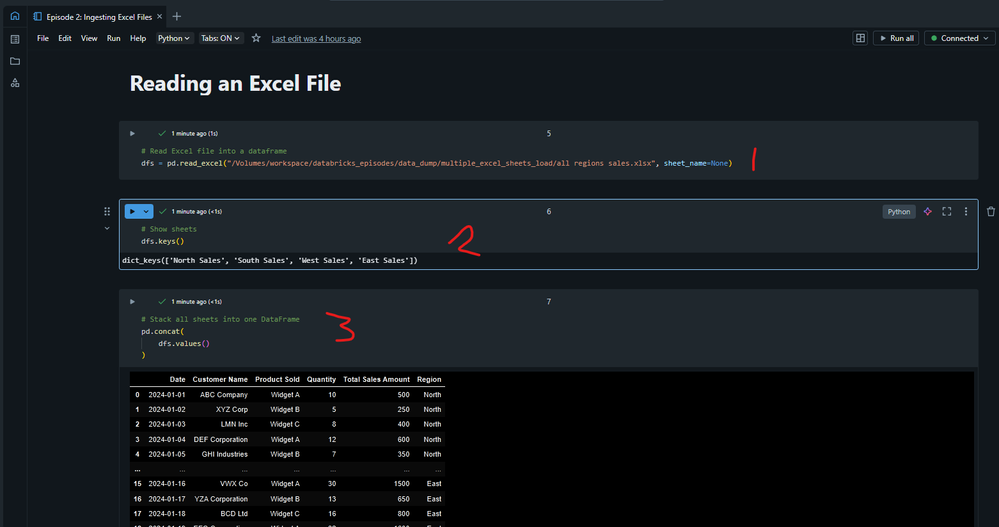
Now comes the fun part. In the picture below, you'll see three numbers: 1,2,3. Only two of them contribute to reading ALL sheets from an Excel file into a single Dataframe. Pandas is amazing for this.
# Read Excel file into a dataframe
dfs = pd.read_excel("/Volumes/workspace/databricks_episodes/data_dump/multiple_excel_sheets_load/all regions sales.xlsx", sheet_name=None)
(1) The important parameter used in the .read_excel method is sheet_name=None. If you supply this, it'll read all sheets in. In a similar fashion, you could supply one or more sheets if you don't want to read them all in. Just supply a list ["Sheet1_here","Sheet2_here"]. If you leave this parameter out, I think it may just read the first sheet in. Worth checking out the docs and finding out for yourselves - there's your homework! 😏.
(2) You can see "dfs.keys()". This shows all the sheets that have been read in. I always like to check 🤓
(3) To stack all the sheets on top of one another, it's as simple as wrapping dfs.values() i.e all the different sheet dataframes, in a pd.concat() method which allows us to stack Dataframes vertically (or horizontally)
Ingesting Multiple Excel Files *with Multiple Sheets*
Ooft, the code in the picture below is very concise. I originally started by creating a For Loop to build on the previous step. However, I thought I'd add a little flair for this section. List Comprehension is a thing of beauty, especially for the Pythonistas out there 🐍. The code below will read in multiple files and even all the sheets on these files! It's very compact. Adjust it as you see fit 😊.
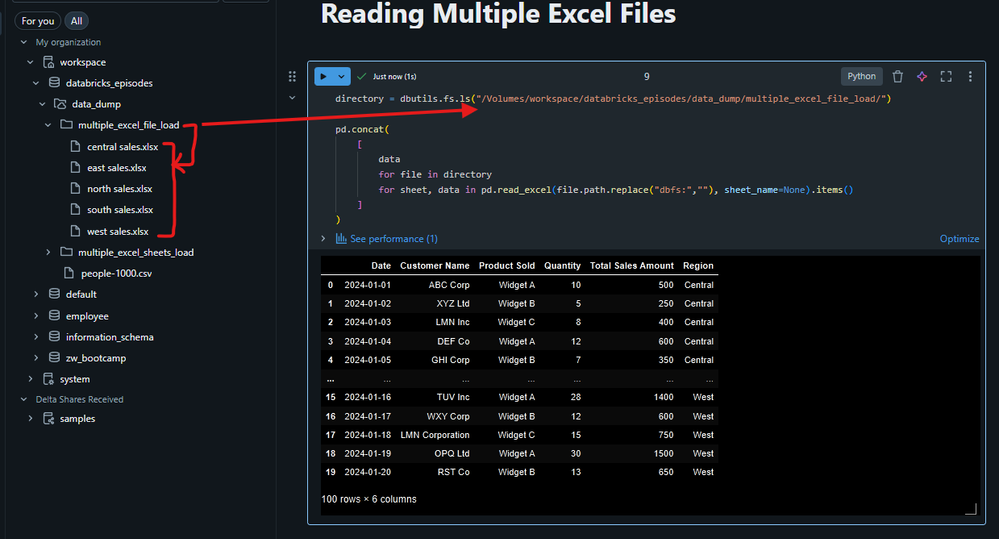
I encourage you to get your hands dirty and step through the loops if you don't feel you can understand it. It's a really fun and rewarding exercise 🙌. Below, I'll outline what the logic achieves:
- directory = dbutils.fs.ls(...) → stores a list of file objects from the specified Databricks folder in the variable directory. This is where the Excel files live.
- The list comprehension loops over:
- Each file in directory.
- Each (sheet, data) pair in file (all sheets of that Excel file).
- Reads the Excel file using pd.read_excel, stripping the "dbfs:" prefix to make it a local path for pandas. Note, if you don't strip out "dbfs:" then you'll encounter an error which prompts you to remove it 😆.
- Collects all the individual sheet DataFrames into a list.
- pd.concat([...]) → stacks all these DataFrames into one combined DataFrame.
Till next time
That’s all for now, folks! I can't wait for our next episode. We're currently wondering through ingestion ... but where do we stop? Should we delve into Databases? Should we hit APIs? Perhaps we'll bounce around a little! As long as we're having fun, we're moving forward, right? 🙌.
All the best,
BS





