cancel
Showing results forย 
Search instead forย 
Did you mean:ย 
Data Engineering
Join discussions on data engineering best practices, architectures, and optimization strategies within the Databricks Community. Exchange insights and solutions with fellow data engineers.
cancel
Showing results forย 
Search instead forย 
Did you mean:ย 

Azure Databricks Streamlit Application - Doubts

RJTECHY210
New Contributor II

Hi Databricks community, I am currently tasked with creating a stream lit application with the help of data bricks application feature, I have currently created a lake base instance to sync the delta table located at the unity catalog and I have also created the application using stream lit and connected the lake base instance as backend  and now I got a doubt, Is it possible to start/stop the lake base instance via the stream lit application Ui, if possible what are all the prerequisite access do I need to get in order to trigger lake base instance from my application and any code snippet that I can refer to?

1 ACCEPTED SOLUTION

Accepted Solutions

szymon_dybczak
Esteemed Contributor III

Hi @RJTECHY210 ,

Yes, it's possible. You can use python sdk to achieve what you want. Here's a sample code for a reference:

from databricks.sdk import WorkspaceClient
from databricks.sdk.service.database import DatabaseInstance

# Initialize the Workspace client
w = WorkspaceClient()

# Stop a database instance
instance_name = "my-database-instance"
w.database.update_database_instance(
    name=instance_name,
    database_instance=DatabaseInstance(
        name=instance_name,
        stopped=True
    ),
    update_mask="*"
)
print(f"Stopped database instance: {instance_name}")

# Start a database instance
w.database.update_database_instance(
    name=instance_name,
    database_instance=DatabaseInstance(
        name=instance_name,
        stopped=False
    ),
    update_mask="*"
)
print(f"Started database instance: {instance_name}")

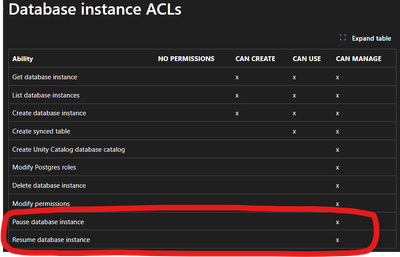
Also, don't forget to add proper permission for you databricks apps service principal. To be able to start and stop lakebase instance you need to have can manage permissions:
szymon_dybczak_0-1765046635264.png


View solution in original post

3 REPLIES 3

szymon_dybczak
Esteemed Contributor III

Hi @RJTECHY210 ,

Yes, it's possible. You can use python sdk to achieve what you want. Here's a sample code for a reference:

from databricks.sdk import WorkspaceClient
from databricks.sdk.service.database import DatabaseInstance

# Initialize the Workspace client
w = WorkspaceClient()

# Stop a database instance
instance_name = "my-database-instance"
w.database.update_database_instance(
    name=instance_name,
    database_instance=DatabaseInstance(
        name=instance_name,
        stopped=True
    ),
    update_mask="*"
)
print(f"Stopped database instance: {instance_name}")

# Start a database instance
w.database.update_database_instance(
    name=instance_name,
    database_instance=DatabaseInstance(
        name=instance_name,
        stopped=False
    ),
    update_mask="*"
)
print(f"Started database instance: {instance_name}")

Also, don't forget to add proper permission for you databricks apps service principal. To be able to start and stop lakebase instance you need to have can manage permissions:

szymon_dybczak_0-1765046635264.png


Hi @szymon_dybczak, Thanks for the solution.

szymon_dybczak
Esteemed Contributor III

No problem @RJTECHY210 , happy coding!
