cancel
Showing results forย 
Search instead forย 
Did you mean:ย 
Data Engineering
Join discussions on data engineering best practices, architectures, and optimization strategies within the Databricks Community. Exchange insights and solutions with fellow data engineers.
cancel
Showing results forย 
Search instead forย 
Did you mean:ย 

Databricks AutoLoader IncrementalListing mode changes

deng_dev
New Contributor III

Hi everyone!
I wan investigating how Databricks AutoLoader IncrementalListing mode changes will impact my current autoloader streams. Currently all of them are set to cloudFiles.useIncrementalListing: auto. So I wanted to check if any of streams is actually using this mode. 
In log4j logs I have found this output:

deng_dev_0-1764849398594.png

Does it mean that in this Autoloader stream incremental listing is not used? Or are there any other ways to check?

Thank you!


1 ACCEPTED SOLUTION

Accepted Solutions

szymon_dybczak
Esteemed Contributor III

Hi @deng_dev ,

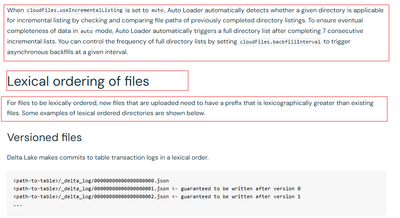
When cloudFiles.useIncrementalListing is set to auto, Auto Loader automatically detects whether a given directory is applicable for incremental listing by checking and comparing file paths of previously completed directory listings.

To ensure eventual completeness of data in auto mode, Auto Loader automatically triggers a full directory list after completing 7 consecutive incremental lists

So, in other words. This option makes a best effort to incrementally list your files. But once in a while it will perform full directory list to backfill missing files.

Last but not least - incorrectly enabling incremental listing on a non-lexically ordered directory prevents Auto Loader from discovering new files!

Auto Loader options | Databricks on AWS
szymon_dybczak_0-1764850696869.png


View solution in original post

3 REPLIES 3

szymon_dybczak
Esteemed Contributor III

Hi @deng_dev ,

When cloudFiles.useIncrementalListing is set to auto, Auto Loader automatically detects whether a given directory is applicable for incremental listing by checking and comparing file paths of previously completed directory listings.

To ensure eventual completeness of data in auto mode, Auto Loader automatically triggers a full directory list after completing 7 consecutive incremental lists

So, in other words. This option makes a best effort to incrementally list your files. But once in a while it will perform full directory list to backfill missing files.

Last but not least - incorrectly enabling incremental listing on a non-lexically ordered directory prevents Auto Loader from discovering new files!

Auto Loader options | Databricks on AWS

szymon_dybczak_0-1764850696869.png


thank you for details!
Could you also please let me know, if you have this information: if in log4j logs in autoloader stream I see this output:

25/11/26 14:06:46 INFO IncrementalListingUtils: [queryId = ffdd9] [batchId = 58] Checked whether or not to use incremental listing. numBackfills: 0, [minBackfillsRequired: 5] outOfOrderFileRatio: 0.0, [outOfOrderFileThreshold: 0.05]
useIncrementalListing: false
autoDetectResult: 2

does it mean incremental listing is not being used after checking if it's possible?

szymon_dybczak
Esteemed Contributor III

Hi @deng_dev ,

Sure, at that particular batch, the DLT pipeline used full directory listing for ingestion.

Join Us as a Local Community Builder!

Passionate about hosting events and connecting people? Help us grow a vibrant local communityโ€”sign up today to get started!

Sign Up Now