
Turn on suggestions
Auto-suggest helps you quickly narrow down your search results by suggesting possible matches as you type.
Showing results for
Data Engineering
Join discussions on data engineering best practices, architectures, and optimization strategies within the Databricks Community. Exchange insights and solutions with fellow data engineers.
Turn on suggestions
Auto-suggest helps you quickly narrow down your search results by suggesting possible matches as you type.
Showing results for
- Databricks Community
- Data Engineering
- Re: Establishing a Connection between ADLS Gen2, D...
Options
- Subscribe to RSS Feed
- Mark Topic as New
- Mark Topic as Read
- Float this Topic for Current User
- Bookmark
- Subscribe
- Mute
- Printer Friendly Page

Options
- Mark as New
- Bookmark
- Subscribe
- Mute
- Subscribe to RSS Feed
- Permalink
- Report Inappropriate Content
12-04-2025 06:28 AM
Hello,
May, Someone please help me with establishing connection between ADLS Gen2, Databricks and ADF, full steps if possibble. Do I need to route through key-vault, this is i am first time doing in production,.
May somebody please share detailed step for implementing in Production.
ADF - Orchastrator
ADLS Gen2 - Storage
Databricks - Processsing data, transformation using pyspark.
Thanks a lot


1 ACCEPTED SOLUTION
Accepted Solutions

Options
- Mark as New
- Bookmark
- Subscribe
- Mute
- Subscribe to RSS Feed
- Permalink
- Report Inappropriate Content
12-04-2025 07:51 AM
For a production environment (ADF as orchestrator, ADLS Gen2 as storage, Databricks for PySpark transformations), follow Microsoft-recommended best practices:
- Databricks → ADLS Gen2: Use Unity Catalog with Azure Managed Identity (via Access Connector) for direct, secure access without secrets or mounts. Avoid mounting in production (it's legacy and less secure/governable). If not using Unity Catalog yet, fall back to Service Principal + OAuth with secrets from Azure Key Vault.
- ADF → Databricks: Create a Databricks linked service using a Personal Access Token (PAT) stored in Azure Key Vault.
- ADF → ADLS Gen2: Use System-assigned Managed Identity or Service Principal (secrets in Key Vault).
- Key Vault: Yes, route secrets through Key Vault – it's essential for production security (never hardcode credentials).
Below are detailed, step-by-step instructions for a fully secure setup.
1. Prerequisites
- Azure subscription with Contributor/Owner access.
- Create an Azure Key Vault.
- Enable Unity Catalog on your Databricks workspace (recommended for production governance). If not possible yet, see the Service Principal fallback in section 2.
2. Databricks to ADLS Gen2 Access (Recommended: Unity Catalog + Managed Identity)
This is the modern, secretless approach (no Key Vault needed for storage access).
Step 1: Create an Azure Databricks Access Connector
- In Azure Portal → Search for "Databricks Access Connector" → Create.
- Note the Resource ID (e.g.,
/subscriptions/.../resourceGroups/.../providers/Microsoft.Databricks/accessConnectors/my-connectorStep 2: Grant the Access Connector permission on ADLS Gen2
- Go to your ADLS Gen2 storage account → Access Control (IAM) → Add role assignment.
- Role: Storage Blob Data Contributor (or finer-grained if needed).
- Assign to: The Access Connector (search by name or use its Managed Identity Application ID).
Step 3: In Databricks, create a Storage Credential (Unity Catalog)
- In Databricks workspace → Catalog → Add → Storage credential.
- Type: Managed identity.
- Paste the Access Connector's Resource ID.
- Test the connection.
Step 4: Create an External Location (points to ADLS containers)
- Catalog → Add → External location.
- Select the Storage Credential above.
- Path
abfss://<container>@<storage-account>.dfs.core.windows.net/<optional-folder>- Grant READ/WRITE permissions to users/groups as needed.
Step 5: In PySpark notebooks
- No mounts or configs needed.
- Read/write directly:
df = spark.read.parquet("abfss://<container>@<storage-account>.dfs.core.windows.net/path/to/data")
df.write.format("delta").save("abfss://<container>@<storage-account>.dfs.core.windows.net/output")- Unity Catalog enforces governance (auditing, access controls).
Fallback if no Unity Catalog: Service Principal + Key Vault
- Register an App in Microsoft Entra ID → Note Client ID, Tenant ID, generate Client Secret.
- Grant the Service Principal Storage Blob Data Contributor on ADLS Gen2.
- Store Client ID, Secret, Tenant ID as secrets in Key Vault.
- In Databricks: Create Key Vault-backed secret scope (URL: https://#secrets/createScope in workspace).
- In notebooks, set Spark configs (no mount needed for production):
spark.conf.set("fs.azure.account.auth.type.<storage-account>.dfs.core.windows.net", "OAuth")
spark.conf.set("fs.azure.account.oauth.provider.type.<storage-account>.dfs.core.windows.net", "org.apache.hadoop.fs.azurebfs.oauth2.ClientCredsTokenProvider")
spark.conf.set("fs.azure.account.oauth2.client.id.<storage-account>.dfs.core.windows.net", dbutils.secrets.get(scope="<scope>", key="client-id"))
spark.conf.set("fs.azure.account.oauth2.client.secret.<storage-account>.dfs.core.windows.net", dbutils.secrets.get(scope="<scope>", key="client-secret"))
spark.conf.set("fs.azure.account.oauth2.client.endpoint.<storage-account>.dfs.core.windows.net", "https://login.microsoftonline.com/<tenant-id>/oauth2/token")3. ADF to Databricks Linked Service (Secure with Key Vault)
Step 1: Generate Databricks Personal Access Token (PAT)
- In Databricks → User Settings → Developer → Access tokens → Generate new token (no expiration for production).
Step 2: Store PAT in Key Vault
- Key Vault → Secrets → Generate/Import → Name: e.g., databricks-pat.
Step 3: Grant ADF access to Key Vault
- Enable System-assigned Managed Identity on your ADF (Properties tab).
- Key Vault → Access policies → Add → Principal: Your ADF's Managed Identity → Permissions: Get (secrets).
Step 4: Create Key Vault Linked Service in ADF
- ADF → Manage → Linked services → New → Azure Key Vault → Select your Key Vault.
Step 5: Create Databricks Linked Service
- Linked services → New → Azure Databricks.
- Workspace URL: e.g., https://adb-xxx.azuredatabricks.net
- Authentication: Access token.
- For the token: Select "Azure Key Vault" → Choose the Key Vault linked service → Secret name: databricks-pat.
- Cluster: Use an existing Job cluster or new (for production, use Job clusters or serverless).
4. ADF to ADLS Gen2 Linked Service (Secure)
- Linked services → New → Azure Data Lake Storage Gen2.
- Authentication: System-assigned Managed Identity (recommended, secretless) or Service Principal (store ID/Secret in Key Vault as above).
- Test connection.
5. Orchestrate with ADF Pipeline
- Create a pipeline.
- Add Databricks Notebook activity.
- Linked service: The one from step 3.
- Notebook path: e.g., /Users/yourname/my-notebook.
- Pass parameters if needed (e.g., file paths in ADLS).
- For input/output: Use ADLS linked datasets (abfss:// paths).
- Trigger: Schedule, Tumbling window, or Event-based (on new files in ADLS).
Production Tips
- Use Job clusters (not interactive) for cost/reliability.
- Enable ADF monitoring, alerts, and Git integration.
- Rotate secrets/PATs regularly.
- Network security: VNet-integrate Databricks and use Private Endpoints for ADLS/Key Vault if needed.
- If using Delta Lake tables on ADLS, register them in Unity Catalog for governance.
2 REPLIES 2

Options
- Mark as New
- Bookmark
- Subscribe
- Mute
- Subscribe to RSS Feed
- Permalink
- Report Inappropriate Content
12-04-2025 07:10 AM
Hi!
I asume that ADF is just the trigger and it's from Databricks the direct access to ADLS to process the data.
ADLS Access:
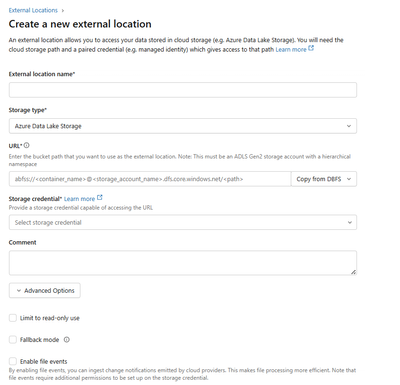
You create an External Location in your Databricks workspace that acts as a bridge to ADLS. This is done through Catalog Explorer.
To set it up:
Create a Storage Credential using a Managed Identity (or Service Principal) that has permissions to your ADLS
Create an External Location that links this credential to your specific ADLS path
You can assign granular permissions at the workspace or catalog level
That's it. Now Databricks can read and write to that ADLS path directly.
Calling Databricks Job
To trigger a Databricks job from ADF, you need:
Job ID - the ID of your Databricks job
Linked Service - an ADF connection to your Databricks workspace (using a Service Principal)
That's the minimum. Everything else is optional, likes warehouse/cluster id if dont need serverless, parameters jobs, etc.
Reference: https://learn.microsoft.com/en-us/azure/data-factory/transform-data-databricks-job
Options
- Mark as New
- Bookmark
- Subscribe
- Mute
- Subscribe to RSS Feed
- Permalink
- Report Inappropriate Content
12-04-2025 07:51 AM
For a production environment (ADF as orchestrator, ADLS Gen2 as storage, Databricks for PySpark transformations), follow Microsoft-recommended best practices:
- Databricks → ADLS Gen2: Use Unity Catalog with Azure Managed Identity (via Access Connector) for direct, secure access without secrets or mounts. Avoid mounting in production (it's legacy and less secure/governable). If not using Unity Catalog yet, fall back to Service Principal + OAuth with secrets from Azure Key Vault.
- ADF → Databricks: Create a Databricks linked service using a Personal Access Token (PAT) stored in Azure Key Vault.
- ADF → ADLS Gen2: Use System-assigned Managed Identity or Service Principal (secrets in Key Vault).
- Key Vault: Yes, route secrets through Key Vault – it's essential for production security (never hardcode credentials).
Below are detailed, step-by-step instructions for a fully secure setup.
1. Prerequisites
- Azure subscription with Contributor/Owner access.
- Create an Azure Key Vault.
- Enable Unity Catalog on your Databricks workspace (recommended for production governance). If not possible yet, see the Service Principal fallback in section 2.
2. Databricks to ADLS Gen2 Access (Recommended: Unity Catalog + Managed Identity)
This is the modern, secretless approach (no Key Vault needed for storage access).
Step 1: Create an Azure Databricks Access Connector
- In Azure Portal → Search for "Databricks Access Connector" → Create.
- Note the Resource ID (e.g.,
/subscriptions/.../resourceGroups/.../providers/Microsoft.Databricks/accessConnectors/my-connectorStep 2: Grant the Access Connector permission on ADLS Gen2
- Go to your ADLS Gen2 storage account → Access Control (IAM) → Add role assignment.
- Role: Storage Blob Data Contributor (or finer-grained if needed).
- Assign to: The Access Connector (search by name or use its Managed Identity Application ID).
Step 3: In Databricks, create a Storage Credential (Unity Catalog)
- In Databricks workspace → Catalog → Add → Storage credential.
- Type: Managed identity.
- Paste the Access Connector's Resource ID.
- Test the connection.
Step 4: Create an External Location (points to ADLS containers)
- Catalog → Add → External location.
- Select the Storage Credential above.
- Path
abfss://<container>@<storage-account>.dfs.core.windows.net/<optional-folder>- Grant READ/WRITE permissions to users/groups as needed.
Step 5: In PySpark notebooks
- No mounts or configs needed.
- Read/write directly:
df = spark.read.parquet("abfss://<container>@<storage-account>.dfs.core.windows.net/path/to/data")
df.write.format("delta").save("abfss://<container>@<storage-account>.dfs.core.windows.net/output")- Unity Catalog enforces governance (auditing, access controls).
Fallback if no Unity Catalog: Service Principal + Key Vault
- Register an App in Microsoft Entra ID → Note Client ID, Tenant ID, generate Client Secret.
- Grant the Service Principal Storage Blob Data Contributor on ADLS Gen2.
- Store Client ID, Secret, Tenant ID as secrets in Key Vault.
- In Databricks: Create Key Vault-backed secret scope (URL: https://#secrets/createScope in workspace).
- In notebooks, set Spark configs (no mount needed for production):
spark.conf.set("fs.azure.account.auth.type.<storage-account>.dfs.core.windows.net", "OAuth")
spark.conf.set("fs.azure.account.oauth.provider.type.<storage-account>.dfs.core.windows.net", "org.apache.hadoop.fs.azurebfs.oauth2.ClientCredsTokenProvider")
spark.conf.set("fs.azure.account.oauth2.client.id.<storage-account>.dfs.core.windows.net", dbutils.secrets.get(scope="<scope>", key="client-id"))
spark.conf.set("fs.azure.account.oauth2.client.secret.<storage-account>.dfs.core.windows.net", dbutils.secrets.get(scope="<scope>", key="client-secret"))
spark.conf.set("fs.azure.account.oauth2.client.endpoint.<storage-account>.dfs.core.windows.net", "https://login.microsoftonline.com/<tenant-id>/oauth2/token")3. ADF to Databricks Linked Service (Secure with Key Vault)
Step 1: Generate Databricks Personal Access Token (PAT)
- In Databricks → User Settings → Developer → Access tokens → Generate new token (no expiration for production).
Step 2: Store PAT in Key Vault
- Key Vault → Secrets → Generate/Import → Name: e.g., databricks-pat.
Step 3: Grant ADF access to Key Vault
- Enable System-assigned Managed Identity on your ADF (Properties tab).
- Key Vault → Access policies → Add → Principal: Your ADF's Managed Identity → Permissions: Get (secrets).
Step 4: Create Key Vault Linked Service in ADF
- ADF → Manage → Linked services → New → Azure Key Vault → Select your Key Vault.
Step 5: Create Databricks Linked Service
- Linked services → New → Azure Databricks.
- Workspace URL: e.g., https://adb-xxx.azuredatabricks.net
- Authentication: Access token.
- For the token: Select "Azure Key Vault" → Choose the Key Vault linked service → Secret name: databricks-pat.
- Cluster: Use an existing Job cluster or new (for production, use Job clusters or serverless).
4. ADF to ADLS Gen2 Linked Service (Secure)
- Linked services → New → Azure Data Lake Storage Gen2.
- Authentication: System-assigned Managed Identity (recommended, secretless) or Service Principal (store ID/Secret in Key Vault as above).
- Test connection.
5. Orchestrate with ADF Pipeline
- Create a pipeline.
- Add Databricks Notebook activity.
- Linked service: The one from step 3.
- Notebook path: e.g., /Users/yourname/my-notebook.
- Pass parameters if needed (e.g., file paths in ADLS).
- For input/output: Use ADLS linked datasets (abfss:// paths).
- Trigger: Schedule, Tumbling window, or Event-based (on new files in ADLS).
Production Tips
- Use Job clusters (not interactive) for cost/reliability.
- Enable ADF monitoring, alerts, and Git integration.
- Rotate secrets/PATs regularly.
- Network security: VNet-integrate Databricks and use Private Endpoints for ADLS/Key Vault if needed.
- If using Delta Lake tables on ADLS, register them in Unity Catalog for governance.

Announcements


Related Content
- How to store credentials in Databricks and assign them to job parameters in Data Engineering
- Databricks Standard SharePoint Connector Performance Issues in Data Engineering
- DBSQL MCP output limit in Generative AI
- Databricks Connect - Will I ever have to Stop clean up Spark session when creating new per request in Data Engineering
- Why We Moved Our Operational Database Into Databricks — And Stopped Managing Two Stacks in Data Engineering