
Turn on suggestions
Auto-suggest helps you quickly narrow down your search results by suggesting possible matches as you type.
Showing results for
Data Engineering
Join discussions on data engineering best practices, architectures, and optimization strategies within the Databricks Community. Exchange insights and solutions with fellow data engineers.
Turn on suggestions
Auto-suggest helps you quickly narrow down your search results by suggesting possible matches as you type.
Showing results for
- Databricks Community
- Data Engineering
- How can I send custom email notification
Options
- Subscribe to RSS Feed
- Mark Topic as New
- Mark Topic as Read
- Float this Topic for Current User
- Bookmark
- Subscribe
- Mute
- Printer Friendly Page

Options
- Mark as New
- Bookmark
- Subscribe
- Mute
- Subscribe to RSS Feed
- Permalink
- Report Inappropriate Content
01-09-2023 03:04 AM
I am using the edit notification in databricks to send email notification in case of workflow failure or success. How can I add additional information to this report for example if I want to notify about number of rows got processed or added how can I do this


1 ACCEPTED SOLUTION
Accepted Solutions

Options
- Mark as New
- Bookmark
- Subscribe
- Mute
- Subscribe to RSS Feed
- Permalink
- Report Inappropriate Content
01-09-2023 07:05 AM
@Rohit Kapoor If you want more control over notifications I'd check out Alerts in DB SQL. You can set custom Alert Destinations and create SQL queries for fine-grained control. For example, you can jobs to schedule a DLT pipeline to run and then trigger an alert right after to send an email with how many rows were processed or how many rows failed.
5 REPLIES 5

Options
- Mark as New
- Bookmark
- Subscribe
- Mute
- Subscribe to RSS Feed
- Permalink
- Report Inappropriate Content
01-09-2023 07:02 AM
Hi @Rohit Kapoor :
There is a new format for job emails, this can be enabled from Admin console -> Workspace settings
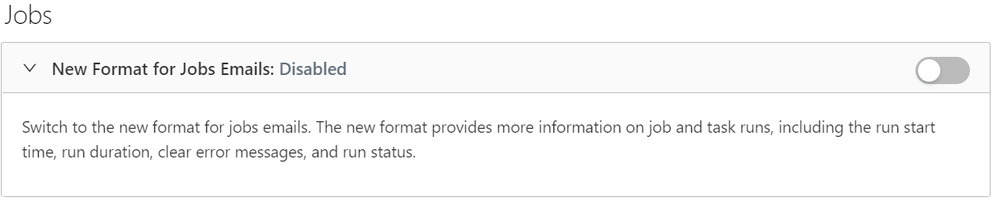
Another option is to implement a function to send mails, so you can customize your message and send it on success/ failure.
Hope this helps
Thanks,
RKNutalapati
Options
- Mark as New
- Bookmark
- Subscribe
- Mute
- Subscribe to RSS Feed
- Permalink
- Report Inappropriate Content
01-09-2023 07:05 AM
@Rohit Kapoor If you want more control over notifications I'd check out Alerts in DB SQL. You can set custom Alert Destinations and create SQL queries for fine-grained control. For example, you can jobs to schedule a DLT pipeline to run and then trigger an alert right after to send an email with how many rows were processed or how many rows failed.

Options
- Mark as New
- Bookmark
- Subscribe
- Mute
- Subscribe to RSS Feed
- Permalink
- Report Inappropriate Content
10-21-2024 12:51 AM
I am trying alerts option to send an email but when I am trying to add email address in destination it is not allowing me to add. Only user id it is allowing. Please help. Also, I am trying to send emails directly from notebooks using SMTP server provided by my company but again timeout error is coming

Options
- Mark as New
- Bookmark
- Subscribe
- Mute
- Subscribe to RSS Feed
- Permalink
- Report Inappropriate Content
10-21-2024 04:50 AM
There are three approaches I can think of for this:
Approach 1: Creating an email template and sending emails programmatically from DBX Notebook.
Approach 2: Invoke a Logic App via an Azure REST API from Databricks after the code executes successfully or in the failure (catch) block.
Approach 3: Invoke a Webhook that internally triggers a Logic App to send an email using a predefined template.

Options
- Mark as New
- Bookmark
- Subscribe
- Mute
- Subscribe to RSS Feed
- Permalink
- Report Inappropriate Content
12-04-2025 04:02 AM
Anybody tried to configure the custom email notification using logic app POST URL? asking because i am stuck not able to configure with right way, basically i am deploying the job using DAB, and i have created a logic app with custom email, now i am stuck at the job level configuration to send the notification to webhook, where i am not able to find the way, i tried by creating the destination at workspace level and tried to add in job yaml at task level using webhook_notification but looks like not working , not sure what i am missing. Can someone guide if they have already configured this solution.

Announcements


Related Content
- HubSpot connector in Data Engineering
- Regarding the DAB Ingestion Pipeline Creating the Volume in Data Engineering
- Lakeflow connect Ingestion pipeline notification for gateway pipeline in Data Engineering
- How to show full query results in a SQL alert's notification? in Data Engineering
- Enable Foundation Model APIs for AWS Marketplace trial workspace in Generative AI