
Turn on suggestions
Auto-suggest helps you quickly narrow down your search results by suggesting possible matches as you type.
Showing results for
Data Engineering
Join discussions on data engineering best practices, architectures, and optimization strategies within the Databricks Community. Exchange insights and solutions with fellow data engineers.
Turn on suggestions
Auto-suggest helps you quickly narrow down your search results by suggesting possible matches as you type.
Showing results for
- Databricks Community
- Data Engineering
- Re: Read Array of Arrays of Objects JSON file usin...
Options
- Subscribe to RSS Feed
- Mark Topic as New
- Mark Topic as Read
- Float this Topic for Current User
- Bookmark
- Subscribe
- Mute
- Printer Friendly Page

Options
- Mark as New
- Bookmark
- Subscribe
- Mute
- Subscribe to RSS Feed
- Permalink
- Report Inappropriate Content
12-17-2025 03:57 AM - edited 12-17-2025 04:09 AM
Hi Databricks Community!
This is my first post in this forum, so I hope you can forgive me if it's not according to the forum best practices 🙂
After lots of searching, I decided to share the peculiar issue I'm running into in this community.
I try to load a JSON format that is exposed via the Home Assistant /api/history/period/ endpoint. The format consists of an array of arrays:
[
   [
      {
         "entity_id": "sensor.solaredge_lifetime_energy",
         "state": "19848848.0",
         "attributes": {
            "state_class": "total",
            "unit_of_measurement": "Wh",
            "device_class": "energy",
            "friendly_name": "solaredge Lifetime energy"
         },
         "last_changed": "2025-12-14T23:00:00+00:00",
         "last_updated": "2025-12-14T23:00:00+00:00"
      },
      { ... }
   ],
   [ ... ]
]
Each array contains measurements of a specific sensor. Every object has the same 5 properties / fields.
The file(s) live in S3 and I try to read them as follows:
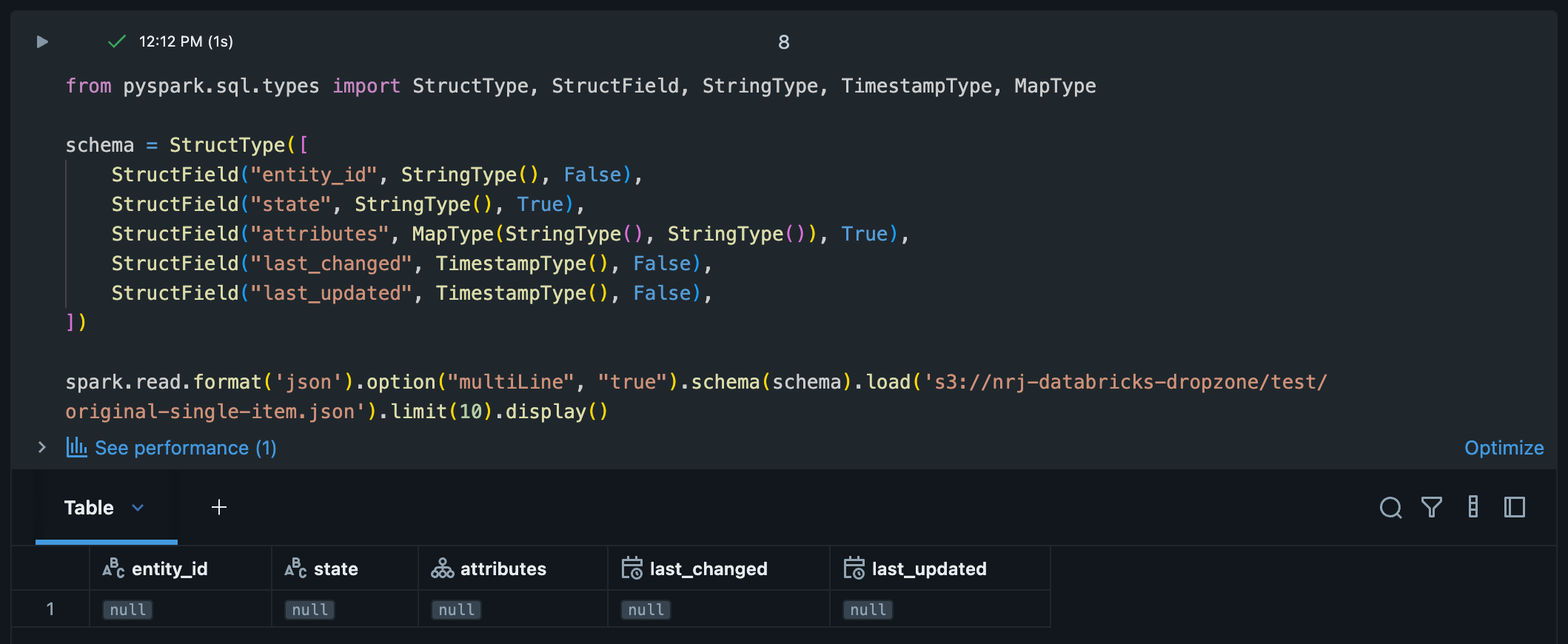
schema = StructType([
   StructField("entity_id", StringType(), False),
   StructField("state", StringType(), True),
   StructField("attributes", MapType(StringType(), StringType()), True),
   StructField("last_changed", TimestampType(), False),
   StructField("last_updated", TimestampType(), False),
])

spark.read.format('json').option("multiLine", "true").schema(schema).load(<S3 location>).limit(10).display()
For some strange reason the result is 1 row per file with all null values, while the correct columns are there.
I tried / checked different things so far:
- Validated the JSON: The JSON file is valid and doesn't contain any malformed / missing values.
- I 'flattened' the list of lists to a single top-level list using flattened = [element for sub_list in data for element in sub_list]. The resulting JSON is loaded just fine and is exactly what I want as the output.
- I tried removing the schema definition, but the result remains the same.
Any suggestions? I don't think I should transform the source JSON in order to be able to load it using Spark.
Labels:
- Labels:
-
Spark


1 ACCEPTED SOLUTION
Accepted Solutions

Options
- Mark as New
- Bookmark
- Subscribe
- Mute
- Subscribe to RSS Feed
- Permalink
- Report Inappropriate Content
12-20-2025 03:26 AM
Hi @Joost1024 ,
So here's the issue. It seems that JSON DataFrameReader expects to have a JSON object. But in your case we're dealing with JSON array at root level - not a JSON object.
So for instance,if we would just rewrite your file in following way then spark would be able to infer schema without any issues:
{
    "data": [
            [
                {
                "entity_id": "sensor.solaredge_lifetime_energy",
                "state": "19848848.0",
                "attributes": {
                    "state_class": "total",
                    "unit_of_measurement": "Wh",
                    "device_class": "energy",
                    "friendly_name": "solaredge Lifetime energy"
                },
                "last_changed": "2025-12-14T23:00:00+00:00",
                "last_updated": "2025-12-14T23:00:00+00:00"
                },
                {
                "entity_id": "sensor.solaredge_lifetime_energy",
                "state": "19849120.0",
                "attributes": {
                    "state_class": "total",
                    "unit_of_measurement": "Wh",
                    "device_class": "energy",
                    "friendly_name": "solaredge Lifetime energy"
                },
                "last_changed": "2025-12-14T23:15:00+00:00",
                "last_updated": "2025-12-14T23:15:00+00:00"
                },
                {
                "entity_id": "sensor.solaredge_lifetime_energy",
                "state": "19849580.0",
                "attributes": {
                    "state_class": "total",
                    "unit_of_measurement": "Wh",
                    "device_class": "energy",
                    "friendly_name": "solaredge Lifetime energy"
                },
                "last_changed": "2025-12-14T23:30:00+00:00",
                "last_updated": "2025-12-14T23:30:00+00:00"
                }
            ],
            [
                {
                "entity_id": "sensor.home_temperature",
                "state": "21.5",
                "attributes": {
                    "state_class": "measurement",
                    "unit_of_measurement": "°C",
                    "device_class": "temperature",
                    "friendly_name": "Home Temperature"
                },
                "last_changed": "2025-12-14T23:00:00+00:00",
                "last_updated": "2025-12-14T23:00:00+00:00"
                },
                {
                "entity_id": "sensor.home_temperature",
                "state": "21.3",
                "attributes": {
                    "state_class": "measurement",
                    "unit_of_measurement": "°C",
                    "device_class": "temperature",
                    "friendly_name": "Home Temperature"
                },
                "last_changed": "2025-12-14T23:15:00+00:00",
                "last_updated": "2025-12-14T23:15:00+00:00"
                }
            ],
            [
                {
                "entity_id": "sensor.power_consumption",
                "state": "1250.0",
                "attributes": {
                    "state_class": "measurement",
                    "unit_of_measurement": "W",
                    "device_class": "power",
                    "friendly_name": "Power Consumption"
                },
                "last_changed": "2025-12-14T23:00:00+00:00",
                "last_updated": "2025-12-14T23:00:00+00:00"
                },
                {
                "entity_id": "sensor.power_consumption",
                "state": "1180.0",
                "attributes": {
                    "state_class": "measurement",
                    "unit_of_measurement": "W",
                    "device_class": "power",
                    "friendly_name": "Power Consumption"
                },
                "last_changed": "2025-12-14T23:15:00+00:00",
                "last_updated": "2025-12-14T23:15:00+00:00"
                },
                {
                "entity_id": "sensor.power_consumption",
                "state": "1320.0",
                "attributes": {
                    "state_class": "measurement",
                    "unit_of_measurement": "W",
                    "device_class": "power",
                    "friendly_name": "Power Consumption"
                },
                "last_changed": "2025-12-14T23:30:00+00:00",
                "last_updated": "2025-12-14T23:30:00+00:00"
                },
                {
                "entity_id": "sensor.power_consumption",
                "state": "1295.0",
                "attributes": {
                    "state_class": "measurement",
                    "unit_of_measurement": "W",
                    "device_class": "power",
                    "friendly_name": "Power Consumption"
                },
                "last_changed": "2025-12-14T23:45:00+00:00",
                "last_updated": "2025-12-14T23:45:00+00:00"
                }
            ]
            ]

}

Ok, so for json arrays as a top objects we can try different approach. We can read json file as a text (important thing here - we want to use option wholeText=True to not split by new lines) and then use from_json function to parse it correctly:
from pyspark.sql.functions import lit, from_json, col, explode
from pyspark.sql.types import StructType, StructField, ArrayType, StringType


attributes_schema = StructType([
    StructField("state_class", StringType(), nullable=True),
    StructField("unit_of_measurement", StringType(), nullable=True),
    StructField("device_class", StringType(), nullable=True),
    StructField("friendly_name", StringType(), nullable=True)
])

sensor_reading_schema = StructType([
    StructField("entity_id", StringType(), nullable=True),
    StructField("state", StringType(), nullable=True),
    StructField("attributes", attributes_schema, nullable=True),
    StructField("last_changed", StringType(), nullable=True),
    StructField("last_updated", StringType(), nullable=True)
])


df_text = spark.read.text('/Volumes/logging_demo/default/logs/sample_data.json', wholetext=True)

array_schema = ArrayType(ArrayType(sensor_reading_schema))
df_parsed = df_text.select(from_json(col("value"), array_schema).alias("data"))


# df_flat = df_parsed.select(explode(col("data")).alias("inner_array")) \
#                    .select(explode(col("inner_array")).alias("sensor")) \
#                    .select("sensor.*")

display(df_parsed)
And as you can see on below screenshot - now we parsed our file correctly:

Of course you can flattened it further - just uncomment df_flat dataframe.
6 REPLIES 6

Options
- Mark as New
- Bookmark
- Subscribe
- Mute
- Subscribe to RSS Feed
- Permalink
- Report Inappropriate Content
12-17-2025 05:18 AM
Greetings @Joost1024 , I did some digging.
You’re running into a root type mismatch.
Your JSON’s top level is an array of arrays, but the schema you provided describes a single struct (one record). Spark can’t reconcile those two shapes, so it does what it always does in this situation: it gives you one row per file and fills the struct fields with nulls.
What’s happening
The file’s root is an array of arrays of structs — think [[{...}, {...}], [...]]. Your schema, however, describes only the inner object, not the outer container. When multiLine JSON is enabled, Spark treats each file as a single JSON value. Since the root type doesn’t match the schema, Spark can’t align the fields and you end up with nulls across the board.
The good news: you don’t need to change the source JSON. There are two clean ways to handle this directly in Spark.
Option A: Let Spark infer the nested arrays, then explode twice
Have Spark read the file as-is, infer the shape, and flatten it step by step:
from pyspark.sql import functions as F

df0 = (spark.read.format("json")
       .option("multiLine", "true")
       .load("<S3 location>"))

# df0 has a single column `value`: array<array<struct<entity_id,...>>>
df = (df0
      .select(F.explode("value").alias("arr"))   # array<struct>
      .select(F.explode("arr").alias("row"))     # struct
      .select(
          "row.entity_id",
          F.col("row.state").alias("state"),
          "row.attributes",
          F.to_timestamp(
              "row.last_changed",
              "yyyy-MM-dd'T'HH:mm:ssXXX"
          ).alias("last_changed"),
          F.to_timestamp(
              "row.last_updated",
              "yyyy-MM-dd'T'HH:mm:ssXXX"
          ).alias("last_updated"),
      ))

display(df.limit(10))
A couple of notes:
-
The timestamp pattern yyyy-MM-dd'T'HH:mm:ssXXX correctly handles ISO-8601 offsets like +00:00.
-
If state should be numeric, just cast it after the explode.
Option B: Define a schema that actually matches the root
Instead of fighting the JSON shape, describe it accurately: a single top-level field that is an array of arrays of structs.
from pyspark.sql import functions as F, types as T

inner = T.StructType([
    T.StructField("entity_id", T.StringType(), False),
    T.StructField("state", T.StringType(), True),
    T.StructField("attributes", T.MapType(T.StringType(), T.StringType()), True),
    T.StructField("last_changed", T.StringType(), False),
    T.StructField("last_updated", T.StringType(), False),
])

schema = T.StructType([
    T.StructField("value", T.ArrayType(T.ArrayType(inner)), True)
])

df0 = (spark.read.format("json")
       .option("multiLine", "true")
       # .option("primitivesAsString", "true")  # optional, see notes below
       .schema(schema)
       .load("<S3 location>"))

df = (df0
      .select(F.explode("value").alias("arr"))
      .select(F.explode("arr").alias("row"))
      .select(
          "row.entity_id",
          F.col("row.state").alias("state"),
          "row.attributes",
          F.to_timestamp(
              "row.last_changed",
              "yyyy-MM-dd'T'HH:mm:ssXXX"
          ).alias("last_changed"),
          F.to_timestamp(
              "row.last_updated",
              "yyyy-MM-dd'T'HH:mm:ssXXX"
          ).alias("last_updated"),
      ))

display(df.limit(10))
Extra tips worth knowing
If attributes can contain numbers or booleans, you have a couple of safe options:
-
Use .option("primitivesAsString", "true") so everything lands as strings and nothing silently becomes null.
-
Or widen the map type and normalize downstream once the data is flattened.
Also worth calling out: your original approach worked once you flattened the JSON externally because you removed that extra array level. The double-explode here is doing the same thing, just inside Spark where it belongs.
Hope this helps, Louis.
Options
- Mark as New
- Bookmark
- Subscribe
- Mute
- Subscribe to RSS Feed
- Permalink
- Report Inappropriate Content
12-17-2025 05:32 AM
Thank you so much for your extensive explanation @Louis_Frolio! Now it makes complete sense.
Options
- Mark as New
- Bookmark
- Subscribe
- Mute
- Subscribe to RSS Feed
- Permalink
- Report Inappropriate Content
12-17-2025 05:59 AM
I guess I was a bit over enthusiastic by accepting the answer.
When I run the following on the single object array of arrays (as shown in the original post) I get a single row with column "value" and value null.
from pyspark.sql import functions as F, types as T

inner = T.StructType([
   T.StructField("entity_id", T.StringType(), False),
   T.StructField("state", T.StringType(), True),
   T.StructField("attributes", T.MapType(T.StringType(), T.StringType()), True),
   T.StructField("last_changed", T.StringType(), False),
   T.StructField("last_updated", T.StringType(), False),
])

schema = T.StructType([
   T.StructField("value", T.ArrayType(T.ArrayType(inner)), True)
])

df0 = (spark.read.format("json")
   .option("multiLine", "true")
   .option("primitivesAsString", "true")
   .schema(schema)
   .load("<S3 path>/original-single-item.json"))

display(df0)
Options
- Mark as New
- Bookmark
- Subscribe
- Mute
- Subscribe to RSS Feed
- Permalink
- Report Inappropriate Content
12-19-2025 06:11 AM
Any idea @Louis_Frolio? Is this DF supposed to be displayed as null?
Options
- Mark as New
- Bookmark
- Subscribe
- Mute
- Subscribe to RSS Feed
- Permalink
- Report Inappropriate Content
12-20-2025 03:26 AM
Hi @Joost1024 ,
So here's the issue. It seems that JSON DataFrameReader expects to have a JSON object. But in your case we're dealing with JSON array at root level - not a JSON object.
So for instance,if we would just rewrite your file in following way then spark would be able to infer schema without any issues:
{
    "data": [
            [
                {
                "entity_id": "sensor.solaredge_lifetime_energy",
                "state": "19848848.0",
                "attributes": {
                    "state_class": "total",
                    "unit_of_measurement": "Wh",
                    "device_class": "energy",
                    "friendly_name": "solaredge Lifetime energy"
                },
                "last_changed": "2025-12-14T23:00:00+00:00",
                "last_updated": "2025-12-14T23:00:00+00:00"
                },
                {
                "entity_id": "sensor.solaredge_lifetime_energy",
                "state": "19849120.0",
                "attributes": {
                    "state_class": "total",
                    "unit_of_measurement": "Wh",
                    "device_class": "energy",
                    "friendly_name": "solaredge Lifetime energy"
                },
                "last_changed": "2025-12-14T23:15:00+00:00",
                "last_updated": "2025-12-14T23:15:00+00:00"
                },
                {
                "entity_id": "sensor.solaredge_lifetime_energy",
                "state": "19849580.0",
                "attributes": {
                    "state_class": "total",
                    "unit_of_measurement": "Wh",
                    "device_class": "energy",
                    "friendly_name": "solaredge Lifetime energy"
                },
                "last_changed": "2025-12-14T23:30:00+00:00",
                "last_updated": "2025-12-14T23:30:00+00:00"
                }
            ],
            [
                {
                "entity_id": "sensor.home_temperature",
                "state": "21.5",
                "attributes": {
                    "state_class": "measurement",
                    "unit_of_measurement": "°C",
                    "device_class": "temperature",
                    "friendly_name": "Home Temperature"
                },
                "last_changed": "2025-12-14T23:00:00+00:00",
                "last_updated": "2025-12-14T23:00:00+00:00"
                },
                {
                "entity_id": "sensor.home_temperature",
                "state": "21.3",
                "attributes": {
                    "state_class": "measurement",
                    "unit_of_measurement": "°C",
                    "device_class": "temperature",
                    "friendly_name": "Home Temperature"
                },
                "last_changed": "2025-12-14T23:15:00+00:00",
                "last_updated": "2025-12-14T23:15:00+00:00"
                }
            ],
            [
                {
                "entity_id": "sensor.power_consumption",
                "state": "1250.0",
                "attributes": {
                    "state_class": "measurement",
                    "unit_of_measurement": "W",
                    "device_class": "power",
                    "friendly_name": "Power Consumption"
                },
                "last_changed": "2025-12-14T23:00:00+00:00",
                "last_updated": "2025-12-14T23:00:00+00:00"
                },
                {
                "entity_id": "sensor.power_consumption",
                "state": "1180.0",
                "attributes": {
                    "state_class": "measurement",
                    "unit_of_measurement": "W",
                    "device_class": "power",
                    "friendly_name": "Power Consumption"
                },
                "last_changed": "2025-12-14T23:15:00+00:00",
                "last_updated": "2025-12-14T23:15:00+00:00"
                },
                {
                "entity_id": "sensor.power_consumption",
                "state": "1320.0",
                "attributes": {
                    "state_class": "measurement",
                    "unit_of_measurement": "W",
                    "device_class": "power",
                    "friendly_name": "Power Consumption"
                },
                "last_changed": "2025-12-14T23:30:00+00:00",
                "last_updated": "2025-12-14T23:30:00+00:00"
                },
                {
                "entity_id": "sensor.power_consumption",
                "state": "1295.0",
                "attributes": {
                    "state_class": "measurement",
                    "unit_of_measurement": "W",
                    "device_class": "power",
                    "friendly_name": "Power Consumption"
                },
                "last_changed": "2025-12-14T23:45:00+00:00",
                "last_updated": "2025-12-14T23:45:00+00:00"
                }
            ]
            ]

}
Ok, so for json arrays as a top objects we can try different approach. We can read json file as a text (important thing here - we want to use option wholeText=True to not split by new lines) and then use from_json function to parse it correctly:
from pyspark.sql.functions import lit, from_json, col, explode
from pyspark.sql.types import StructType, StructField, ArrayType, StringType


attributes_schema = StructType([
    StructField("state_class", StringType(), nullable=True),
    StructField("unit_of_measurement", StringType(), nullable=True),
    StructField("device_class", StringType(), nullable=True),
    StructField("friendly_name", StringType(), nullable=True)
])

sensor_reading_schema = StructType([
    StructField("entity_id", StringType(), nullable=True),
    StructField("state", StringType(), nullable=True),
    StructField("attributes", attributes_schema, nullable=True),
    StructField("last_changed", StringType(), nullable=True),
    StructField("last_updated", StringType(), nullable=True)
])


df_text = spark.read.text('/Volumes/logging_demo/default/logs/sample_data.json', wholetext=True)

array_schema = ArrayType(ArrayType(sensor_reading_schema))
df_parsed = df_text.select(from_json(col("value"), array_schema).alias("data"))


# df_flat = df_parsed.select(explode(col("data")).alias("inner_array")) \
#                    .select(explode(col("inner_array")).alias("sensor")) \
#                    .select("sensor.*")

display(df_parsed)
And as you can see on below screenshot - now we parsed our file correctly:
Of course you can flattened it further - just uncomment df_flat dataframe.
Options
- Mark as New
- Bookmark
- Subscribe
- Mute
- Subscribe to RSS Feed
- Permalink
- Report Inappropriate Content
12-22-2025 08:00 AM
Nice job @szymon_dybczak . Thanks for helping to make Databricks Community stronger!
Cheers, Louis.

Announcements



Related Content
- What happens to with SCD2 tables if the source pipeline performs a Full Refresh? in Data Engineering
- Best option for parallel processing in Data Engineering
- Can't Migrate Auto Loader To File Events in Data Engineering
- UNSUPPORTED_TIME_TYPE despite 18.1 runtime? in Data Engineering
- matching sas proc survey means for quantiles in databricks in Data Engineering