
Turn on suggestions
Auto-suggest helps you quickly narrow down your search results by suggesting possible matches as you type.
Showing results for
Data Engineering
Join discussions on data engineering best practices, architectures, and optimization strategies within the Databricks Community. Exchange insights and solutions with fellow data engineers.
Turn on suggestions
Auto-suggest helps you quickly narrow down your search results by suggesting possible matches as you type.
Showing results for
- Databricks Community
- Data Engineering
- Re: Testing Spark Declarative Pipeline in Docker C...
Options
- Subscribe to RSS Feed
- Mark Topic as New
- Mark Topic as Read
- Float this Topic for Current User
- Bookmark
- Subscribe
- Mute
- Printer Friendly Page

Options
- Mark as New
- Bookmark
- Subscribe
- Mute
- Subscribe to RSS Feed
- Permalink
- Report Inappropriate Content
01-13-2026 07:32 PM
Hi there, I see via an announcement last year that Spark Declarative Pipeline (previously DLT) was getting open sourced into Apache Spark, and I see that this recently is true as of Apache 4.1:
I'm trying to test this out on a docker container, just to see if/how it's possible to use SDP as a fully standalone tool and help ease vendor lock-in concerns. However, outside of building a SDP pipeline in Databricks, I'm not sure how I'd go about doing this with the open source version. For context, here is the dockerfile I'm currently using to get the latest version of apache spark (4.1.1 at this time).
FROM apache/spark:latest

# Switch to root to install packages
USER root

# Install pyspark and findspark
RUN pip install --no-cache-dir \
    jupyter \
    ipykernel \
    findspark \
    pyspark

# 3. Register the ipykernel
# This ensures "Python 3" is available as a kernel option in the UI
RUN python3 -m ipykernel install --user

ENV SPARK_HOME=/opt/spark
ENV PATH=$SPARK_HOME/bin:$PATH

# Switch back to spark user if desired, or stay root for VS Code access
USER root

WORKDIR /opt/spark/app

CMD ["/bin/bash"]
I'm able to import the pipelines library in pyspark, but when I attempt to use it I quickly get an error:
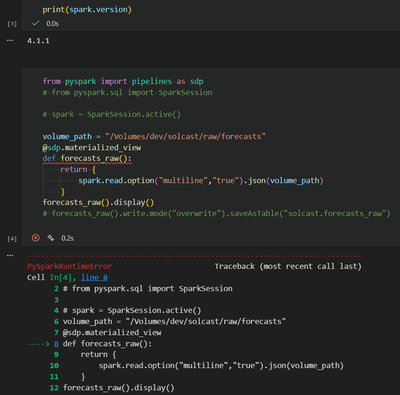
ERROR MESSAGE:
PySparkRuntimeError: [GRAPH_ELEMENT_DEFINED_OUTSIDE_OF_DECLARATIVE_PIPELINE] APIs that define elements of a declarative pipeline can only be invoked within the context of defining a pipeline.
Any help would be much appreciated to clarify what might be the issue here!
Labels:
- Labels:
-
Spark


1 ACCEPTED SOLUTION
Accepted Solutions

Options
- Mark as New
- Bookmark
- Subscribe
- Mute
- Subscribe to RSS Feed
- Permalink
- Report Inappropriate Content
01-14-2026 07:23 AM - edited 01-14-2026 07:24 AM
I think this error is something a lot of people hit when moving from regular PySpark to Spark Declarative Pipelines in Spark 4.1.
I believe the main reason it shows up is because SDP doesn’t work like normal PySpark where you can run things cell by cell in a notebook. It’s declarative in nature. You define the entire pipeline first, and then the SDP runtime comes in and executes the whole graph for you.
You can try the steps below that may help to resolve your issues.
Solution: Moving from Interactive to Pipeline Mode
The error GRAPH_ELEMENT_DEFINED_OUTSIDE_OF_DECLARATIVE_PIPELINE happens because the @sdp.table decorators are trying to register themselves into a "Pipeline Context" that doesn't exist in a standard pyspark session.
Step 1: Update your Dockerfile
You need the specific CLI tools for pipelines. Change your pip install line to include the pipelines extra:
To fix this in your Docker environment, you need to change how you execute the code.
Step 2: Use the Pipeline Structure
Instead of running a script directly, create a small project structure. SDP requires a YAML file to tell Spark where your code is.
1. Create a spark-pipeline.yml file:
name: "my_docker_pipeline"
storage: "/tmp/checkpoints" # Required for streaming state
libraries:
- glob: "transformations/*.py"
2. Put your logic in transformations/my_task.py:
from pyspark import pipelines as sdp

@sdp.table(name="raw_data")
def raw_data():
return spark.read.format("csv").load("/opt/spark/app/data.csv")

@sdp.materialized_view(name="clean_data")
def clean_data():
return sdp.read("raw_data").filter("id IS NOT NULL")
Step 3: Run using the CLI
Inside your container, don't use python my_script.py. Use the spark-pipelines command that comes with the package:
spark-pipelines run --spec spark-pipeline.yml
Why this works?
When you use spark-pipelines run, the tool initializes the "Declarative Context" first. It then scans your files, builds a dependency graph of your @sdp decorators, and handles the spark.read and .write operations automatically.
Hope this should work! 🤞
Thanks!
4 REPLIES 4
Options
- Mark as New
- Bookmark
- Subscribe
- Mute
- Subscribe to RSS Feed
- Permalink
- Report Inappropriate Content
01-14-2026 07:23 AM - edited 01-14-2026 07:24 AM
I think this error is something a lot of people hit when moving from regular PySpark to Spark Declarative Pipelines in Spark 4.1.
I believe the main reason it shows up is because SDP doesn’t work like normal PySpark where you can run things cell by cell in a notebook. It’s declarative in nature. You define the entire pipeline first, and then the SDP runtime comes in and executes the whole graph for you.
You can try the steps below that may help to resolve your issues.
Solution: Moving from Interactive to Pipeline Mode
The error GRAPH_ELEMENT_DEFINED_OUTSIDE_OF_DECLARATIVE_PIPELINE happens because the @sdp.table decorators are trying to register themselves into a "Pipeline Context" that doesn't exist in a standard pyspark session.
Step 1: Update your Dockerfile
You need the specific CLI tools for pipelines. Change your pip install line to include the pipelines extra:
To fix this in your Docker environment, you need to change how you execute the code.
Step 2: Use the Pipeline Structure
Instead of running a script directly, create a small project structure. SDP requires a YAML file to tell Spark where your code is.
1. Create a spark-pipeline.yml file:
name: "my_docker_pipeline"
storage: "/tmp/checkpoints" # Required for streaming state
libraries:
- glob: "transformations/*.py"
2. Put your logic in transformations/my_task.py:
from pyspark import pipelines as sdp

@sdp.table(name="raw_data")
def raw_data():
return spark.read.format("csv").load("/opt/spark/app/data.csv")

@sdp.materialized_view(name="clean_data")
def clean_data():
return sdp.read("raw_data").filter("id IS NOT NULL")
Step 3: Run using the CLI
Inside your container, don't use python my_script.py. Use the spark-pipelines command that comes with the package:
spark-pipelines run --spec spark-pipeline.yml
Why this works?
When you use spark-pipelines run, the tool initializes the "Declarative Context" first. It then scans your files, builds a dependency graph of your @sdp decorators, and handles the spark.read and .write operations automatically.
Hope this should work! 🤞
Thanks!
Options
- Mark as New
- Bookmark
- Subscribe
- Mute
- Subscribe to RSS Feed
- Permalink
- Report Inappropriate Content
01-14-2026 07:40 AM
This is great info! Couple of quick follow-up questions:
- Can I get some assistance with identifying what CLI tools would need to be included in the dockerfile? I see you put the following comment, not sure if you meant to highlight the CLI tools, but it seems cut off
@osingh wrote:Step 1: Update your Dockerfile
You need the specific CLI tools for pipelines. Change your pip install line to include the pipelines extra:To fix this in your Docker environment, you need to change how you execute the code.
- Also, I understand that due to the declarative nature of SDP, the current setup will not run cell-by-cell. But I'm wondering, how would this normally be tested if cell-by-cell is not testable? Within the SDP context, how would devs commonly test SDP functionality without needing to write the entire pipeline and pray that it works (I'm sure this shouldn't be the case).
Options
- Mark as New
- Bookmark
- Subscribe
- Mute
- Subscribe to RSS Feed
- Permalink
- Report Inappropriate Content
01-14-2026 08:16 AM
You just need the pipeline CLI that comes with PySpark itself.
In the Dockerfile, install PySpark with the pipelines extra:
RUN pip install --no-cache-dir "pyspark[pipelines]"
This installs the spark-pipelines CLI, which is required to run Spark Declarative Pipelines. Without this, SDP code won’t work, even if PySpark is already installed.
Reply to the second ask:
You can use the "Logic vs. Wrapper" Pattern
The most effective way to test is to keep your actual business logic (the transformations) in standard PySpark functions that have no decorators attached to them.
- Step 1: Write a "pure" function in a separate .py file that takes a DataFrame and returns a DataFrame.
- Step 2: Test that function in a standard Jupyter cell or a pytest script using a small, manually created dummy DataFrame.
- Step 3: Once you know the logic works, simply wrap it in an @sdp.table function in your pipeline file.
You can also use the dry-run Command

Options
- Mark as New
- Bookmark
- Subscribe
- Mute
- Subscribe to RSS Feed
- Permalink
- Report Inappropriate Content
01-14-2026 08:27 AM
Hi @ChristianRRL ,
In addition to @osingh 's answers, check out this old but good blog post about how to structure the pipelines's code to enable dev and test cycle: https://www.databricks.com/blog/applying-software-development-devops-best-practices-delta-live-table... (section "Structuring the DLT pipeline's code" and "Implementing unit tests")
Best regards,


