
Turn on suggestions
Auto-suggest helps you quickly narrow down your search results by suggesting possible matches as you type.
Showing results for
Databricks Free Edition Help
Engage in discussions about the Databricks Free Edition within the Databricks Community. Share insights, tips, and best practices for getting started, troubleshooting issues, and maximizing the value of your trial experience to explore Databricks' capabilities effectively.
Turn on suggestions
Auto-suggest helps you quickly narrow down your search results by suggesting possible matches as you type.
Showing results for
- Databricks Community
- Databricks Free Edition Help
- Re: Serverless All-purpose cluster in Free Edition
Options
- Subscribe to RSS Feed
- Mark Topic as New
- Mark Topic as Read
- Float this Topic for Current User
- Bookmark
- Subscribe
- Mute
- Printer Friendly Page

Options
- Mark as New
- Bookmark
- Subscribe
- Mute
- Subscribe to RSS Feed
- Permalink
- Report Inappropriate Content
06-26-2025 01:09 AM
Hi Databricks community,
Good day.
Do anyone manage to use serverless all purpose cluster in the Databricks Free edition?
As referring to the documentation, it does mentioned that free edition do allow user to create a small serverless all purpose cluster. But in my free edition workspace, there's no option to create all purpose cluster and only serverless SQL warehouse is available.
**note: I am trying to run some pyspark code in notebook, and serverless SQL warehouse only support SQL. If free edition doesn't allow to create all purpose cluster, sounds like there's no other way to run non-SQL notebook/code in free edition.
https://docs.databricks.com/aws/en/getting-started/free-edition-limitations#compute-limitations
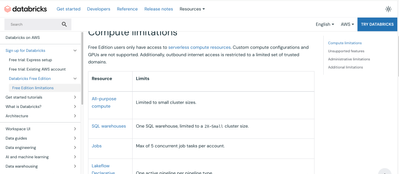
My Free edition workspace:
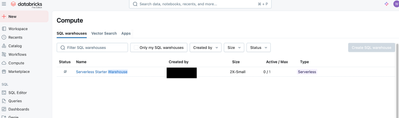
Thanks.


1 ACCEPTED SOLUTION
Accepted Solutions

Options
- Mark as New
- Bookmark
- Subscribe
- Mute
- Subscribe to RSS Feed
- Permalink
- Report Inappropriate Content
06-26-2025 04:03 AM
Hello @Kai-
You can use serverless compute, and there is no need to provisioned it, Databricks handles that for you.
All what you need to do is, on the top right side, click Connect and choose Serverless, and you are good to go
to run non-SQL code notebooks.

Hope that helps. Best, Ilir
4 REPLIES 4
Options
- Mark as New
- Bookmark
- Subscribe
- Mute
- Subscribe to RSS Feed
- Permalink
- Report Inappropriate Content
06-26-2025 04:03 AM
Hello @Kai-
You can use serverless compute, and there is no need to provisioned it, Databricks handles that for you.
All what you need to do is, on the top right side, click Connect and choose Serverless, and you are good to go
to run non-SQL code notebooks.
Hope that helps. Best, Ilir

Options
- Mark as New
- Bookmark
- Subscribe
- Mute
- Subscribe to RSS Feed
- Permalink
- Report Inappropriate Content
07-28-2025 02:27 AM
But in Databricks free edition, we have only serverless compute, how view spark job, spark UI ?
Options
- Mark as New
- Bookmark
- Subscribe
- Mute
- Subscribe to RSS Feed
- Permalink
- Report Inappropriate Content
09-09-2025 11:55 PM
Hi @Navneet670 ,
Is a limitation of serverless compute, spark UI is not available
https://docs.databricks.com/aws/en/compute/serverless/limitations#general-limitations
FYR, another community post that discuss about the same topic:
https://community.databricks.com/t5/get-started-discussions/is-spark-ui-available-on-the-databricks-...

Thanks.
Best Regards,
Kai
Options
- Mark as New
- Bookmark
- Subscribe
- Mute
- Subscribe to RSS Feed
- Permalink
- Report Inappropriate Content
06-26-2025 11:45 PM
Hi @ilir_nuredini,
Thanks for the suggestion, it worked!
Just sharing for information, noticed that it will prompt error when choosing Serverless in a imported notebook (tested with html and dbc). But works fine in a new notebook (with same pyspark code).
Imported via DBC:

Same code in new notebook:

Thanks.

Announcements


Related Content
- Compute start issue in Databricks Free Edition Help
- Node.js on Databricks: where do i find information about available runtime(s) (versions)? in Databricks Free Edition Help
- Learn scala using Databricks free edition in Get Started Discussions
- Hitting Free Tier Daily Limit During Hackathon - Unable to Continue Work! in Databricks Free Edition Help
- Cannot create Databricks spark compute in new latest community edition ?? in Databricks Free Edition Help