- Mark as New
- Bookmark
- Subscribe
- Mute
- Subscribe to RSS Feed
- Permalink
- Report Inappropriate Content
01-12-2022 11:45 PM
Consider we have two tables A & B.
qry = """
INSERT INTO Table A
Select * from Table B where Id is null
"""
spark.sql(qry)
I need to get the number of records inserted after running this in databricks.
- Labels:
-
Databricks SQL
-
Number
-
SQL Editor
-
Table
- Mark as New
- Bookmark
- Subscribe
- Mute
- Subscribe to RSS Feed
- Permalink
- Report Inappropriate Content
01-13-2022 04:39 AM
- Mark as New
- Bookmark
- Subscribe
- Mute
- Subscribe to RSS Feed
- Permalink
- Report Inappropriate Content
01-13-2022 05:06 AM
Hi @Kaniz Fatma ,
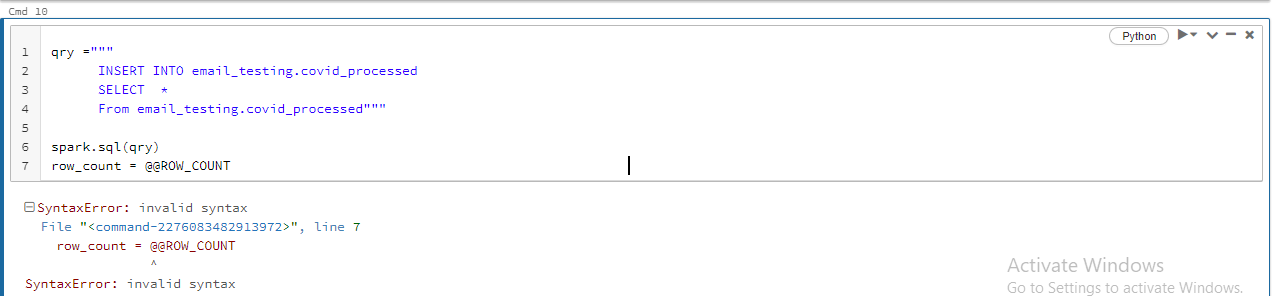
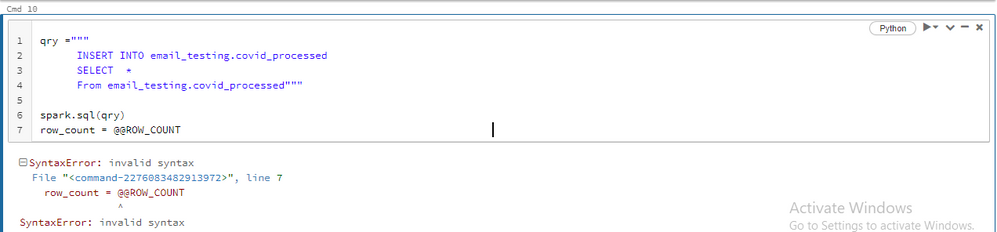
I have tried the way you have mentioned but it still throws an error.
- Mark as New
- Bookmark
- Subscribe
- Mute
- Subscribe to RSS Feed
- Permalink
- Report Inappropriate Content
01-13-2022 05:46 AM
Hi ,
My requirement here is I will be creating a function using Python code to perform insert operation to a Delta table , that is why I am running it in an Python cell.
I will be passing a table name to that function and I need to get the number of records inserted into the table once the function is executed.
So any solution to achieve this?

- Mark as New
- Bookmark
- Subscribe
- Mute
- Subscribe to RSS Feed
- Permalink
- Report Inappropriate Content
01-14-2022 02:52 AM
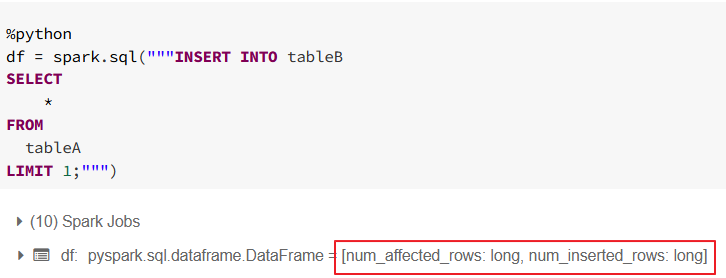
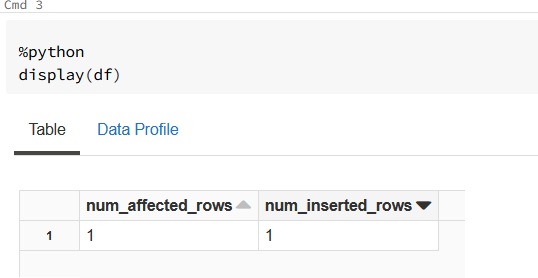
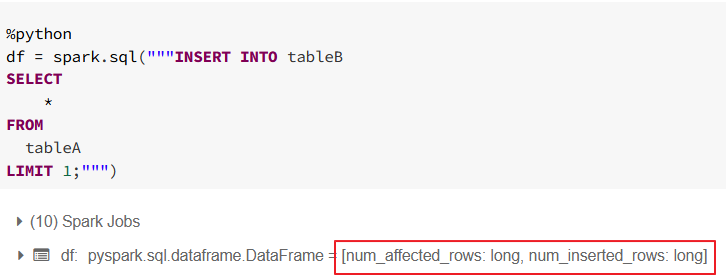
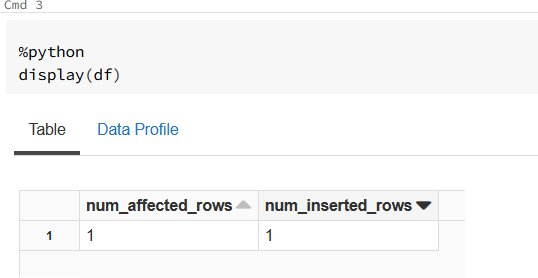
@@ROWCOUNT is rather T-SQL function not Spark SQL. I haven't found something like that in documentation but there is other way as every insert anyway return num_affected_rows and num_inserted_rows fields.
So you can for example use
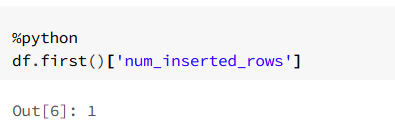
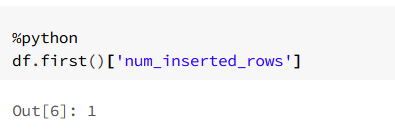
df.first()['num_inserted_rows'] or subquery and select in sql syntax.
I am including example screenshots.
My blog: https://databrickster.medium.com/
- Mark as New
- Bookmark
- Subscribe
- Mute
- Subscribe to RSS Feed
- Permalink
- Report Inappropriate Content
01-14-2022 06:21 AM
Hi @Hubert Dudek
Your approach is working for me.
Thank you.
- Mark as New
- Bookmark
- Subscribe
- Mute
- Subscribe to RSS Feed
- Permalink
- Report Inappropriate Content
01-14-2022 06:54 AM
Great! Please when you can select as best answer.
My blog: https://databrickster.medium.com/

- Mark as New
- Bookmark
- Subscribe
- Mute
- Subscribe to RSS Feed
- Permalink
- Report Inappropriate Content
06-14-2023 03:38 PM
@Hubert Dudek, when I execute a similar piece of code in VSCode executed through databricks-connect, the dataframe contains 1 row with no columns, which is a problem. Executing the same code in a notebook on the same cluster works as you stated. Is this possibly a bug in databricks-connect?

- Mark as New
- Bookmark
- Subscribe
- Mute
- Subscribe to RSS Feed
- Permalink
- Report Inappropriate Content
05-22-2025 06:45 AM - edited 05-22-2025 06:48 AM
Hi Hubert, will this work with all DML operations and on all Spark versions? And can i use NUM_AFFECTED_ROWS for all DML operations?

- Mark as New
- Bookmark
- Subscribe
- Mute
- Subscribe to RSS Feed
- Permalink
- Report Inappropriate Content
06-15-2023 01:27 AM
Almost same advice than Hubert, I use the history of the delta table :
df_history.select(F.col('operationMetrics')).collect()[0].operationMetrics['numOutputRows']You can find also other 'operationMetrics' values, like 'numTargetRowsDeleted'.

- Mark as New
- Bookmark
- Subscribe
- Mute
- Subscribe to RSS Feed
- Permalink
- Report Inappropriate Content
07-23-2025 04:28 PM
in case someone is looking for purely SQL based solution: (add LIMIT 1 to the query if you are looking for last op only)
select t.timestamp, t.operation, t.operationMetrics.numOutputRows as numOutputRows
from (
DESCRIBE HISTORY <catalog>.<schema>.<table>
) t
where t.operation like "%INSERT%"
order by t.timestamp desc