Getting java.util.concurrent.TimeoutException: Timed out after 15 seconds on community edition

- Mark as New
- Bookmark
- Subscribe
- Mute
- Subscribe to RSS Feed
- Permalink
- Report Inappropriate Content
03-27-2024 08:10 AM
Im using databricks communtiy edition for learning purpose and im whenever im running notebook, im getting:
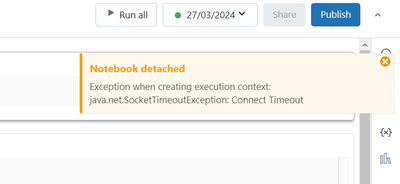
Exception when creating execution context: java.util.concurrent.TimeoutException: Timed out after 15 seconds databricks.
I have deleted cluster multiple times and created new cluster but still facing the same issue:

- Mark as New
- Bookmark
- Subscribe
- Mute
- Subscribe to RSS Feed
- Permalink
- Report Inappropriate Content
03-27-2024 08:26 AM
I am facing the same issue, Can anyone help with this?

- Mark as New
- Bookmark
- Subscribe
- Mute
- Subscribe to RSS Feed
- Permalink
- Report Inappropriate Content
03-27-2024 09:03 AM
Hello, Databricks Team,
My students are reporting none of them are able to use DBCE, and are running into this same error when they spin up an instance with defaults (DBR 12.2 LTS). Some have reported seeing this error since last night (3/26 ET). Could you please advice if there is a workaround or an ETA for fix? I rely on DBCE for pedagogy, so it is a major hurdle not to be able to use it. Thanks for your help.
Best,
Venu

- Mark as New
- Bookmark
- Subscribe
- Mute
- Subscribe to RSS Feed
- Permalink
- Report Inappropriate Content
05-14-2025 02:34 AM - edited 05-14-2025 02:36 AM
The issue is that, you've run the notebook with old connector connected to your old deleted cluster with same names, when you ran a terminated cluster, you see the error. First delete existing cluster and logout and detach old cluster as below and wait for 90+ minutes and create a new cluster and attached the new one. And every time you run a notebook always make sure to Detach the old terminated cluster and attach the new one if it's community edition. If it's a premium or free trail, and cluster is re-started then detach and re-attach the cluster.
The error you are facing is due to not detaching the old cluster, which is terminated/auto-terminated and when you run a cluster that connected to new cluster with same name and config. Which notebook tries to connect to old cluster which is still not deleted and just terminated with new cluster under same name, which makes the notebook run under work cluster which is terminated.

Solution: detach old cluster from notebook and reload the web_page, you can see only new cluster but not both at a time as below. Now attach the new cluster and run your notebook.

detach old cluster

reload the page, you can see only new cluster

Now attach the new cluster and run your notebook.


