cancel
Showing results for 
Search instead for 
Did you mean: 
Get Started Discussions
Start your journey with Databricks by joining discussions on getting started guides, tutorials, and introductory topics. Connect with beginners and experts alike to kickstart your Databricks experience.
cancel
Showing results for 
Search instead for 
Did you mean: 

Error in creating external iceberg table

icurious
Visitor

I am new to Databrcicks and was trying to create an Iceberg table. 
I have configured the Credentials and External Location using the UI under Catalog > External Locations and Credentials. I am able to create a table by using the Browse feature.

But when I am trying to create an Iceberg table from the SQL Editor I am getting a strange error

CREATE TABLE nation2_iceberg
USING iceberg
LOCATION 's3://xyz/databricks/nation_iceberg'
as
SELECT *
FROM parquet.`s3://xyz/sf/nation.RV6Vad/data/56`;
This is the error:
[MANAGED_ICEBERG_OPERATION_NOT_SUPPORTED] Managed Iceberg tables do not support REPLACE on external tables.
The table does not exist and not using any REPLACE command.
Does anyone know what has to be done in or

1 ACCEPTED SOLUTION

Accepted Solutions

iyashk-DB
Databricks Employee
Databricks Employee

This behavior is expected given how Databricks handles Iceberg tables in Unity Catalog.
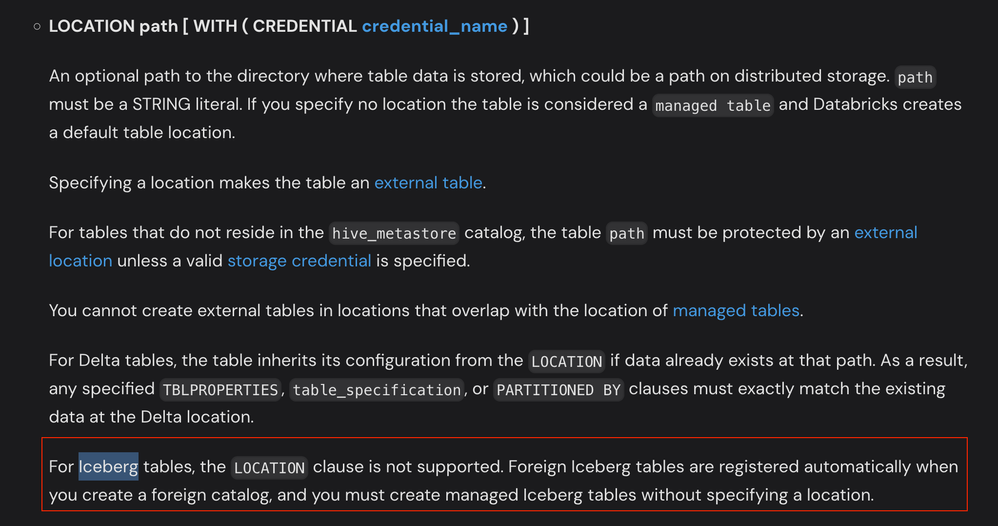
Iceberg tables in Unity Catalog do not support a LOCATION clause. Databricks requires Iceberg tables to be created as managed tables (with UC controlling the storage location) or registered via a foreign catalog; specifying LOCATION 's3://...' with USING iceberg is not supported.
Ref Doc - https://docs.databricks.com/aws/en/sql/language-manual/sql-ref-syntax-ddl-create-table-using
Screenshot 2025-12-22 at 1.54.36 PM.png

The error mentions REPLACE because Databricks’ CREATE TABLE semantics include an internal “replace” capability for Delta and Iceberg; mixing “external path + Iceberg” triggers an unsupported operation for managed Iceberg, even if you didn’t explicitly use REPLACE in your SQL.

You can do two things here:
1) Run the CTAS without LOCATION, and fully-qualify the table name in a Unity Catalog catalog and schema

CREATE TABLE <catalog>.<schema>.nation2_iceberg
USING iceberg
AS
SELECT *
FROM parquet.`s3://xyz/sf/nation.RV6Vad/data/56`;

Managed tables are the recommended table type.
2) If you need a specific S3 path for the table
Placing managed Iceberg table data at a user-specified path via LOCATION isn’t supported. If the table is already managed by another Iceberg catalog (for example, Glue or Snowflake), you should register it as a foreign Iceberg table via Lakehouse Federation rather than using a path. Foreign Iceberg is read‑only in Databricks, with updates governed by the external catalogue.

Alternatives:

Use a managed Iceberg table in UC and let external Iceberg clients read/write to it through the Iceberg REST catalog API (credential vending supported for some clients). This preserves Iceberg semantics while UC manages storage and governance.

If controlling the path is a hard requirement for writes from Databricks, use an external Delta table with LOCATION (Delta supports LOCATION), or create the Iceberg table in an external catalog and write to it outside Databricks, then read it in Databricks as a foreign table.


View solution in original post

2 REPLIES 2

iyashk-DB
Databricks Employee
Databricks Employee

This behavior is expected given how Databricks handles Iceberg tables in Unity Catalog.
Iceberg tables in Unity Catalog do not support a LOCATION clause. Databricks requires Iceberg tables to be created as managed tables (with UC controlling the storage location) or registered via a foreign catalog; specifying LOCATION 's3://...' with USING iceberg is not supported.
Ref Doc - https://docs.databricks.com/aws/en/sql/language-manual/sql-ref-syntax-ddl-create-table-using
Screenshot 2025-12-22 at 1.54.36 PM.png

The error mentions REPLACE because Databricks’ CREATE TABLE semantics include an internal “replace” capability for Delta and Iceberg; mixing “external path + Iceberg” triggers an unsupported operation for managed Iceberg, even if you didn’t explicitly use REPLACE in your SQL.

You can do two things here:
1) Run the CTAS without LOCATION, and fully-qualify the table name in a Unity Catalog catalog and schema

CREATE TABLE <catalog>.<schema>.nation2_iceberg
USING iceberg
AS
SELECT *
FROM parquet.`s3://xyz/sf/nation.RV6Vad/data/56`;

Managed tables are the recommended table type.
2) If you need a specific S3 path for the table
Placing managed Iceberg table data at a user-specified path via LOCATION isn’t supported. If the table is already managed by another Iceberg catalog (for example, Glue or Snowflake), you should register it as a foreign Iceberg table via Lakehouse Federation rather than using a path. Foreign Iceberg is read‑only in Databricks, with updates governed by the external catalogue.

Alternatives:

Use a managed Iceberg table in UC and let external Iceberg clients read/write to it through the Iceberg REST catalog API (credential vending supported for some clients). This preserves Iceberg semantics while UC manages storage and governance.

If controlling the path is a hard requirement for writes from Databricks, use an external Delta table with LOCATION (Delta supports LOCATION), or create the Iceberg table in an external catalog and write to it outside Databricks, then read it in Databricks as a foreign table.

icurious
Visitor

Thanks I am able to create a Lakehouse Federation and query the Snowflake catalog. So, if I create an Iceberg table in Databricks, one cannot access the path directly from else where like if I want to access it from Snowflake, right?
