
Turn on suggestions
Auto-suggest helps you quickly narrow down your search results by suggesting possible matches as you type.
Showing results for
Get Started Discussions
Start your journey with Databricks by joining discussions on getting started guides, tutorials, and introductory topics. Connect with beginners and experts alike to kickstart your Databricks experience.
Turn on suggestions
Auto-suggest helps you quickly narrow down your search results by suggesting possible matches as you type.
Showing results for
- Databricks Community
- Get Started Discussions
- Re: Import .py files module does not work on VNET ...
Options
- Subscribe to RSS Feed
- Mark Topic as New
- Mark Topic as Read
- Float this Topic for Current User
- Bookmark
- Subscribe
- Mute
- Printer Friendly Page

Options
- Mark as New
- Bookmark
- Subscribe
- Mute
- Subscribe to RSS Feed
- Permalink
- Report Inappropriate Content
01-02-2026 02:55 AM
We have problem with import any python files as module on VNET injected workspace.
- For same folder structure (see bellow), the imports works on serverless clusters or in databricks managed workspace (i.e. create new azure databricks workspace without networking), but not in VNET injected workspace.
- no firewall (we dont have hub-spoke architecture), only NSG, NAT and public dns zones (privatelink.azuredatabricks.net, privatelink.dfs.core.windows.net)
- NSG rules:
- NSG rules:
- no firewall (we dont have hub-spoke architecture), only NSG, NAT and public dns zones (privatelink.azuredatabricks.net, privatelink.dfs.core.windows.net)
- workspace netowrking setting (SCC enables, public access enabled, no azure datbairkcs rules)+ PE to back-end connectivity
- Once we create any kind of cluster (unrestricted, shared, personal or job) the import issue arise. Tested with runtimes 17.4 and 16.4.
- Py files appears to be visible but empty from the cluster perspective. (we alsp see errno 5 file exists issues
- %run works for notebook but cant import func between notebooksTrivial import test:


On serverless (OK):

Any idea what to check or might be missing? I suspect some networking missconfiguration but cant find potentials issue.
Labels:
- Labels:
-
import
-
Networking
-
Vnet


1 ACCEPTED SOLUTION
Accepted Solutions
Options
- Mark as New
- Bookmark
- Subscribe
- Mute
- Subscribe to RSS Feed
- Permalink
- Report Inappropriate Content
01-06-2026 05:49 AM
Redeploying workspace from azure portal worked with "documentation" VNET injection set up with NSG and NAT gw. Only added new NSG rule on top of deployed rules
| Outbound | TCP | VirtualNetwork | Any | AzureDatabricks (service tag) | 443, 3306, 8443-8451 |
No idea where the issue was. Most likely in egress.
4 REPLIES 4

Options
- Mark as New
- Bookmark
- Subscribe
- Mute
- Subscribe to RSS Feed
- Permalink
- Report Inappropriate Content
01-03-2026 01:55 PM
Try to go via this manual https://learn.microsoft.com/en-us/azure/databricks/security/network/classic/private-link-standard
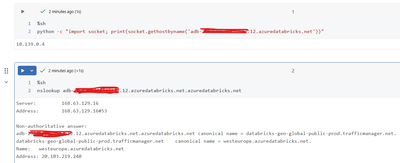
It looks like problem with 443 connection from cluster to control plane. Check also:
%sh
python -c "import socket; print(socket.gethostbyname('<YOUR-WORKSPACE-HOST>.azuredatabricks.net'))"
nslookup <YOUR-WORKSPACE-HOST>.azuredatabricks.net

%sh
curl -I -sS https://<YOUR-WORKSPACE-HOST>.azuredatabricks.net | head
My blog: https://databrickster.medium.com/
Options
- Mark as New
- Bookmark
- Subscribe
- Mute
- Subscribe to RSS Feed
- Permalink
- Report Inappropriate Content
01-05-2026 12:22 AM
I will try to recreate manualy the workspace manually since we deployed it via ARM, but by checking the private-link-standard documentation steps, I think we have same more-less the same setup except for different CIDR ranges for subnets.
For the commands, I dont see anything unussual
Options
- Mark as New
- Bookmark
- Subscribe
- Mute
- Subscribe to RSS Feed
- Permalink
- Report Inappropriate Content
01-05-2026 12:30 AM
Adding sh error to see file content:

Options
- Mark as New
- Bookmark
- Subscribe
- Mute
- Subscribe to RSS Feed
- Permalink
- Report Inappropriate Content
01-06-2026 05:49 AM
Redeploying workspace from azure portal worked with "documentation" VNET injection set up with NSG and NAT gw. Only added new NSG rule on top of deployed rules
| Outbound | TCP | VirtualNetwork | Any | AzureDatabricks (service tag) | 443, 3306, 8443-8451 |
No idea where the issue was. Most likely in egress.

Announcements


Related Content
- Import .py files module does not work on VNET injected workspace in Get Started Discussions
- ModuleNotFoundError: No module named 'MY-MODEL' in Get Started Discussions
- Attempting to Use VSCode Extension: Error: No sync destination found in Get Started Discussions
- Need Access to Data Science & Engineering Persona – Individual Account in Databricks Free Edition Help
- Accessing views using unitycatalog module in Get Started Discussions