cancel
Showing results for 
Search instead for 
Did you mean: 
Machine Learning
Dive into the world of machine learning on the Databricks platform. Explore discussions on algorithms, model training, deployment, and more. Connect with ML enthusiasts and experts.
cancel
Showing results for 
Search instead for 
Did you mean: 

Full list of serving endpoint metrics returned by api/2.0/serving-endpoints/[ENDPOINT_NAME]/metrics

KyraHinnegan
New Contributor II

Hello! Looking at the documentation for this metric endpoint: https://docs.databricks.com/aws/en/machine-learning/model-serving/metrics-export-serving-endpoint
It does not include a sample API response, and the code examples given don't have the full list of possible metric keys that can be returned.
These are the keys that I was able to find:
cpu_usage_percentage
mem_usage_percentage
provisioned_concurrent_requests_total
request_4xx_count_total
request_5xx_count_total
request_count_total
request_latency_ms - histogram (request_latency_ms_bucket, request_latency_ms_count, request_latency_ms_sum)

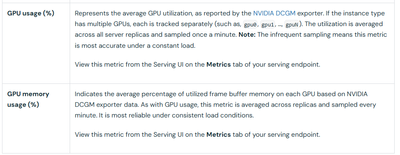
However this is missing the following GPU metrics:

KyraHinnegan_0-1767388845438.png

What would the keys and the response structure look like for those? An output example would be very helpful.
Thanks!

1 ACCEPTED SOLUTION

Accepted Solutions

Louis_Frolio
Databricks Employee
Databricks Employee

Hey @KyraHinnegan , I did some digging and here is what I found: Based on the Databricks documentation, GPU metrics exposed by the Serving Endpoint Metrics API follow a clear and consistent naming convention. Once you know the pattern, the response is very predictable and easy to work with.

GPU metric keys

The API exposes two GPU-specific metrics, each broken out per individual GPU on the serving instance.

GPU usage

You’ll see GPU utilization reported using the following key pattern:

  • gpu_usage_percentage{gpu=“gpu0”}

  • gpu_usage_percentage{gpu=“gpu1”}

  • gpu_usage_percentage{gpu=“gpuN”}

Each GPU is tracked independently using the gpu label. Values like gpu0, gpu1, and so on correspond to the physical GPUs attached to the instance.

GPU memory usage

GPU memory utilization follows the same labeling approach:

  • gpu_memory_usage_percentage{gpu=“gpu0”}

  • gpu_memory_usage_percentage{gpu=“gpu1”}

  • gpu_memory_usage_percentage{gpu=“gpuN”}

Again, memory usage is reported per GPU device, making it straightforward to see how evenly (or unevenly) memory pressure is distributed.

Response format

All metrics are returned using the Prometheus / OpenMetrics exposition format. In practice, a response containing GPU metrics will look something like this:

# TYPE gpu_usage_percentage gauge
gpu_usage_percentage{gpu="gpu0",endpoint="your-endpoint-name"} 45.2
gpu_usage_percentage{gpu="gpu1",endpoint="your-endpoint-name"} 52.8

# TYPE gpu_memory_usage_percentage gauge
gpu_memory_usage_percentage{gpu="gpu0",endpoint="your-endpoint-name"} 68.5
gpu_memory_usage_percentage{gpu="gpu1",endpoint="your-endpoint-name"} 71.3

This structure makes it easy to scrape, aggregate, and visualize the metrics using standard Prometheus tooling.

Important notes and gotchas

A few practical details are worth keeping in mind:

  • These values are averages across all server replicas and are sampled once per minute.

  • Because of the relatively low sampling frequency, the metrics are most accurate when the endpoint is under steady, sustained load.

    • GPU_SMALL → 1× T4

    • GPU_MEDIUM → 1× A10G

    • GPU_MEDIUM_4X → 4× A10G

      The number of gpu labels you see depends on the workload size. For example:

Put simply: the metric schema scales naturally with the hardware you provision, and each GPU shows up as its own labeled time series.

As always, if you’re planning alerts or capacity decisions, it’s worth correlating these metrics with request volume and latency to get the full picture.

Hope this helps, Louis.

View solution in original post

1 REPLY 1

Louis_Frolio
Databricks Employee
Databricks Employee

Hey @KyraHinnegan , I did some digging and here is what I found: Based on the Databricks documentation, GPU metrics exposed by the Serving Endpoint Metrics API follow a clear and consistent naming convention. Once you know the pattern, the response is very predictable and easy to work with.

GPU metric keys

The API exposes two GPU-specific metrics, each broken out per individual GPU on the serving instance.

GPU usage

You’ll see GPU utilization reported using the following key pattern:

  • gpu_usage_percentage{gpu=“gpu0”}

  • gpu_usage_percentage{gpu=“gpu1”}

  • gpu_usage_percentage{gpu=“gpuN”}

Each GPU is tracked independently using the gpu label. Values like gpu0, gpu1, and so on correspond to the physical GPUs attached to the instance.

GPU memory usage

GPU memory utilization follows the same labeling approach:

  • gpu_memory_usage_percentage{gpu=“gpu0”}

  • gpu_memory_usage_percentage{gpu=“gpu1”}

  • gpu_memory_usage_percentage{gpu=“gpuN”}

Again, memory usage is reported per GPU device, making it straightforward to see how evenly (or unevenly) memory pressure is distributed.

Response format

All metrics are returned using the Prometheus / OpenMetrics exposition format. In practice, a response containing GPU metrics will look something like this:

# TYPE gpu_usage_percentage gauge
gpu_usage_percentage{gpu="gpu0",endpoint="your-endpoint-name"} 45.2
gpu_usage_percentage{gpu="gpu1",endpoint="your-endpoint-name"} 52.8

# TYPE gpu_memory_usage_percentage gauge
gpu_memory_usage_percentage{gpu="gpu0",endpoint="your-endpoint-name"} 68.5
gpu_memory_usage_percentage{gpu="gpu1",endpoint="your-endpoint-name"} 71.3

This structure makes it easy to scrape, aggregate, and visualize the metrics using standard Prometheus tooling.

Important notes and gotchas

A few practical details are worth keeping in mind:

  • These values are averages across all server replicas and are sampled once per minute.

  • Because of the relatively low sampling frequency, the metrics are most accurate when the endpoint is under steady, sustained load.

    • GPU_SMALL → 1× T4

    • GPU_MEDIUM → 1× A10G

    • GPU_MEDIUM_4X → 4× A10G

      The number of gpu labels you see depends on the workload size. For example:

Put simply: the metric schema scales naturally with the hardware you provision, and each GPU shows up as its own labeled time series.

As always, if you’re planning alerts or capacity decisions, it’s worth correlating these metrics with request volume and latency to get the full picture.

Hope this helps, Louis.