
Turn on suggestions
Auto-suggest helps you quickly narrow down your search results by suggesting possible matches as you type.
Showing results for
Machine Learning
Dive into the world of machine learning on the Databricks platform. Explore discussions on algorithms, model training, deployment, and more. Connect with ML enthusiasts and experts.
Turn on suggestions
Auto-suggest helps you quickly narrow down your search results by suggesting possible matches as you type.
Showing results for
- Databricks Community
- Machine Learning
- MLFlow Detailed Trace view doesn't work in some wo...
Options
- Subscribe to RSS Feed
- Mark Topic as New
- Mark Topic as Read
- Float this Topic for Current User
- Bookmark
- Subscribe
- Mute
- Printer Friendly Page
MLFlow Detailed Trace view doesn't work in some workspaces

Options
- Mark as New
- Bookmark
- Subscribe
- Mute
- Subscribe to RSS Feed
- Permalink
- Report Inappropriate Content
01-07-2026 03:44 AM
I've created a Databricks Model Serving Endpoint which serves an MLFlow Pyfunc model. The model uses langchain and I'm using mlflow.langchain.autolog().
At my company we have some production(-like) workspaces where users cannot e.g. run Notebooks and everything is done my Service Principals (e.g. in Jobs).
In those workspaces, I cannot use the detailed trace view to inspect my MLFlow traces. I can see a list of traces in the Experiments UI

but when I click on an individual trace, I get something like

and not the clean Langchain detailed view like
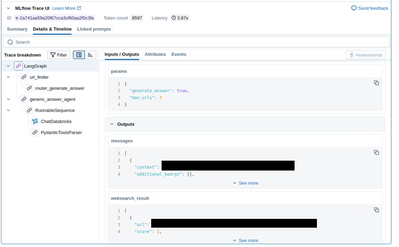
Interestingly, if I use another workspace (where human users have more access) to `display` the Inference Table in a Notebook similar to [this](https://docs.databricks.com/aws/en/mlflow3/genai/tracing/observe-with-traces/ui-traces#tracing-in-da...), I can access this nice detailed view.
Is there a workspace setting (or access to compute resources) that is necessary in order to display the Detailed Trace view?
Labels:
- Labels:
-
Model Serving


7 REPLIES 7
Options
- Mark as New
- Bookmark
- Subscribe
- Mute
- Subscribe to RSS Feed
- Permalink
- Report Inappropriate Content
01-07-2026 06:14 AM
FWIW in the 'sandbox' workspace I can see more detailed traces in the Experiments UI. The UI there also looks a bit different, it has a part indicated with a red triangle

that is absent in the 'production' workspaces where the detailed view doesn't work


Options
- Mark as New
- Bookmark
- Subscribe
- Mute
- Subscribe to RSS Feed
- Permalink
- Report Inappropriate Content
01-07-2026 08:18 AM
@thomasm , could you try setting the time range option to custom instead of 7 days? It should show the custom time range tab as shown in the first screenshot. By default, it is 7 days, which is the reason we don't see a range.
Jahnavi N
Options
- Mark as New
- Bookmark
- Subscribe
- Mute
- Subscribe to RSS Feed
- Permalink
- Report Inappropriate Content
01-07-2026 08:20 AM
Regarding the Trace UI, the level of detail shown depends on how many models or agents are involved in generating the output.
-
If a single model is used with a direct input and output, the traces appear simple and minimal.
-
If multiple agents or models are involved in producing the output, the Trace UI will display separate traces for each component, reflecting the interactions between them.
In other words, the Trace UI becomes more detailed as the workflow becomes more complex, providing visibility into each step and component involved in generating the final response.
Jahnavi N
Options
- Mark as New
- Bookmark
- Subscribe
- Mute
- Subscribe to RSS Feed
- Permalink
- Report Inappropriate Content
01-12-2026 08:58 AM
Hi Jahnavi,
Thanks for your reply. I think the issues you mentioned are not the cause of the discrepancy though. I have attached a screenshot of the same trace ID when displayed in the Experiments UI (where I cannot get a detailed trace view) and in the notebook UI (where I can access the detailed view). I have highlighted the trace ID with a red box.
Do you have any guidance what workspace or compute settings I might need to change to access the detailed view also in the Experiments UI?



Options
- Mark as New
- Bookmark
- Subscribe
- Mute
- Subscribe to RSS Feed
- Permalink
- Report Inappropriate Content
04-10-2026 06:28 AM
Hi, I am currently experiencing this exact issue. Did you manage to solve it?
If I run my application locally it produces the trace as expected, but when I deploy it, I get the same layout as you - I am unsure what happened.
Options
- Mark as New
- Bookmark
- Subscribe
- Mute
- Subscribe to RSS Feed
- Permalink
- Report Inappropriate Content
04-10-2026 09:12 AM
Since this week it went away automatically. I don't know why, I think Databricks changed something under the hood. The Databricks platform engineering team at my company couldn't figure out the cause, and also our resident Databricks solution architect could reproduce the issue on his own (Databricks internal) workspace and didn't know how it could be solved.
So I'm happy the problem magically disappeared for me, but unfortunately can offer you little advice beyond "wait and hope it will disappear" =(
Options
- Mark as New
- Bookmark
- Subscribe
- Mute
- Subscribe to RSS Feed
- Permalink
- Report Inappropriate Content
04-13-2026 12:38 AM
Funnily enough, the problem also disappeard on my end this morning 🙂
Previously, I saw a networking issue in my logs, but that also went away. Let's hope it stays that way!

Announcements


Related Content
- Azure Databricks S3 External Location in Data Engineering
- Deploying Overwatch on Databricks (AWS) with System Tables as the Data Source in Data Engineering
- Service Principal types in Azure Databricks in Data Engineering
- We are excited to announce the Security Analysis Tool (SAT) for AWS! What is the Security Analysis Tool (SAT)?SAT helps customers monitor the securit... in Data Governance