Databricks Community Edition Login - Sign Up/Sign In/Forgot Password

- Mark as New
- Bookmark
- Subscribe
- Mute
- Subscribe to RSS Feed
- Permalink
- Report Inappropriate Content
06-01-2024 02:15 PM - edited 06-01-2024 02:17 PM
Sign Up
- Go to https://www.databricks.com/try-databricks
- Fill in the 2 steps box on the right hand side
- Note - It is important to select the Personal use section in the above step.


Sign In
- Enter your details here https://accounts.cloud.databricks.com/
Forgot Password
- Click on Forgot Password on https://community.cloud.databricks.com/login.html
- You would receive and email (check All email section)



- Mark as New
- Bookmark
- Subscribe
- Mute
- Subscribe to RSS Feed
- Permalink
- Report Inappropriate Content
06-11-2025 04:51 AM
Hi,
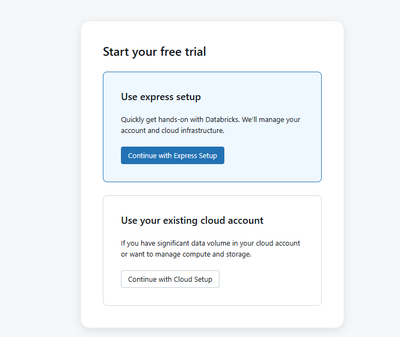
I cannot signup to Community edition. When I try to sign up using this link https://www.databricks.com/try-databricks it first shows this pop up, non of these two options allows me to signup for community edition. I don't find option 'get started with community edition'. Could you please suggest.


- Mark as New
- Bookmark
- Subscribe
- Mute
- Subscribe to RSS Feed
- Permalink
- Report Inappropriate Content
06-11-2025 01:16 PM
Hello @siva-Manohar!
On that page, look for the text Looking for Databricks Free Edition? Click here. Click on the link to proceed with creating your Free Edition account.
Also, check out this article: https://www.databricks.com/blog/introducing-databricks-free-edition


- Mark as New
- Bookmark
- Subscribe
- Mute
- Subscribe to RSS Feed
- Permalink
- Report Inappropriate Content
08-20-2025 10:08 AM
did you figure it out?
