How We Built Robust Data Governance at Scale

- Mark as New
- Bookmark
- Subscribe
- Mute
- Subscribe to RSS Feed
- Permalink
- Report Inappropriate Content
07-25-2025 10:00 AM
In today's data-driven world, trust is currency—and that trust starts with quality data governed by strong principles. For one of our client, where we're on a mission to build intelligent enterprises with AI, data isn't just an asset—it's a responsibility.
So how do you scale data governance across petabytes, hundreds of users, and global compliance expectations?
Let me take you behind the scenes of how we architected a secure, automated, and scalable data governance framework using Databricks, AWS, and some clever engineering.
📊 Executive View: The Size of the Problem
We’re powering AI and data transformation across industries:
- Manufacturing
- Retail & CPG
- Healthcare & Life Sciences
- Energy & Sustainability
- Financial Services
- Education
But with great data comes even greater complexity—different regulations, sensitive data like PII, and cross-functional stakeholders.
That’s where our Data Quality & Governance Initiative began.
🧭 Setting the Foundation: What Is Data Governance?
We defined a comprehensive data governance framework with these core pillars:
- 🔐 Data Classification & Cataloging
- 👤 Access Control & Security
- 🧼 Data Quality Management
- 🧬 Metadata Management
- 🧾 Data Lineage & Traceability
Our goal? Build a self-service, secure, and compliant environment where business teams can access what they need—without compromising privacy or compliance.
Let’s unpack each of these pillars with real-world implementation details.
Step 1: 🔍 PII Classification: Taming the Sensitive Beast
Before governance, comes knowing your data. And that means identifying PII (Personally Identifiable Information).
Automated PII Detection with Unity Catalog
We used Databricks' classify_tables() function to scan our entire catalog for PII:
✅ Name
✅ Address
✅ Phone, Email
✅ IPs, SSNs, Photos
... and more.
Each table’s results were reviewed and confirmed by data owners—humans + machine learning = 💯 confidence.
We started by scanning Bronze, Silver, and Gold layers in our Databricks lakehouse. Using Databricks’ classification APIs, we ran classify_tables() over each catalog and schema in Unity Catalog.
from databricks.data_classification import classify_tables

# classify on catalog level
results = classify_tables(securable_name="catalog")

# classify on schema level
# results = classify_tables(securable_name="catalog.schema")

# classify on table level
# results = classify_tables(securable_name="catalog.schema.table")

display(results.summary)
This gave us a summary DataFrame of detected PII entities per table, including sample values for verification. No guesswork—just facts.
The output will include two pandas DataFrames: new_classifications and summary, each listing all detected PII entities across the scanned tables. For a detailed breakdown of PII findings per table, access the table_results field as follows:
display(results.table_results["catalog.schema.table"])This will show a DataFrame where each row corresponds to a column in the table, along with any detected PII entity and up to five sample values. Columns without detected PII will have null values in the pii_entity and samples fields.

This will run Data Classification over all tables under the given securable.
To exclude any tables or schemas, use the exclude_securables parameters:
classify_tables(
    securable_name="catalog",
    exclude_securables=[
        "catalog.schema_to_skip",              # Exclude all tables under this schema
        "catalog.other_schema.table_to_skip",  # Exclude only this table
    ],
)
Step 2: 📥 Client Collaboration: The Human Layer
We exported classification results to Excel and shared with data owners. They reviewed each flagged column and marked them as PII (Yes/No). This added a critical human review loop into our automated system.
Then came the smart part.

Step 3: 👥 Role-Based Access for PII
We created granular user groups like:
- <source_name>_admin
- <source_name>_user
- <source_name>_pii
Only approved roles could see sensitive data. Others saw masked versions. ✅
All access was stored in centralized metadata tables—and enforced by code.
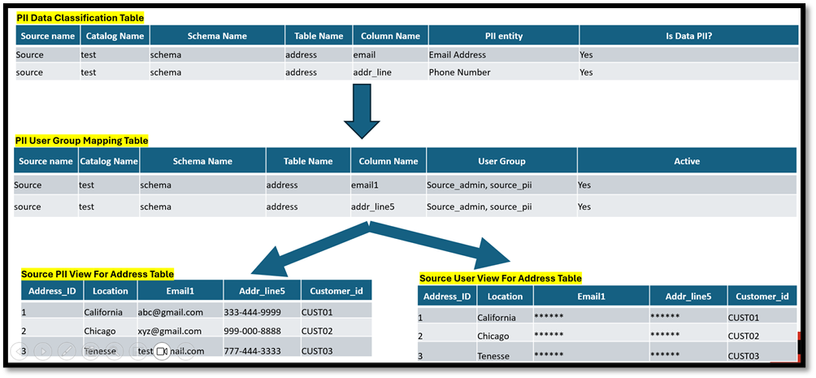
Only <source_name>_admin and <source_name>_pii groups could view sensitive fields. Others got a masked version. All this was controlled dynamically via a central masking metadata table and Databricks UDFs.
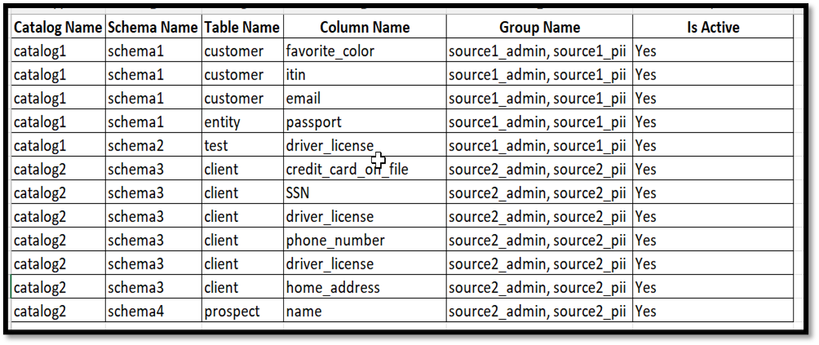
Step 4: 👥 Define PII-to-User Group Mapping Table
Created a table to store the information for PII data classification and user group mapping. Below is the sample data for this table.
Step 5: 🛡️One UDF to Rule Them All
We built a single dynamic masking function to apply column-level masking at query time—based on who’s running the query.
This function checked:
- What table is queried
- What user group the person belongs to
- What PII columns should be masked
🎯 Result? No duplication. No confusion. Full automation.
No need to create separate UDFs for every PII column and user group combo. This dynamic UDF does all the heavy lifting—smartly adapting to multiple PII columns and user groups in one go. Clean, efficient, and scalable!
CREATE FUNCTION IF NOT EXISTS <catalog_name>.<schema_name>.<masking_function_name>(COLUMN_NAME STRING, GROUP_NAMES STRING)
                RETURN CASE WHEN EXISTS(SPLIT(GROUP_NAMES, ','), g -> is_member(g))
                            THEN COLUMN_NAME
                            ELSE '***-**-****'
                       END;
This reduced overhead, simplified debugging, and centralized governance logic in one place.
Step 6: 👥Dynamic PII Column Masking Based on User Group
This function masking() dynamically applies data masking to a specific column in a table based on the provided user group. It extracts the catalog name, schema name, column name, user group information from PII-user-group-mapping table and constructs an ALTER TABLE SQL statement using a custom masking function. This enables flexible, reusable, and scalable masking logic across different tables, columns, and user groups. It also includes error handling to provide detailed feedback in case of failure.
def masking(CATALOG_NAME, SCHEMA_NAME, TABLE_NAME, COLUMN_NAME, GROUP_NAME):
      spark.sql(f'''ALTER TABLE {CATALOG_NAME}.{SCHEMA_NAME}.{TABLE_NAME} ALTER COLUMN {COLUMN_NAME} SET MASK <catalog_name>.<schema_name>.<masking_function_name> USING COLUMNS ('{GROUP_NAME}');''')
      RETURN f'successfully masked for {CATALOG_NAME}.{SCHEMA_NAME}.{TABLE_NAME} and {COLUMN_NAME}'
Step 7: 👥Member of user group <source_name>_admin and <source_name>_pii will be able to see PII data, while member who is not part of these groups will not be able to see PII data.
🧾 Metadata & Lineage: More Than a Glossary
We tracked everything—from column classifications to access mappings and masking status—in a unified metadata repository. It powered:
- Self-service catalogs
- Lineage visualizations
- Compliance audits
- Root cause analysis for quality issues
No more tribal knowledge. Everything was logged, visualized, and queryable.
📈 Outcomes: From Chaos to Clarity
Here’s what we achieved:
- Secure Access: Only approved groups could see PII. Everyone else saw safe versions.
- Auditable Governance: From classification to masking to access—all changes were tracked and approved.
- Scalable Automation: Single masking function + dynamic role checks = infinite scalability.
- Business Confidence: Teams trusted the data and could innovate without fear.
🎯Final Thoughts
Governing data isn’t about saying “no”—it’s about saying “yes” safely.
With this system, we turned governance from a bottleneck into a business enabler. And with Databricks, Unity Catalog, and a little creativity, we proved that security, scalability, and simplicity can coexist.
If your organization is struggling with PII, data sprawl, or compliance—start with classification and automation. Build once. Scale forever.
Note: Data Classification is currently in Beta on AWS and Azure Databricks. Make sure to consult the documentation for the latest implementation steps and Beta conditions.
#Databricks#PIIDataClassification#PIIDataMasking#UnityCatalog

- Mark as New
- Bookmark
- Subscribe
- Mute
- Subscribe to RSS Feed
- Permalink
- Report Inappropriate Content
07-25-2025 10:16 AM
Great article @Nidhi_Patni

- Mark as New
- Bookmark
- Subscribe
- Mute
- Subscribe to RSS Feed
- Permalink
- Report Inappropriate Content
07-27-2025 08:02 PM
Great Article @Nidhi_Patni

- Mark as New
- Bookmark
- Subscribe
- Mute
- Subscribe to RSS Feed
- Permalink
- Report Inappropriate Content
03-04-2026 07:34 PM
cannot seem to find Databricks Classification API?
