
- Mark as New
- Bookmark
- Subscribe
- Mute
- Subscribe to RSS Feed
- Permalink
- Report Inappropriate Content
01-28-2025 09:14 AM
I'm looking for a way to query for the VACUUM retention period for a specific table. This does not show up with DESSCRIBE DETAIL <table_name>;

- Mark as New
- Bookmark
- Subscribe
- Mute
- Subscribe to RSS Feed
- Permalink
- Report Inappropriate Content
01-28-2025 11:31 AM
Hi @WWoman ,
the default retention period is 7 days and as per documentation it is regulated by 'delta.deletedFileRetentionDuration' table property:
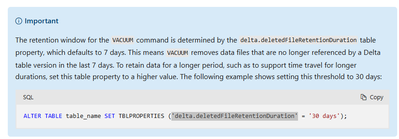
If there is no delta.deletedFileRetentionDuration table property it means it uses the default, so 7 days.
If you set the delta.deletedFileRetentionDuration like this:
ALTER TABLE dev.bronze.source_table SET TBLPROPERTIES ('delta.deletedFileRetentionDuration' = '30 days');you will be able to check the property by running SHOW TBLPROPERTIES:
SHOW TBLPROPERTIES dev.bronze.source_table;The result:
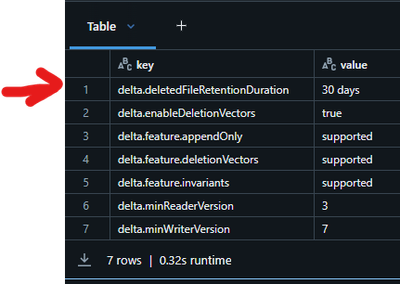
However, one can always run the VACUUM overwriting the defaults, so if you have any process that explicitly states the number of retained hours, you won't be able to check this at table properties level:

- Mark as New
- Bookmark
- Subscribe
- Mute
- Subscribe to RSS Feed
- Permalink
- Report Inappropriate Content
01-28-2025 11:36 AM
Thank you!
- Mark as New
- Bookmark
- Subscribe
- Mute
- Subscribe to RSS Feed
- Permalink
- Report Inappropriate Content
01-28-2025 11:38 AM
No problem, glad it was helpful!
