Terraform - Azure Databricks workspace without NAT gateway

- Mark as New
- Bookmark
- Subscribe
- Mute
- Subscribe to RSS Feed
- Permalink
- Report Inappropriate Content
10-16-2024 10:30 PM
Hi all,
I have experienced an increase in costs - even when not using Databricks compute.
It is due to the NAT-gateway, that are (suddenly) automatically deployed.
When creating Azure Databricks workspaces using Terraform:
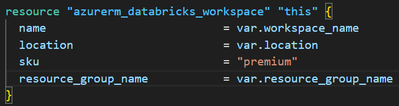
A NAT-gateway is created.
When I create the workspace using Azure Portal UI:
This is the resources: Managed Identity, Storage account, Access Connector for Azure Databricks, Network security group and Virtual network!
No NAT gateway is created!
How do I mirror the setup without a gateway?
Also see this medium post: https://medium.com/@optiman87/how-to-disable-nat-gateway-for-azure-databricks-11447015d917

- Mark as New
- Bookmark
- Subscribe
- Mute
- Subscribe to RSS Feed
- Permalink
- Report Inappropriate Content
10-22-2024 07:43 AM
try by adding more properties:
Also, Ensure that the subnets used by Azure Databricks do not have settings that require a NAT gateway.Consider using private endpoints for Azure Databricks to avoid the need for a NAT gateway.

- Mark as New
- Bookmark
- Subscribe
- Mute
- Subscribe to RSS Feed
- Permalink
- Report Inappropriate Content
05-19-2025 01:34 PM
Hi,
Unfortunately, you need to explicitly define each resource of the non-NAT-gateway pattern, if you want to replicate the setup as it is deployed using Azure portal. For me, the following TF declaration did the job:
provider "azurerm" {
  features {}
}


# Define the resource group (optional: if created inside the module)
resource "azurerm_resource_group" "rg" {
  name     = var.resource_group_name
  location = var.location
}

resource "azurerm_virtual_network" "databricks" {
  name                = "databricks-vnet"
  resource_group_name = azurerm_resource_group.rg.name
  location            = azurerm_resource_group.rg.location
  address_space       = ["10.179.0.0/16"]
}

resource "azurerm_subnet" "public" {
  name                 = "public-subnet"
  resource_group_name  = azurerm_resource_group.rg.name
  virtual_network_name = azurerm_virtual_network.databricks.name
  address_prefixes     = ["10.179.1.0/24"]
  service_endpoints    = ["Microsoft.Storage"]
  delegation {
    name = "databricks_delegation"
    service_delegation {
      name = "Microsoft.Databricks/workspaces"
      actions = [
        "Microsoft.Network/virtualNetworks/subnets/action"
      ]
    }
  }
}

resource "azurerm_subnet" "private" {
  name                 = "private-subnet"
  resource_group_name  = azurerm_resource_group.rg.name
  virtual_network_name = azurerm_virtual_network.databricks.name
  address_prefixes     = ["10.179.2.0/24"]
  service_endpoints    = ["Microsoft.Storage"]
  delegation {
    name = "databricks_delegation"
    service_delegation {
      name = "Microsoft.Databricks/workspaces"
      actions = [
        "Microsoft.Network/virtualNetworks/subnets/action"
      ]
    }
  }
}

resource "azurerm_network_security_group" "public" {
  name                = "databricks-public-nsg"
  location            = azurerm_resource_group.rg.location
  resource_group_name = azurerm_resource_group.rg.name
}

resource "azurerm_subnet_network_security_group_association" "public" {
  subnet_id                 = azurerm_subnet.public.id
  network_security_group_id = azurerm_network_security_group.public.id
}

resource "azurerm_network_security_group" "private" {
  name                = "databricks-private-nsg"
  location            = azurerm_resource_group.rg.location
  resource_group_name = azurerm_resource_group.rg.name
}

resource "azurerm_subnet_network_security_group_association" "private" {
  subnet_id                 = azurerm_subnet.private.id
  network_security_group_id = azurerm_network_security_group.private.id
}

# Define the Databricks workspace
resource "azurerm_databricks_workspace" "workspace" {
  name                       = var.workspace_name
  resource_group_name        = azurerm_resource_group.rg.name
  location                   = azurerm_resource_group.rg.location
  sku                        = var.workspace_sku
  public_network_access_enabled = true
  #network_security_group_rules_required               = "AllRules"
  managed_resource_group_name = var.managed_resource_group_name

  custom_parameters {
    virtual_network_id  = azurerm_virtual_network.databricks.id
    public_subnet_name  = azurerm_subnet.public.name
    private_subnet_name = azurerm_subnet.private.name
    public_subnet_network_security_group_association_id  = azurerm_subnet_network_security_group_association.public.id
    private_subnet_network_security_group_association_id = azurerm_subnet_network_security_group_association.private.id
    no_public_ip = true
  }
}

- Mark as New
- Bookmark
- Subscribe
- Mute
- Subscribe to RSS Feed
- Permalink
- Report Inappropriate Content
06-05-2025 08:22 AM
In Azure Databricks, a NAT Gateway will be required (by Microsoft) for all egress from VMs, which affects Databricks compute: Azure updates | Microsoft Azure
