Databricks Federated Token Exchange Returns HTML Login Page Instead of Access Token(GCP →Databricks)

- Mark as New
- Bookmark
- Subscribe
- Mute
- Subscribe to RSS Feed
- Permalink
- Report Inappropriate Content
11-24-2025 09:53 PM - edited 11-24-2025 10:00 PM
Hi everyone,
I’m trying to implement federated authentication (token exchange) from Google Cloud → Databricks without using a client ID / client secret only using a Google-issued service account token. I have also created a federation policy in Databricks.
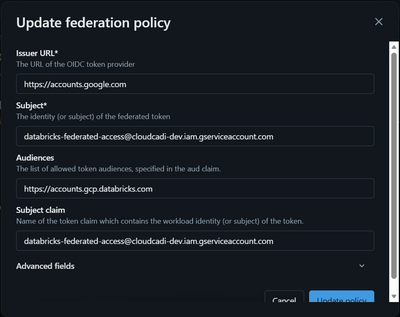
const audience = "https://accounts.gcp.databricks.com";

const resp = await axios.post(
"https://accounts.gcp.databricks.com",
qs.stringify({
grant_type: "urn:ietf:params:oauth:grant-type:token-exchange",
subject_token: accessToken,
subject_token_type: "urn:ietf:params:oauth:token-type:jwt",
audience,
requested_token_type: "urn:ietf:params:oauth:token-type:access_token",
}),
{ headers: { "Content-Type": "application/x-www-form-urlencoded" } }
);
Which API should i use instead of "https://accounts.gcp.databricks.com"?
<!doctype html>
<html lang="en">
<head>
<meta charset="utf-8">
<meta name="viewport" content="width=device-width,initial-scale=1">
<meta name="description" content="Databricks Sign in">
<title>Databricks - Sign in</title>
...
</html>
Can anyone help me to solve this error or provide any document for this Federated Token Exchange (GCP →Databricks).

- Mark as New
- Bookmark
- Subscribe
- Mute
- Subscribe to RSS Feed
- Permalink
- Report Inappropriate Content
11-25-2025 05:02 PM
Hi @GeraldBriyolan,
Maybe this documentation can help you:
https://docs.databricks.com/gcp/en/dev-tools/auth/authentication-google-id
Data Engineer | Machine Learning Engineer
LinkedIn: linkedin.com/in/wiliamrosa
- Mark as New
- Bookmark
- Subscribe
- Mute
- Subscribe to RSS Feed
- Permalink
- Report Inappropriate Content
11-26-2025 08:19 PM
I have tried using this document I got the access token (been authenticated from databricks) but when i tried to use it to get the users or the workspace it shows error.
      const auth = new GoogleAuth();
      const idTokenClient = await auth.getIdTokenClient(audience);
      const headers = await idTokenClient.getRequestHeaders();
      const oidc_token = headers.Authorization.replace('Bearer ', '');

      const token_exchange_url = `https://2153434890.0.gcp.databricks.com/oidc/v1/token`;
      const formData = new URLSearchParams({
        grant_type: 'urn:ietf:params:oauth:grant-type:token-exchange',
        requestedTokenType: 'urn:ietf:params:oauth:token-type:access_token',
        subject_token: oidc_token,
        subject_token_type: 'urn:ietf:params:oauth:token-type:jwt',
        scope: 'all-apis',
      });

      const response = await axios.post(token_exchange_url, formData, {
        headers: { 'Content-Type': 'application/x-www-form-urlencoded' },
        timeout: 30000,
      });

      const access_token = response.data.access_token;

      if (!accessToken) return { success: false, message: 'Invalid Credentials' };

      const api = `https://accounts.gcp.databricks.com/api/2.0/accounts/${databricksAccountId}/workspaces`;
      const headers = {
        Authorization: `Bearer ${accessToken}`,
        'Content-Type': 'application/json',
      };

      const response = await axios.get(api, {
        headers,
        timeout: 15000,
      });

      const workspaces = await response.data.map((workspace) => {
        return {
          workspaceId: workspace.workspace_id,
          workspaceName: workspace.workspace_name,
          regionName: workspace.location,
          workspaceUrl: `${workspace.deployment_name}.gcp.databricks.com`,
          workspaceTier: workspace.pricing_tier,
        };
      });
I have attached the code if i am done any mistake in the code kindly lent me know and tell me a solution for this issue.
- Mark as New
- Bookmark
- Subscribe
- Mute
- Subscribe to RSS Feed
- Permalink
- Report Inappropriate Content
11-27-2025 11:16 AM
You might want to check whether the issue is related to your federation policy configuration.
Try reviewing the following documentation to confirm that your policy is correctly set up (issuer, audiences, and other expected claims):
https://docs.databricks.com/gcp/en/dev-tools/auth/oauth-federation-policy
Data Engineer | Machine Learning Engineer
LinkedIn: linkedin.com/in/wiliamrosa
