
Options
- Mark as New
- Bookmark
- Subscribe
- Mute
- Subscribe to RSS Feed
- Permalink
- Report Inappropriate Content
06-23-2021 04:25 PM
With S3-SQS it was easier to identify the backlog ( the messages that are fetched from SQS and not consumed by the streaming job)
How to find the same with Auto-loader
Labels:
- Labels:
-
Autoloader
Options
- Mark as New
- Bookmark
- Subscribe
- Mute
- Subscribe to RSS Feed
- Permalink
- Report Inappropriate Content
06-23-2021 04:27 PM
For DBR versions prior to 8.2 use the below code snippet:
import org.rocksdb.Options
import org.apache.hadoop.fs.Path
import com.databricks.sql.rocksdb.{CloudRocksDB, PutLogEntry}
val rocksdbPath: String = new Path("/tmp/hari/streaming/auto_loader2/sources/0/", "rocksdb").toString
val rocksDBOptions = new Options()
  rocksDBOptions
    .setCreateIfMissing(true)
    .setMaxTotalWalSize(Long.MaxValue)
    .setWalTtlSeconds(Long.MaxValue)
    .setWalSizeLimitMB(Long.MaxValue)
val rocksDB = CloudRocksDB.open(
    rocksdbPath,
    hadoopConf = spark.sessionState.newHadoopConf(),
    dbOptions = rocksDBOptions,
    opTypePrefix = "autoIngest")
println("Latest offset in RocksDB:" + rocksDB.latestDurableSequenceNumber)
println("Number of files to be processed " + rocksDB.latestDurableSequenceNumber - latestSeqFromQueryProgression)Options
- Mark as New
- Bookmark
- Subscribe
- Mute
- Subscribe to RSS Feed
- Permalink
- Report Inappropriate Content
06-23-2021 04:29 PM
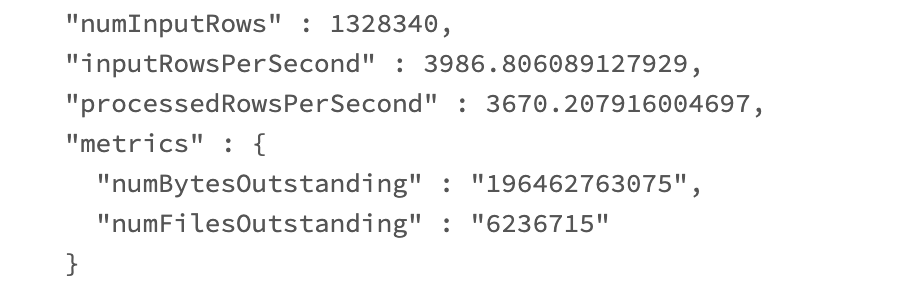
For DBR 8.2 or later, the backlog details are captured in the Streaming metrics
Eg:

.png)
.png)