
- Mark as New
- Bookmark
- Subscribe
- Mute
- Subscribe to RSS Feed
- Permalink
- Report Inappropriate Content
10-18-2022 09:46 AM
I am trying to use selenium webdriver to do a scraping project in Databricks. The notebook used to run properly but now has an issue with the
Get:1 http://archive.ubuntu.com/ubuntu focal/main amd64 fonts-liberation all 1:1.07.4-11 [822 kB]
command .
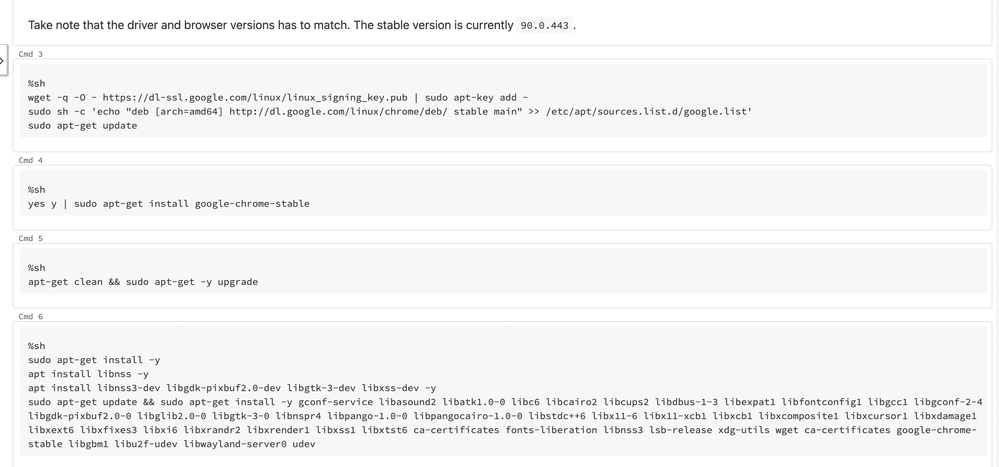
In the cells prior to this, I run the following commands:
apt-get clean && sudo apt-get -y upgrade
sudo apt-get install -y
apt install libnss -y
apt install libnss3-dev libgdk-pixbuf2.0-dev libgtk-3-dev libxss-dev -y
sudo apt-get update && sudo apt-get install -y gconf-service libasound2 libatk1.0-0 libc6 libcairo2 libcups2 libdbus-1-3 libexpat1 libfontconfig1 libgcc1 libgconf-2-4 libgdk-pixbuf2.0-0 libglib2.0-0 libgtk-3-0 libnspr4 libpango-1.0-0 libpangocairo-1.0-0 libstdc++6 libx11-6 libx11-xcb1 libxcb1 libxcomposite1 libxcursor1 libxdamage1 libxext6 libxfixes3 libxi6 libxrandr2 libxrender1 libxss1 libxtst6 ca-certificates fonts-liberation libnss3 lsb-release xdg-utils wget ca-certificates google-chrome-stable libgbm1 libu2f-udev libwayland-server0 udev
I attached the cell that fails and the error message. If you have any suggestions please let me know.
- Labels:
-
FAILED
-
Selenium Webdriver

- Mark as New
- Bookmark
- Subscribe
- Mute
- Subscribe to RSS Feed
- Permalink
- Report Inappropriate Content
10-18-2022 11:06 AM
Maybe my manual on how to run selenium on Databricks will help:
In the clusters library tab, please install PyPi chromedriver-binary==83.0 (or higher, probably version in the script can also be updated)
Please run below script from notebook to create "/databricks/scripts/selenium-install.sh" file.
    dbutils.fs.mkdirs("dbfs:/databricks/scripts/")
    dbutils.fs.put("/databricks/scripts/selenium-install.sh","""
    #!/bin/bash
    apt-get update
    apt-get install chromium-browser=91.0.4472.101-0ubuntu0.18.04.1 --yes
    wget https://chromedriver.storage.googleapis.com/91.0.4472.101/chromedriver_linux64.zip -O /tmp/chromedriver.zip
    mkdir /tmp/chromedriver
    unzip /tmp/chromedriver.zip -d /tmp/chromedriver/
    """, True)
    display(dbutils.fs.ls("dbfs:/databricks/scripts/"))
Please add "/databricks/scripts/selenium-install.sh" as starting script - init in cluster config.
Later in the notebook, you can use chrome, as in the below example.
    from selenium import webdriver
    chrome_driver = '/tmp/chromedriver/chromedriver'
    chrome_options = webdriver.ChromeOptions()
    chrome_options.add_argument('--no-sandbox')
    chrome_options.add_argument('--headless')
    # chrome_options.add_argument('--disable-dev-shm-usage')
    chrome_options.add_argument('--homedir=/dbfs/tmp')
    chrome_options.add_argument('--user-data-dir=/dbfs/selenium')
    # prefs = {"download.default_directory":"/dbfs/tmp",
    #          "download.prompt_for_download":False
    # }
    # chrome_options.add_experimental_option("prefs",prefs)
    driver = webdriver.Chrome(executable_path=chrome_driver, options=chrome_options)
My blog: https://databrickster.medium.com/
- Mark as New
- Bookmark
- Subscribe
- Mute
- Subscribe to RSS Feed
- Permalink
- Report Inappropriate Content
10-18-2022 03:57 PM
I got an error from the second line of the install script
- Mark as New
- Bookmark
- Subscribe
- Mute
- Subscribe to RSS Feed
- Permalink
- Report Inappropriate Content
10-19-2022 12:31 AM
Hi @Dagart Allison , With apt-get upgrade, could you please run apt-get update in the previous cell?
Also, you can try apt-get install (package-name) --fix-missing.
- Mark as New
- Bookmark
- Subscribe
- Mute
- Subscribe to RSS Feed
- Permalink
- Report Inappropriate Content
10-19-2022 10:40 AM
Hi, I still get the same error as I previously posted about the chromium-browser not found for that version.
- Mark as New
- Bookmark
- Subscribe
- Mute
- Subscribe to RSS Feed
- Permalink
- Report Inappropriate Content
10-24-2022 10:29 AM
- Mark as New
- Bookmark
- Subscribe
- Mute
- Subscribe to RSS Feed
- Permalink
- Report Inappropriate Content
11-09-2022 06:26 AM
Hi, @Dagart Allison . I've created a new version of the selenium with the databricks manual. Please look here https://community.databricks.com/s/feed/0D58Y00009SWgVuSAL
My blog: https://databrickster.medium.com/

