- Mark as New
- Bookmark
- Subscribe
- Mute
- Subscribe to RSS Feed
- Permalink
- Report Inappropriate Content
10-14-2022 01:29 PM
I predefined my schema for a Delta Live Table Autoload. This included comments for some attributes. When performing a standard readStream, my comments appear, but when in Delta Live Tables I get no comments. Is there anything I need to do get comments to appear?
Schema definition:
schema = StructType([
  StructField("uuid",StringType(),True, {'comment': "Unique customer id"}),
  StructField("GPS",StringType(),True)])
Delta Live Table Stream:
@dlt.table(name="test_bronze",
                  comment = "test account data incrementally ingested from S3 Raw landing zone",
  table_properties={
    "quality": "bronze"
  }
)

# Stream data
#@dlt.table
def test_bronze():
  return (
    spark.readStream
                  .format("cloudFiles")
                  .option("cloudFiles.format", "csv)
                  .option("header", "True")
                  .schema(schema)
                  .load(data_source)
  )
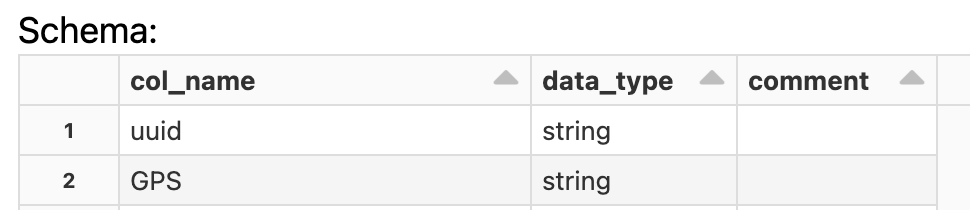
But no comments in data:
- Labels:
-
Delta Live Tables

- Mark as New
- Bookmark
- Subscribe
- Mute
- Subscribe to RSS Feed
- Permalink
- Report Inappropriate Content
10-18-2022 05:53 AM
Hi @Dave Wilson , are you getting any error for the same?
You can include comments.
Delta Live Tables automatically captures the dependencies between datasets defined in your pipeline and uses this dependency information to determine the execution order when performing an update and to record lineage information in the event log for a pipeline.
Both views and tables have the following optional properties:
- COMMENT: A human-readable description of this dataset.
Please refer https://docs.databricks.com/workflows/delta-live-tables/delta-live-tables-sql-ref.html#sql-datasets

- Mark as New
- Bookmark
- Subscribe
- Mute
- Subscribe to RSS Feed
- Permalink
- Report Inappropriate Content
10-20-2022 06:24 AM
You need to add your schema to dlt declaration:
@dlt.table(
   name="test_bronze",
   comment = "test account data incrementally ingested from S3 Raw landing zone",
   table_properties={ "quality": "bronze" },
   schema=schema)
My blog: https://databrickster.medium.com/

- Mark as New
- Bookmark
- Subscribe
- Mute
- Subscribe to RSS Feed
- Permalink
- Report Inappropriate Content
02-06-2023 03:16 AM
what does adding table_properties do again? any links to the documentation?
- Mark as New
- Bookmark
- Subscribe
- Mute
- Subscribe to RSS Feed
- Permalink
- Report Inappropriate Content
03-09-2023 03:58 AM
table_properties are optional parameters that you can use to configure various aspects of your Delta Live Tables, such as optimization, partitioning, and retention and also set own custom tags.
You can find more details about table_properties and their possible values in Table properties - https://learn.microsoft.com/en-us/azure/databricks/workflows/delta-live-tables/dlt-table-properties
My blog: https://databrickster.medium.com/