I want to split a dataframe with date range 1 week, with each week data in different column.

- Mark as New
- Bookmark
- Subscribe
- Mute
- Subscribe to RSS Feed
- Permalink
- Report Inappropriate Content
11-13-2017 09:09 PM
DF
Q Date(yyyy-mm-dd)
q1 2017-10-01
q2 2017-10-03
q1 2017-10-09
q3 2017-10-06
q2 2017-10-01
q1 2017-10-13
Q1 2017-10-02
Q3 2017-10-21
Q4 2017-10-17
Q5 2017-10-20
Q4 2017-10-31
Q2 2017-10-27
Q5 2017-10-01
Dataframe:
Q Count(week 1) Count(week 2) Count(week 3) Count(week 4) Avg(counts) Standard deviation of the counts
Q1 2 2 0 0 As applicable As applicable
Q2 2 0 0 1 “ “
Q3 1 0 1 0 “ “
Q4 0 0 1 1
Q5 1 0 1 0 “ “

- Mark as New
- Bookmark
- Subscribe
- Mute
- Subscribe to RSS Feed
- Permalink
- Report Inappropriate Content
11-28-2017 04:24 PM
It should just be a matter of applying the correct set of transformations:
- You can start by adding the week-of-year to each record with the command pyspark.sql.functions.weekofyear(..) and name it something like weekOfYear. See https://spark.apache.org/docs/latest/api/python/pyspark.sql.html?highlight=functions#pyspark.sql.fun...
- To get the day-of-week, you can use pyspark.sql.functions.date_format(..) with the format of "u" which yields the number of the week and name it something like dayOfWeek See https://spark.apache.org/docs/latest/api/python/pyspark.sql.html?highlight=functions#pyspark.sql.fun... and then https://docs.oracle.com/javase/8/docs/api/java/text/SimpleDateFormat.html.
- Next would be to add one column for each day of the week (seven steps in all).
- The first part would be to use pyspark.sql.functions.when( condition, value
- ). See https://spark.apache.org/docs/latest/api/python/pyspark.sql.html?highlight=functions#pyspark.sql.fun...
- The condition would be something like col("dayOfWeek") == "1" and the value would be columnWhatever.
- You can then append to the when(..) call an otherwise(..) expression with 0 as in when(condition, value).otherwise(0). See https://spark.apache.org/docs/latest/api/python/pyspark.sql.html?highlight=functions#pyspark.sql.fun...
- Repeat that six more times
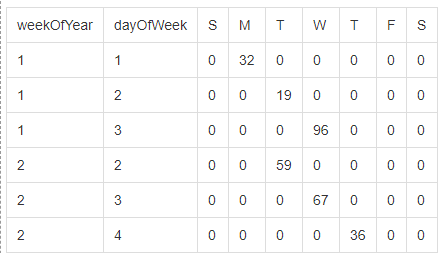
At this stage the data will look something like this:
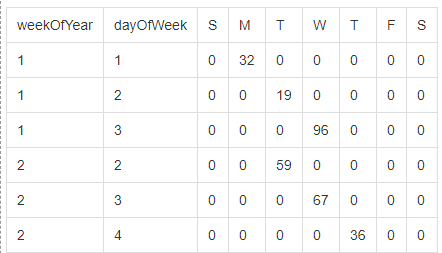
But the real trick is going to be to flatten it and all that should be required is to group by weekOfYear and then select with that the sum of each column (S,M,T,W,T,F,S) and that last call would look something like this:
df.groupBy("weekOfYear")
  .sum("Sun", "Mon","Tue", "Wed", "Thu", "Fri", "Sat")
--------------- UPDATE ------------
The solution involving sum(..) works if you have numerical data. However, if you have non-numerical data, we need a slightly different technique. In this case, we can still group by weekOfYear but instead of using sum(..) we can use agg(first(...), first(...), ...).
Thanks to Adam for the suggestion of using sum(..) and to @doug for the suggestion of using agg(first(..)).
As we were playing with this, I did put together a sample notebook that demonstrates both solutions .