How can I create a Table from a CSV file with first column with data in dictionary format (JSON like)?

- Mark as New
- Bookmark
- Subscribe
- Mute
- Subscribe to RSS Feed
- Permalink
- Report Inappropriate Content
09-01-2016 12:41 AM
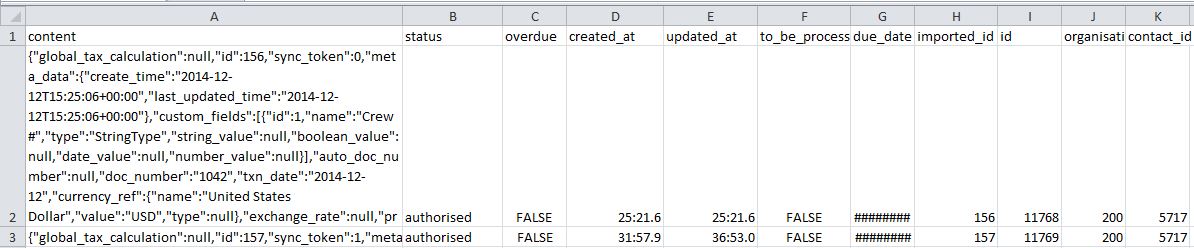
I have a csv file with the first column containing data in dictionary form (keys: value). [see below]

I tried to create a table by uploading the csv file directly to databricks but the file can't be read. Is there a way for me to flatten or convert the first column to excel table with each key as column name and values in rows?
- Labels:
-
SQL

- Mark as New
- Bookmark
- Subscribe
- Mute
- Subscribe to RSS Feed
- Permalink
- Report Inappropriate Content
08-15-2019 12:37 PM
This is apparently a known issue, databricks has their own csv format handler which can handle this
https://github.com/databricks/spark-csv
SQL APICSV data source for Spark can infer data types:
CREATE TABLE cars
USING com.databricks.spark.csv
OPTIONS (path "cars.csv", header "true", inferSchema "true")
You can also specify column names and types in DDL.
CREATE TABLE cars (yearMade double, carMake string, carModel string, comments string, blank string)
USING com.databricks.spark.csv
OPTIONS (path "cars.csv", header "true")Spark 1.4+:
Automatically infer schema (data types), otherwise everything is assumed string:
import org.apache.spark.sql.SQLContextval sqlContext = new SQLContext(sc) val df = sqlContext.read .format("com.databricks.spark.csv") .option("header", "true") // Use first line of all files as header .option("inferSchema", "true") // Automatically infer data types .load("cars.csv")
val selectedData = df.select("year", "model") selectedData.write .format("com.databricks.spark.csv") .option("header", "true")
.save("newcars.csv")