- Mark as New
- Bookmark
- Subscribe
- Mute
- Subscribe to RSS Feed
- Permalink
- Report Inappropriate Content
01-27-2022 10:31 AM
How to save the schema of a csv file in a delta table's column?
In a previous project implemented in Databricks using Scala notebooks, we stored the schema of csv files as a "json string" in a SQL Server table.
When we needed to read or write the csv and the source dataframe das 0 rows, or the source csv does not exist, we use the schema stored in the SQL Server to either create an empty dataframe or empty csv file.
Now, I would like to implement something similar in Databricks but using Python notebook and store the schema of csv files in a delta table.
Any suggestions?
Thanks in advance,
Tiago.

- Mark as New
- Bookmark
- Subscribe
- Mute
- Subscribe to RSS Feed
- Permalink
- Report Inappropriate Content
01-27-2022 10:41 AM
After you read csv to dataframe spark.read.csv ... there are 3 ways
DataFrame.Schema
DataFrame.printSchema() - it is StructType
and 3rd tricky way is DDL string
DataFrame._jdf.schema().toDDL()
Usually DDL as it is simple string is easiest to save somewhere and than reuse. Just insert to some delta table schema and then select when needed.
My blog: https://databrickster.medium.com/
- Mark as New
- Bookmark
- Subscribe
- Mute
- Subscribe to RSS Feed
- Permalink
- Report Inappropriate Content
02-02-2022 01:17 AM
Hi Hubert,
Thanks for you answer, but I was not able to make it work.
Let me ask the question in a different way.
I have a csv file with the following basic estruture:
- ProductId - integer.
- ProductDesc - string.
- ProductCost - decimal.
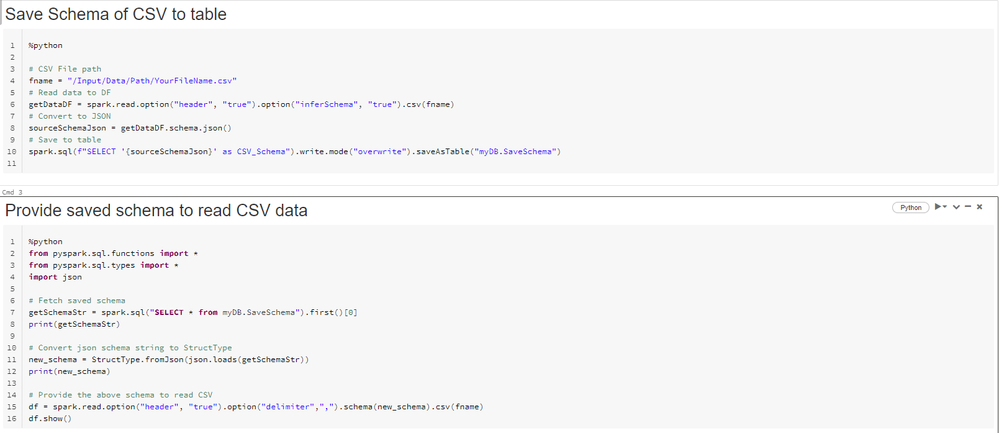
In PySpark I would like to store the file schema in:
- In a variable to be used in the spark.read.schema(schema).options(**fileOptions).schema(schema).load(...).
- Be able to store the file schema in a delta table's column.
What kind of transformations do I need to do to the variable in 1. to be able to stored in 2., and vice-versa?
Thanks in advance,
Tiago R.
- Mark as New
- Bookmark
- Subscribe
- Mute
- Subscribe to RSS Feed
- Permalink
- Report Inappropriate Content
02-07-2022 10:17 AM
Hi Kaniz,
Thanks for your answer, although it did not answer my questions.

- Mark as New
- Bookmark
- Subscribe
- Mute
- Subscribe to RSS Feed
- Permalink
- Report Inappropriate Content
02-22-2022 04:43 AM
- Mark as New
- Bookmark
- Subscribe
- Mute
- Subscribe to RSS Feed
- Permalink
- Report Inappropriate Content
02-23-2022 01:23 AM
Hi,
Thanks for you code, I will test it.
Regards,
Tiago.

- Mark as New
- Bookmark
- Subscribe
- Mute
- Subscribe to RSS Feed
- Permalink
- Report Inappropriate Content
03-01-2022 01:47 PM
@Tiago Rente - How did the test go?
- Mark as New
- Bookmark
- Subscribe
- Mute
- Subscribe to RSS Feed
- Permalink
- Report Inappropriate Content
03-04-2022 10:20 AM
Hi Piper,
Unfortunately, I was not able to test it before I changed to a new employer, so I can no longer test it. However, I think it would work.
Regards,
Tiago R.
- Mark as New
- Bookmark
- Subscribe
- Mute
- Subscribe to RSS Feed
- Permalink
- Report Inappropriate Content
03-06-2022 01:35 PM
@tarente - Thanks for letting us know. 🙂