DLT: Autoloader Perf

- Mark as New
- Bookmark
- Subscribe
- Mute
- Subscribe to RSS Feed
- Permalink
- Report Inappropriate Content
10-05-2023 08:07 PM
Hi Team,
I am looking for some advice to perf tune my bronze layer using DLT.
I have the following code very simple and yet very effective.
@dlt.create_table(name="bronze_events",
                  comment = "New raw data ingested from storage account landing zone.")
def bronze_events():
    df = (
        spark.readStream.format("cloudFiles")
        .option("cloudFiles.format", "json")
        .schema(schema)
        .load("abfss://data@<some storage account>.dfs.core.windows.net/0_Landing")
      )

    return df
that generates this DAG.
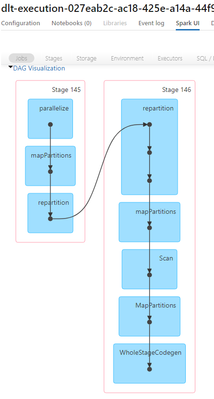
Before it was executing quite fast but as days goes by it is becoming more and more slower like from 2 to 5 to 12 mins. Silver and Gold are all executing less than a minute. So wondering what performance tuning I should do with the bronze layer.
Cheers,
G

- Mark as New
- Bookmark
- Subscribe
- Mute
- Subscribe to RSS Feed
- Permalink
- Report Inappropriate Content
10-05-2023 09:30 PM
Hi @Gilg
Is it ingesting the same number of files as before?
Also, you could try using Auto Loader with file notification mode. If there are too many files in the source directory, then significant amount of time would be spent on listing of the directory. We can validate this by analyzing the logs.
- Mark as New
- Bookmark
- Subscribe
- Mute
- Subscribe to RSS Feed
- Permalink
- Report Inappropriate Content
10-05-2023 10:00 PM
It can be from 600 files to up to 1.5k files. The DLT is set to Triggered in Pipeline mode and Continuous in Trigger Type in Workflows.
- Mark as New
- Bookmark
- Subscribe
- Mute
- Subscribe to RSS Feed
- Permalink
- Report Inappropriate Content
10-11-2023 02:49 AM
Hi @Gilg
You mentioned that micro-batch time is around 12 minutes recently. Do we also see jobs/stages with 12 minutes in the spark ui. If that is the case, then the processing of the file itself takes 12 minutes. If not, the 12 minutes is spent on listing the directory and maintaining the checkpoint.
