Extra underscore behind ".xlsm" and ".xlsx" after exporting excel files from Databricks

- Mark as New
- Bookmark
- Subscribe
- Mute
- Subscribe to RSS Feed
- Permalink
- Report Inappropriate Content
11-20-2023 07:17 AM
Hi all,
I tried to export several excel files from Databricks. But there will always be one extra underscore behind ".xlsm" and ".xlsx", if I export them and try to open the files on local system. I have to manually remove the underscore from the filename and then I am able to open the excel files.
For the solutions, I downloaded different browsers to implement it. It doesn't work either.
I also tried to change the workspace settings. Does anyone know how I can reconfigure the settings to solve the problem?
I will be super grateful if you can provide some hints!
Thanks 🙂
- Mark as New
- Bookmark
- Subscribe
- Mute
- Subscribe to RSS Feed
- Permalink
- Report Inappropriate Content
11-20-2023 07:31 AM

- Mark as New
- Bookmark
- Subscribe
- Mute
- Subscribe to RSS Feed
- Permalink
- Report Inappropriate Content
11-23-2023 06:45 AM
Hello @Retired_mod,
Thank you very much for the response 🙂
My team tested the solutions as you mentioned above. But it didn't work 😞
Note: No code is used to download the excel file. We are trying to directly export the file from Databricks workspace (see screenshot).
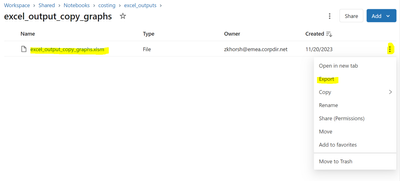
The problem appears for all users and not just for this one excel file.
As I mentioned it's not just for excel, it's for all types of files I export in this way: .txt or .py etc.

I'm looking forward to your feedbacks!

- Mark as New
- Bookmark
- Subscribe
- Mute
- Subscribe to RSS Feed
- Permalink
- Report Inappropriate Content
12-07-2023 01:26 AM
Hi, did you find a solution this? I have the same/similar problem where when I save a dataframe from a Databricks notebook using to_excel() it saves the file with extension ".xlsx_" rather then "xlsx", meaning to open I have to manually download and change the file type