Can not change databricks-connect port

- Mark as New
- Bookmark
- Subscribe
- Mute
- Subscribe to RSS Feed
- Permalink
- Report Inappropriate Content
03-04-2024 06:57 AM - edited 03-04-2024 06:59 AM
I have a Databricks cluster with 10.4 runtime, when I configure databricks-connect configure I put all the information needed and using the default port 15001, databricks-connect test works.
But changing the port to 443 does not work, I tried to do a pyspark session but it also fails:
: com.databricks.service.SparkServiceConnectionException: Invalid port (443) or invalid token:

The port you specified is either being used already or invalid.
Port: The port that Databricks Connect connects to
  - The default Databricks Connect port is 15001
  - Get current value: spark.conf.get("spark.databricks.service.port")
  - Set via conf: spark.conf.set("spark.databricks.service.port", <your port>")
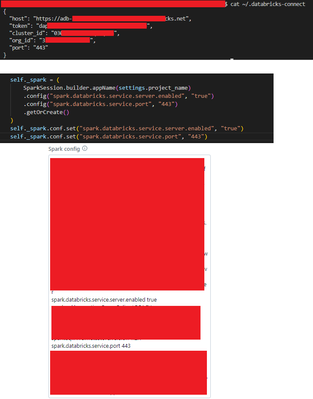
I added a configuration on my cluster (spark config)
spark.databricks.service.server.enabled true
spark.databricks.service.port 443
But it did not work.
Why doesn't it work? The reason why I want to change to port 443 is simple, my github action workflows is on a self-hosted worker which is behind a firewall that block the port 15001, so I'm trying to find a solution to use a port which is opened.
I tried to set up in `databricks-connect configure` the port 443 + adding it to my spark conf on the driver and on the cluster.

- Mark as New
- Bookmark
- Subscribe
- Mute
- Subscribe to RSS Feed
- Permalink
- Report Inappropriate Content
03-05-2024 01:50 AM
Cluster is using 443 (HTTPS) to connect to the control plane, so IMO 443 should not be used for anything else.
- Mark as New
- Bookmark
- Subscribe
- Mute
- Subscribe to RSS Feed
- Permalink
- Report Inappropriate Content
03-05-2024 02:00 AM
@daniel_sahal
Thank you for the reply, indeed port 443 is used by a lot of applucations and could be problematic. But I also tried port `15002` and it didn't work. No other ports than default one works
