{{job.trigger.type}} not working and throws error on Edit Parameter from Job page

- Mark as New
- Bookmark
- Subscribe
- Mute
- Subscribe to RSS Feed
- Permalink
- Report Inappropriate Content
04-19-2024 09:32 AM
Following the instruction on the Job Parameter Dynamic values, I am able to use
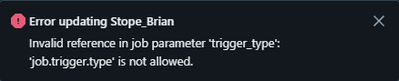
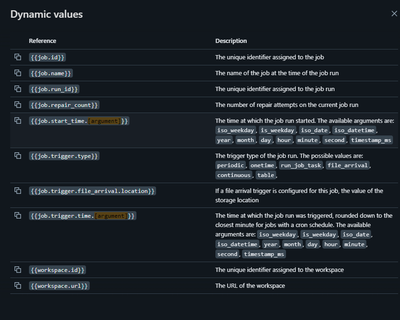
also, I noticed that the Dynamic values window from the Job parameter Edit Parameters page vs. the official doc has discrepancy - {{job.parameters.[name]}} is missing from the Job parameter Edit Parameters page.

- Mark as New
- Bookmark
- Subscribe
- Mute
- Subscribe to RSS Feed
- Permalink
- Report Inappropriate Content
04-21-2024 09:03 PM

- Mark as New
- Bookmark
- Subscribe
- Mute
- Subscribe to RSS Feed
- Permalink
- Report Inappropriate Content
04-21-2024 09:50 PM

- Mark as New
- Bookmark
- Subscribe
- Mute
- Subscribe to RSS Feed
- Permalink
- Report Inappropriate Content
04-22-2024 09:42 AM
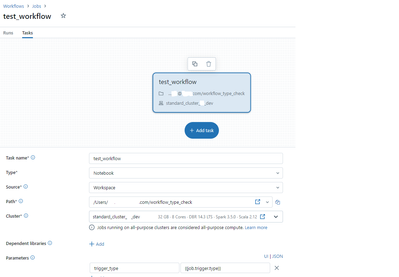
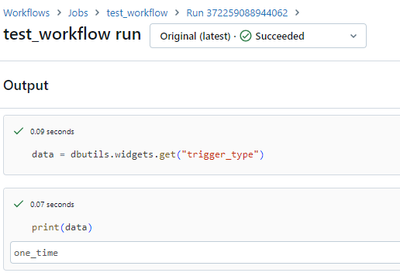
Hi @BrianJ - As a workaround, can you please add the parameter at the task level instead of the job level - {{job.trigger.type}}.
- Mark as New
- Bookmark
- Subscribe
- Mute
- Subscribe to RSS Feed
- Permalink
- Report Inappropriate Content
04-22-2024 10:06 AM
@BrianJ - Have shared the details with the Databricks Engineering team to have this issue addressed. we assure that the issue will be prioritized and fixed in the next release. Kindly use the workaround to proceed further on this.
- Mark as New
- Bookmark
- Subscribe
- Mute
- Subscribe to RSS Feed
- Permalink
- Report Inappropriate Content
04-22-2024 10:00 AM
Thanks everyone, I decided to use the Sparkcontext instead.
