Create New Table, Infer Schema gives error: Invalid column type {colSchemaType}

- Mark as New
- Bookmark
- Subscribe
- Mute
- Subscribe to RSS Feed
- Permalink
- Report Inappropriate Content
09-11-2024 03:42 AM
I'm doing a the course 'Distributed Computing with Spark SQL' on Coursera, and need to create a table by uploading a csv file. That seems to work at first, but as soon as I check the box for 'Infer schema' for the preview table, I get the following message:
The following errors prevented the table from rendering:
- Invalid column type {colSchemaType} at column Call_Date
- Invalid column type {colSchemaType} at column Watch_Date
The csv file I used, can be found by following this link: https://s3-us-west-2.amazonaws.com/davis-dsv1071/data/fire-calls/fire-calls-truncated-comma-no-space...
I would appreciate it very much if you can help me!

- Mark as New
- Bookmark
- Subscribe
- Mute
- Subscribe to RSS Feed
- Permalink
- Report Inappropriate Content
09-11-2024 04:21 AM
Hi @lauracoursera ,
could you share the how you uploaded the file to Databricks to get the error.
I have downloaded the file, went to Data Ingestion and clicked Create or modify table from file upload:

The preview worked:

If it does not work for you, show the content of Advanced attributes:
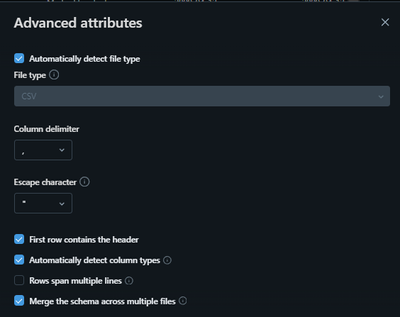
Also, what offering of Databricks are you using: Azure Datbricks, AWS Databricks or Databricks Community Edition?
- Mark as New
- Bookmark
- Subscribe
- Mute
- Subscribe to RSS Feed
- Permalink
- Report Inappropriate Content
09-11-2024 04:33 AM
Hi @filipniziol,
Thanks for looking with me! I use Community Edition. So I get there by clicking 'Catalog', 'Create Table', and then uploading the file. Then 'Create Table with UI', I choose a cluster and click 'Preview Table'. As soon as I check 'Infer schema', I get this:

- Mark as New
- Bookmark
- Subscribe
- Mute
- Subscribe to RSS Feed
- Permalink
- Report Inappropriate Content
09-11-2024 12:13 PM
Hi @lauracoursera ,
In Databricks Community Edition I am getting the same error as you:

The Community Edition is very limited - the UI is not updated to the newest version, it has old runtimes, missing features etc.
My recommendation is to register a free Microsoft Azure account.
The new customers get 200 USD credit to spend within the first 30 days.It is more than enough to go through your course. Additionally, you will be working with the current version of Databricks, having access to the current UI and be able to test the most recent features.
Check this link:
https://azure.microsoft.com/en-us/pricing/purchase-options/azure-account
- Mark as New
- Bookmark
- Subscribe
- Mute
- Subscribe to RSS Feed
- Permalink
- Report Inappropriate Content
09-11-2024 12:28 PM
Ok! Good to know I'm not doing anything wrong. Thanks, I'm going to look into it! 🙂
