how to git integration multiple gitlab repo

- Mark as New
- Bookmark
- Subscribe
- Mute
- Subscribe to RSS Feed
- Permalink
- Report Inappropriate Content
09-26-2024 01:31 AM
I have 3 GitLab repos in my Databricks workspace.
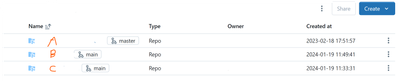
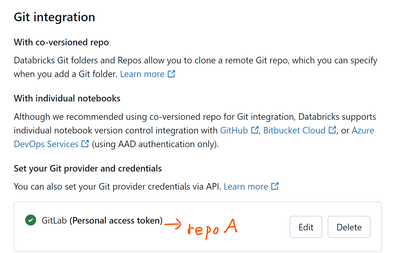
I have also generated personal tokens for these 3 repos. However, it seems that Databricks can only use one repo token at a time for Git integration.
For example: I am currently using the token for repo A in Git integration. But whenever I want to switch to repo B to do a push/pull, an error occurs: "Invalid Git provider credentials," which prevents me from performing any push/pull operations on repo B.
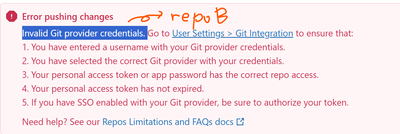
Is there any way to allow Databricks to use multiple repo tokens simultaneously?

- Mark as New
- Bookmark
- Subscribe
- Mute
- Subscribe to RSS Feed
- Permalink
- Report Inappropriate Content
09-27-2024 11:46 AM
Unfortunately this is expected behavior. We only support 1 Git credential at a time per user in the workspace. We are adding a sample notebook in this section to help you swap Git credentials more easily.
https://docs.databricks.com/en/repos/repos-setup.html#add-or-edit-git-credentials-in-databricks
- Mark as New
- Bookmark
- Subscribe
- Mute
- Subscribe to RSS Feed
- Permalink
- Report Inappropriate Content
09-30-2024 05:44 PM
Yes, currently I swap Git credentials as you mentioned.

However, I still find it inconvenient. I hope in the future there will be a feature to use multiple repos. Thank you.
