Databricks overwrite didn't delete previous data

- Mark as New
- Bookmark
- Subscribe
- Mute
- Subscribe to RSS Feed
- Permalink
- Report Inappropriate Content
10-16-2024 01:39 AM
Hi databricks, we met an issue like below picture shows:
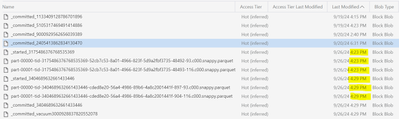
we use pyspark api to store data into ADLS :


- Mark as New
- Bookmark
- Subscribe
- Mute
- Subscribe to RSS Feed
- Permalink
- Report Inappropriate Content
10-17-2024 12:06 AM
Ensure Correct Partition Column Values : Double-check that the values in your partition column "xx" are consistent across the dataset. Make sure there are no formatting issues or null values.
- Mark as New
- Bookmark
- Subscribe
- Mute
- Subscribe to RSS Feed
- Permalink
- Report Inappropriate Content
10-17-2024 01:19 AM
To more Clarify in Delta lake if you are writing or overwriting some data then it is Creating the new version if you see in table then you will be able to see the new Data but when you check in location the parquet file would be present old and latest.
If your motive is to write data in ADLS and use that parquet file then use .format('parquet')

- Mark as New
- Bookmark
- Subscribe
- Mute
- Subscribe to RSS Feed
- Permalink
- Report Inappropriate Content
10-17-2024 02:24 AM
The issue you're encountering seems to involve inconsistent behavior in partition overwrites using PySpark with ADLS.
Can you validate the below along with what @Himanshu6 mentioned.
- Force Spark to refresh the metadata of the data lake directory.
- Ensure that the mode(partitionOverwriteMode) is set properly before executing the overwrite operation.
