Create delta table with space in field names per source CSV file

- Mark as New
- Bookmark
- Subscribe
- Mute
- Subscribe to RSS Feed
- Permalink
- Report Inappropriate Content
12-26-2024 09:57 AM
There are few fields in the source CSV file which has spaces in the field names. When I tried to create the table like `SOURCE 1 NAME` as string for few fields, I got an error message like 'INVALID_COLUMN_NAME_AS_PATH' error. Runtime version is 10.2 and above.
I'd like to know how to retain the space in the field names while creating delta table? I was asked not to rename the field names and the field names should be as it was in CSV file.
If the solution is like below, I'm not certain how to do this before I create the table.
  ALTER TABLE <table_name> SET TBLPROPERTIES (
    'delta.minReaderVersion' = '2',
    'delta.minWriterVersion' = '5',
    'delta.columnMapping.mode' = 'name'
  )

- Mark as New
- Bookmark
- Subscribe
- Mute
- Subscribe to RSS Feed
- Permalink
- Report Inappropriate Content
12-26-2024 06:44 PM
Hi @David_Billa
Before ingesting the csv data into the delta table, you could create delta table using the table properties as shown below:
CREATE TABLE catalog_name.schema_name.table_name (`a` string, `b c` string)
TBLPROPERTIES (
    'delta.minReaderVersion' = '2',
    'delta.minWriterVersion' = '5',
    'delta.columnMapping.mode' = 'name'
  )
Note: I've created a column `b c` with space between them.
Later, I was able to add few more columns using alter table statement
ALTER TABLE
  catalog_name.schema_name.table_name
ADD COLUMNS (
  `SOURCE 1 NAME` string, `SOURCE 2 NAME` string
)
** Important: One thing I notice is you're on DBR version 10.2 which might not support column mapping mode.
This Databricks Documentation mentions that column mapping is enabled for DBX runtime 10.4 LTS or above.
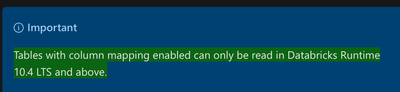
Let me know your further thoughts.
Cheers!
