External connection to Azure ADLS Gen2 storage

- Mark as New
- Bookmark
- Subscribe
- Mute
- Subscribe to RSS Feed
- Permalink
- Report Inappropriate Content
02-18-2025 05:26 AM
Hello,
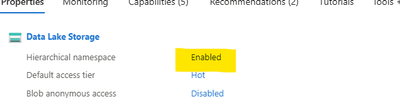
I have a problem trying to make an external connection to a blob storage configured as ADLS Gen2 with hierarchical namespace (HNS) enabled. I have setuup the storage account with a container wirh HNS enabled as in the image attached:
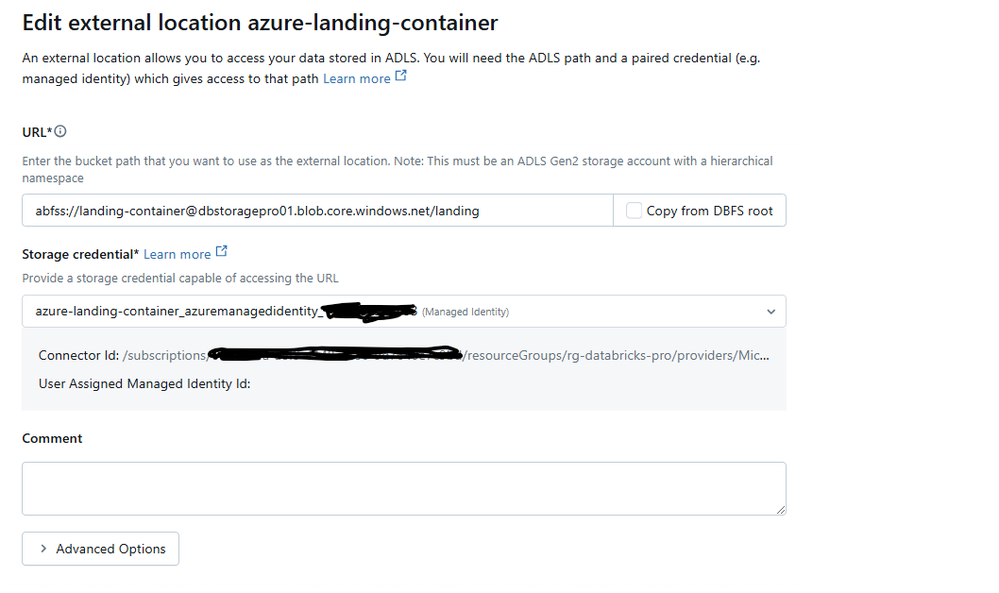
Next I have configured in Azure an Access Connector for Azure Databricks that I use as a Storage credential when setting up the external connection:
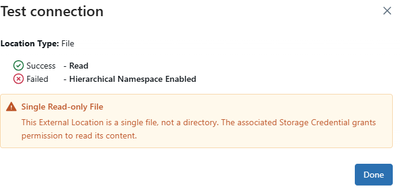
But still when creating the external location I get the error that HNS was not enabled on my Azure blob storage:
Any suggestions on how to make it work ?
Thanks

- Mark as New
- Bookmark
- Subscribe
- Mute
- Subscribe to RSS Feed
- Permalink
- Report Inappropriate Content
02-18-2025 07:42 AM
Hi, would it work if you try to remove "landing" at the end? 🙂 Seems the error is complaining that the external location should be a directory.
- Mark as New
- Bookmark
- Subscribe
- Mute
- Subscribe to RSS Feed
- Permalink
- Report Inappropriate Content
02-18-2025 08:11 AM
Hi, landing is an actual directory in the Azure container. The problem is that Databricks considers it a file, I have checked that the storage credential permissions ant they seem Ok
Thanks
