
- Mark as New
- Bookmark
- Subscribe
- Mute
- Subscribe to RSS Feed
- Permalink
- Report Inappropriate Content
02-25-2025 07:20 AM
Hi community,
Is it possible to read excel files from dbfs using a notebook file inside Databricks? If yes, how to do it?

- Mark as New
- Bookmark
- Subscribe
- Mute
- Subscribe to RSS Feed
- Permalink
- Report Inappropriate Content
02-25-2025 08:05 AM
hi @jeremy98
Have a look here, how to read excel files: https://community.databricks.com/t5/data-engineering/how-to-insert-from-an-excel-row-cell-level-data...
- Mark as New
- Bookmark
- Subscribe
- Mute
- Subscribe to RSS Feed
- Permalink
- Report Inappropriate Content
02-25-2025 09:16 AM
Hello,
Thanks for your answer, but the point is that the file location is based on dbfs and seems that using a serveless compute and executing the pandas api is not possible to look at dbfs
- Mark as New
- Bookmark
- Subscribe
- Mute
- Subscribe to RSS Feed
- Permalink
- Report Inappropriate Content
02-25-2025 09:47 PM
In general, you shouldn't use dbfs any more, instead, use Volumes.
But, as example, if I have an excel in my Worskpace directory, you could do this.

%pip install openpyxl
import pandas as pd

# replace with your path
file_path = "/Workspace/Users/stefan.koch@btelligent.com/excel/FinancialsSampleData.xlsx"

# read the sheet with Name Financials1 into a pandas dataframe
pdf = pd.read_excel(file_path, sheet_name="Financials1")

# Transform the Pandas Dataframe to a Pyspark Dataframe
df = spark.createDataFrame(pdf)

display(df)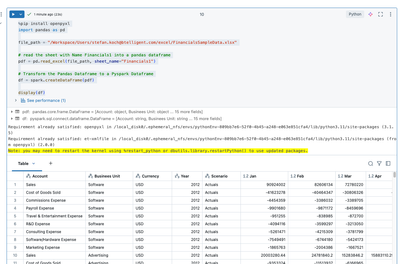
Would this work for you or what is your dbfs path?
- Mark as New
- Bookmark
- Subscribe
- Mute
- Subscribe to RSS Feed
- Permalink
- Report Inappropriate Content
02-26-2025 10:40 AM
amazing, yes that's is totally what I need! Thx Stefan!
