Issue with inserting multiple rows in Delta table with identity column

- Mark as New
- Bookmark
- Subscribe
- Mute
- Subscribe to RSS Feed
- Permalink
- Report Inappropriate Content
02-20-2023 04:44 PM
Running DBR 11.3 / Azure Databricks
Table definition below:
%sql
CREATE OR REPLACE TABLE demo2 (
  id BIGINT GENERATED BY DEFAULT AS IDENTITY,
  product_type STRING,
  sales BIGINT
)
USING DELTA
LOCATION '/folderlocation/'
TBLPROPERTIES (
'delta.columnMapping.mode' = 'name',
   'delta.minReaderVersion' = '2',
   'delta.minWriterVersion' = '5')
Inserting 1 row works fine
%sql
INSERT INTO demo2 (product_type, sales)
VALUES ("cell", 130000);
On attempting to insert a new row I get this error:
"AnalysisException: Column id is not specified in INSERT"
I can insert columns explicitly as follows:
%sql
INSERT INTO demo2 (id,product_type, sales)
VALUES (3,"batt", 130000);
I can even insert duplicate column values like so
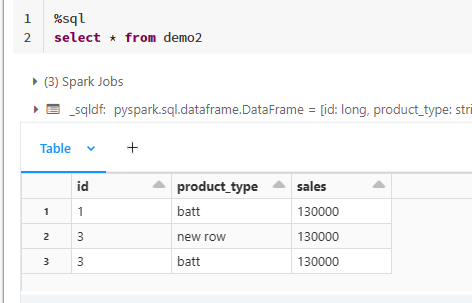
- Labels:
-
Table Definition

- Mark as New
- Bookmark
- Subscribe
- Mute
- Subscribe to RSS Feed
- Permalink
- Report Inappropriate Content
02-21-2023 04:28 AM
https://github.com/delta-io/delta/issues/1215
It is an open issue.
You can enter your own values because you use BY DEFAULT instead of ALWAYS.
- Mark as New
- Bookmark
- Subscribe
- Mute
- Subscribe to RSS Feed
- Permalink
- Report Inappropriate Content
03-09-2023 08:38 PM