path-based access to a table with row filters or column masks is not supported

- Mark as New
- Bookmark
- Subscribe
- Mute
- Subscribe to RSS Feed
- Permalink
- Report Inappropriate Content
04-23-2025 02:21 PM
I have a delta table which I am applying masking to some columns, however, every time I want to refresh the table (overwrite) I cannot I receive this error:
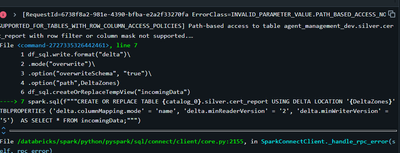
If I do what Assistant recommend me (If you remove the .option("path", DeltaZones))
It worked but I think the table is "managed stored" right? I want to store it in a delta location (external).
This is the corrected code (I think is stored as managed)
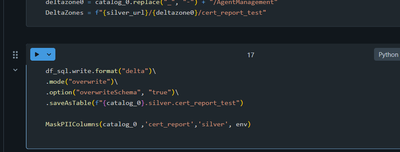
To sum up, anyone know how I can store a table with row filters or column masks in a delta location (external), is something so simple like first store it with a delta location and after that only removed it? I dont know if my table now is external or managed.

- Mark as New
- Bookmark
- Subscribe
- Mute
- Subscribe to RSS Feed
- Permalink
- Report Inappropriate Content
04-24-2025 11:05 AM
Are you using Unity Catalog?

- Mark as New
- Bookmark
- Subscribe
- Mute
- Subscribe to RSS Feed
- Permalink
- Report Inappropriate Content
05-15-2025 02:24 AM
Good morning! I have a similar case:
I have an external table to which I apply a row filter, in our data flow the first step is to check if the table actually exists and otherwise create it at a said location.
So the SQL statement will be like:
 create table if not exists <catalog>.<schema>.<table_name>
()
partitioned by(`<partition_column>`)
location 'abfss://<external_location>'
If the table exists and the Row filter is applied to the table, it will throw an error.
As you can see, we're using unity catalog. Any tips/best practices?
- Mark as New
- Bookmark
- Subscribe
- Mute
- Subscribe to RSS Feed
- Permalink
- Report Inappropriate Content
05-15-2025 09:32 AM
Liselotte, here are some things to consider:
-
Error with Existing Row Filters: If a row filter is applied to an existing table, and you attempt to execute a
CREATE TABLE IF NOT EXISTSstatement, it may lead to failure because row filters impose dynamic constraints that can cause configuration inconsistencies. To avoid such errors, explicitly check and handle the existence of row filters before performing creation operations. -
Modifying a Table with Row Filters: If you encounter issues where a table becomes inaccessible due to orphaned row filter references, you can remove the row filters using the
ALTER TABLE <table_name> DROP ROW FILTER;command before making further modifications. -
Best Practices for External Tables:
- Avoid overlapping storage paths among external tables and volumes, as this is not supported in Unity Catalog and will throw path overlap errors.
- Use a flat hierarchical structure for external tables and register them at sub-directory levels under external locations for clean organization and governance.
-
Unity Catalog Table Constraints:
- For external tables, ensure the location associated with the table is not intersecting with managed paths or other external paths to avoid errors.
- Always verify that the external storage credential has appropriate permissions (e.g., read/write access) and is configured correctly.
- Mark as New
- Bookmark
- Subscribe
- Mute
- Subscribe to RSS Feed
- Permalink
- Report Inappropriate Content
05-19-2025 04:16 AM
Thank you for the response. I will add the additional check into the process to make sure we check if the table and row filter already exist.
