Executors getting killed while Scaling Spark jobs on GPU using RAPIDS(NVIDIA)

- Mark as New
- Bookmark
- Subscribe
- Mute
- Subscribe to RSS Feed
- Permalink
- Report Inappropriate Content
06-16-2025 02:49 AM
Hi Team ,
I want to take advantage of Spark Distribution over GPU clusters using RAPID(NVIDIA) , everything is setup
1. The Jar is loaded correctly via Init script , the jar is downloaded and uploaded on volume (workspace is unity enabled) and via Init script uploaded to databricks jar location
src="/Volumes/ml_apps_ml_dev/volumes/team-volume-ml_apps_nonprod/rapids-4-spark_2.12-25.04.0.jar"
DEST="/databricks/jars/rapids-4-spark_2.12-25.04.0.jar"
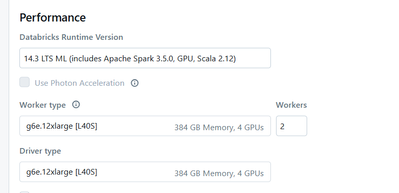
cluster that I am using
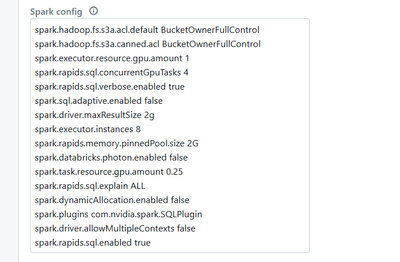
Spark configuration that I am using
After all this configuration I can see GPU optimizations kick in Query Execution Plan as below but when I run the spark join like join , the executors are getting killed and the spark job is stuck , kindly please help


- Mark as New
- Bookmark
- Subscribe
- Mute
- Subscribe to RSS Feed
- Permalink
- Report Inappropriate Content
11-02-2025 06:50 PM
hey @rajanchaturvedi ,
Executor termination, especially when scaling a GPU-accelerated job, is almost always due to memory over-allocation (Out Of Memory, or OOM) on the worker nodes, which causes the cluster manager to kill the process. This is exacerbated in GPU environments because two large memory spaces must be managed: the CPU (JVM) heap and the dedicated GPU memory.
Can you please check and share the cause of the executors are getting killed. Also the job being stuck does not sound right? Are you certain there is nothing running?
- Mark as New
- Bookmark
- Subscribe
- Mute
- Subscribe to RSS Feed
- Permalink
- Report Inappropriate Content
11-02-2025 11:22 PM
Also try to gradually reduce spark.executor.memory You need to allocate less memory to the JVM heap because the GPU needs a large chunk of the node's off-heap (system) memory. The GPU memory is allocated outside the JVM heap. If the heap is too large, it crowds out the native memory required by RAPIDS/CUDA.
Again reduce gradually
spark.rapids.memory.gpu.allocFraction from the default (usually 0.5 or 0.8). Try 0.4 or 0.3
