
- Mark as New
- Bookmark
- Subscribe
- Mute
- Subscribe to RSS Feed
- Permalink
- Report Inappropriate Content
06-23-2025 09:05 AM
Hi everyone
In the new declarative pipeline UI (preview), we have the option to define a root folder.
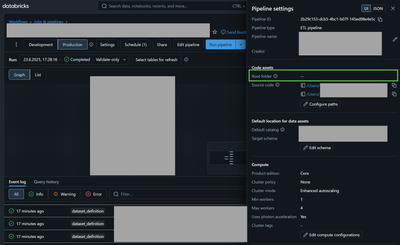
My ressource asset bundle is currently defined as:
resources:
  jobs:
    my_job:
      name: "(${var.branch}) my_job"
      tasks:
        - task_key: my_pipeline
          pipeline_task:
            pipeline_id: ${resources.pipelines.my_pipeline.id}

  pipelines:
    my_pipeline:
      name: "(${var.branch}) my_pipeline"
      clusters:
        ... cluster setup
      catalog: "${var.catalog_silver}"
      schema: my_schema
      target: my_schema
      development: false
      continuous: false
      channel: CURRENT
      edition: CORE
      photon: true
      serverless: false
      libraries:
        - file:
            path: ${workspace.file_path}/src/silver/path_to_my_file/my_file.py
      configuration:
        bronze_catalog: "${var.catalog_bronze}"
        bronze_schema: my_schema
      root_path: "${workspace.file_path}/src"
But the root_path is not set during deployment. I have also tried it with root_folder as the key and tried to set it with the filter.include property but I can't get it working.
Does anyone know how to properly set this up in the asset bundle?
Thank you for your support.
Kind regards

- Mark as New
- Bookmark
- Subscribe
- Mute
- Subscribe to RSS Feed
- Permalink
- Report Inappropriate Content
06-24-2025 01:03 AM
Hello ceediii,
The root_path property under individual resource is not supported and it will be ignored. You would need
to specify it on workspace level, example of databricks.yml file with root_path changed:
targets:
  # The 'dev' target, for development purposes. This target is the default.
  develop:
    # We use 'mode: development' to indicate this is a personal development copy:
    # - Deployed resources get prefixed with '[dev my_user_name]'
    # - Any job schedules and triggers are paused by default
    # - The 'development' mode is used for Delta Live Tables pipelines
    # mode: development you get an error if you enable dev mode with root_path specified
    default: true
    workspace:
      host: https://<databricks_host>.net
      root_path: /Workspace/Shared/<your_folder> #e.g. If you wanna have in shared folder
Hope that helps. Let me know if you need anything else to clarify.
Best,
Ilir
- Mark as New
- Bookmark
- Subscribe
- Mute
- Subscribe to RSS Feed
- Permalink
- Report Inappropriate Content
06-24-2025 12:08 PM
Thank you, Ilir. I missed that. That solved my issue.
- Mark as New
- Bookmark
- Subscribe
- Mute
- Subscribe to RSS Feed
- Permalink
- Report Inappropriate Content
06-24-2025 04:37 PM
You are welcome, great it helped!
Best, Ilir
