DATABRICKS CLI SYNC SPECIFIC FILES

- Mark as New
- Bookmark
- Subscribe
- Mute
- Subscribe to RSS Feed
- Permalink
- Report Inappropriate Content
06-30-2025 12:09 PM
Hello,
I am struggling with this problem I need to update databricks repo, to only sync some files according to documentation is possible:
https://learn.microsoft.com/en-us/azure/databricks/dev-tools/cli/sync-commands#only-sync-specific-fi...
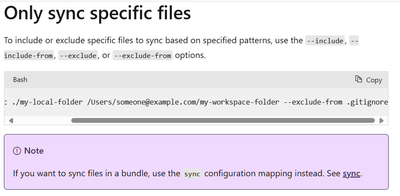
In my workflow I am updating creating my .gitignore file but is syncing all the files not the specific files this ismy code:
- name: Generate .gitignore inside release folder
run: |
echo ".databricks" > "./.release/databricks-1.0.221/.gitignore"
echo ".github/pylintrc" >> "./.release/databricks-1.0.221/.gitignore"
echo "📝 Final .gitignore content:"
cat "./.release/databricks-1.0.221/.gitignore"
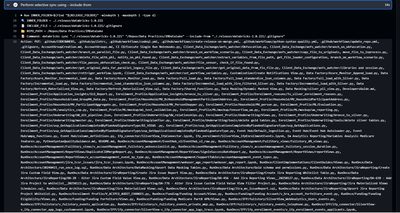
- name: Perform selective sync using --include-from
env:
DATABRICKS_HOST: ${{ secrets.DATABRICKS_HOST }}
DATABRICKS_TOKEN: ${{ env.DATABRICKS_TOKEN }}
run: |
INNER_FOLDER=$(find "${RELEASE_FOLDER}" -mindepth 1 -maxdepth 1 -type d)
INCLUDE_FILE="$INNER_FOLDER/.gitignore"
echo "🔍 INNER_FOLDER = $INNER_FOLDER"
echo "📄 INCLUDE_FILE = $INCLUDE_FILE"
echo "📁 REPO_PATH = $REPO_PATH"
echo "📝 Command: databricks sync \"$INNER_FOLDER\" \"$REPO_PATH\" --include-from \"$INCLUDE_FILE\""
databricks sync "$INNER_FOLDER" "$REPO_PATH" --include-from "./.release/databricks-1.0.221/.gitignore"
I only should be able to sync this file "github/pylintrc"" because is what I put in the gitignore
However is syncing all the files under that path
Any help is welcomed

- Mark as New
- Bookmark
- Subscribe
- Mute
- Subscribe to RSS Feed
- Permalink
- Report Inappropriate Content
11-08-2025 05:04 AM
You are trying to use the --include-from option with your .gitignore file to only sync specific files with the databricks sync command, but you are observing that all files get synced, not just the expected ones. The key issue is how the include/exclude functionality works, and what the file contents should be according to Azure Databricks documentation and best practices.
Why Your Current Approach Is Not Working
-
A
.gitignorefile is designed for Git to exclude files, but for the Databricks CLI--include-fromand--exclude-fromoptions, these files should list path patterns for what to include or exclude from sync—these may need to be written differently than a.gitignore. -
In your code, you’re putting lines like
.databricksand.github/pylintrcinto.gitignoreand passing this file to--include-from. The--include-fromoption means "only sync files matching these patterns." -
If you want to only sync
".github/pylintrc", the include file should list only this specific pattern or filepath.
How --include-from Works
From the Databricks CLI documentation:
-
--include-from <file>: Sync will only include files matching patterns listed in this file (one per line). -
The file provided to
--include-fromshould not behave or be named like a traditional.gitignore, but be a list of files to sync. If you put patterns that exclude things, it will not work as you expect.
What You Should Do Next
-
Make an
include.txtfile (or any filename, not.gitignore) listing only the files (or patterns) you want to sync.-
For example, your file should contain only:
text.github/pylintrc
-
-
Update your workflow as follows:
echo ".github/pylintrc" > "./.release/databricks-1.0.221/include.txt"
cat "./.release/databricks-1.0.221/include.txt"

databricks sync "$INNER_FOLDER" "$REPO_PATH" --include-from "./.release/databricks-1.0.221/include.txt"
-
You should not use
.gitignorefor this purpose. The CLI expects a simple text file with inclusion patterns, not a Git ignore file or a mix of exclusion/inclusion lines.
Additional Troubleshooting Tips
-
Paths in your include file should be relative to the sync root, so adjust as needed depending on where you launch the command.
-
Double-check the pattern matches to make sure they point to actual files you want sync’d.
-
If you want to exclude instead, use
--exclude-fromwith a file listing patterns to omit.
Key Points
-
The pattern file for
--include-frommust list files to include, one per line. -
.gitignorefiles are not suitable for inclusion pattern lists—instead, use a separate include-pattern file. -
Only the files/patterns listed in the include file will be synced; all other files will be ignored.
If you follow the above approach, you should see only the files specifically listed in your include.txt being synced to your Databricks workspace.
