
- Mark as New
- Bookmark
- Subscribe
- Mute
- Subscribe to RSS Feed
- Permalink
- Report Inappropriate Content
08-22-2025 12:09 PM
- I have ingested raw data
- Converted into Bronze Table
- Subsequently have saved the DataFrame as a Delta table in the 'silver' schema
AS part of sending data from silvertable to salesforce
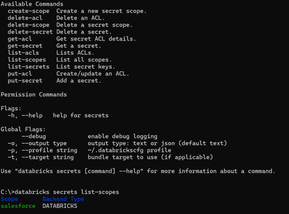
- Install & authenticate the Databricks CLI - Done
- Create the secret scope - Done
- Add secrets into the scope - Suspecting error here
- Verify scope and secrets - Done
5. Load secrets securely in a notebook
- Build a JWT for Salesforce Oauth
The below script is performing fcrucial part of the Salesforce OAuth 2.0 JWT Bearer Flow. Its main goal is to create a secure, signed JSON Web Token (JWT) that can be used to prove the application's identity to Salesforce without using a password.
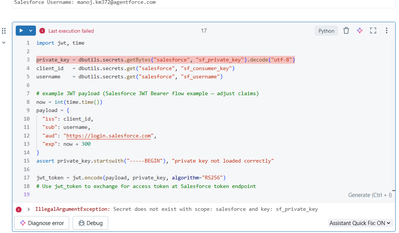
IllegalArgumentException: Secret does not exist with scope: salesforce and key: sf_private_key
Need help debugging
- Mark as New
- Bookmark
- Subscribe
- Mute
- Subscribe to RSS Feed
- Permalink
- Report Inappropriate Content
08-22-2025 01:48 PM
to add

Variables have been set successfully. Consumer Key starts with: 3MVG9rZjd7MXFdL... Salesforce Username: manoj.km372@agentforce.com , private key alone giving error - IllegalArgumentException: Secret does not exist with scope: salesforce and key: sf_private_key . C:\Users\manoj.km\Downloads>server.key opens the note pad file successfully

- Mark as New
- Bookmark
- Subscribe
- Mute
- Subscribe to RSS Feed
- Permalink
- Report Inappropriate Content
08-23-2025 01:58 AM - edited 08-23-2025 02:09 AM
Hi @ManojkMohan ,
Could you send as a command that you used to put secret to a scope for this following key sf_private_key?
Something went wrong with putting this particular key to a scope. You will only get this error if there's no such a key in a scope.
Anyway, you can try once again to add that key to a scope but this time attach --debug flag to a command
databricks secrets put-secret salesforce sf_private_key_test --debug
- Mark as New
- Bookmark
- Subscribe
- Mute
- Subscribe to RSS Feed
- Permalink
- Report Inappropriate Content
08-27-2025 06:40 AM

