
- Mark as New
- Bookmark
- Subscribe
- Mute
- Subscribe to RSS Feed
- Permalink
- Report Inappropriate Content
12-19-2025 10:39 AM
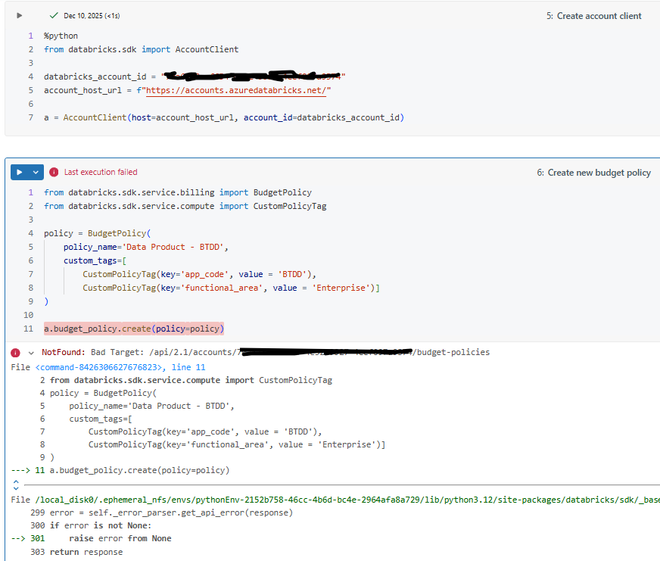
Hi, I am trying to use the Databricks Python SDK (v0.74.0) to automate the creation of budget policies in our Databricks account. See the Python code below where I am trying to create a serverless budget policy. Note the error.
When I click the "Diagnose error" button, the Databricks Assistant provides the following information:
The error NotFound: Bad Target: /api/2.1/accounts/.../budget-policies indicates that the API endpoint you are calling does not exist or is not enabled for your account. This is likely because serverless budget policies are only available for specific resources (like serverless compute or Mosaic AI Vector Search endpoints), and you must have the correct permissions and use the correct API or SDK method to create them
To fix this:
- Ensure you are a workspace admin and have the Billing admin account-level role in the Databricks account console.
- Double-check that your use case is supported (e.g., serverless compute or Vector Search endpoints).
- If you are trying to set a budget policy for a Vector Search endpoint, use the correct SDK or REST API as described in the documentation.
- If you are not working with serverless compute or Vector Search, budget policies may not be available for your resource.
I can create a serverless budget policy via the Databricks UI. I am on the Azure Databricks platform. I have the account admin and billing admin roles at the account level. I am a workspace admin. Is it not possible to create a serverless budget policy via the Python SDK? It seems the backend API endpoint does not exist in our environment. Anyone else run into this issue?

- Mark as New
- Bookmark
- Subscribe
- Mute
- Subscribe to RSS Feed
- Permalink
- Report Inappropriate Content
12-22-2025 01:38 AM
Hi, from the documentation I've found internally, as this feature is still in public previewbudget policy creation via the SDK is not currently supported. You can try using it via the rest API instead however this also could not yet be rolled out to your workspace.
import requests

# Replace these with your actual values
ACCOUNT_ID = 'your_account_id'
TOKEN = 'your_databricks_oauth_token' # Must have billing admin privileges

# Endpoint for budget policy creation
endpoint = f'https://accounts.azuredatabricks.net/api/2.0/accounts/{ACCOUNT_ID}/budget-policies'

# Customize the payload as needed for your budget policy
payload = {
    "name": "Serverless Budget Policy Q4",
    "description": "Control spend for serverless endpoints in Q4",
    "budget": {
        "amount": 5000,
        "currency_code": "GBP"
    },
    "targets": [
        {
            "type": "ENDPOINT",
            "resource_type": "VECTOR_SEARCH",
            # or "SERVERLESS_COMPUTE" depending on what you intend
            "resource_id": "vs-1234567890abcdef"
        }
    ],
    "actions": [
        {
            "action_type": "NOTIFY",
            "threshold_percent": 80,
            "notification_emails": ["emma.stowell@databricks.com"]
        }
    ]
}

# Headers for authentication and content type
headers = {
    "Authorization": f"Bearer {TOKEN}",
    "Content-Type": "application/json"
}

response = requests.post(endpoint, json=payload, headers=headers)

if response.ok:
    print("Budget policy created:", response.json())
else:
    print("Error creating policy:", response.status_code, response.text)
