
- Mark as New
- Bookmark
- Subscribe
- Mute
- Subscribe to RSS Feed
- Permalink
- Report Inappropriate Content
03-17-2026 05:08 AM
Been running notebooks on serverless compute and watching the indicator in the UI. After my last cell finishes, it goes from dark green to this fading green, sits there for maybe 5-10 minutes, then finally goes grey. Pretty sure I'm paying for that entire fade window.
SQL warehouses let you set auto-stop. All-purpose clusters have auto-termination. I can't find anything like that for serverless notebooks. Does it exist and I'm missing it, or is there genuinely no knob for this?
Other thing — when I manually detach, the indicator still fades green for a bit before going grey. Is billing actually stopping when I detach, or am I paying through the teardown too?
Can't find clear docs on either point. If anyone's compared system.billing.usage billed seconds against actual cell execution time, curious what that gap looks like.
I am really expecting some expert and first-hand experience answers rather than sharing some documentation or LLM Answers(because I asked LLMS)

- Mark as New
- Bookmark
- Subscribe
- Mute
- Subscribe to RSS Feed
- Permalink
- Report Inappropriate Content
03-17-2026 07:37 AM
Hi @Kirankumarbs,
Interesting observation.. I had never watched the serverless indicator that closely until you mentioned it. Having said that, I am certainly not the expert you’re looking for to provide a concrete response, but no harm in sharing my viewpoint.
There isn’t any public documentation that explains the exact meaning of the dark green to fading green to grey sequence, so I looked in our internal materials as well. Couldn't find anything concrete. So, I am going to speculate.
I think this could be due to two reasons. The first reason could be that it is deliberate. If we killed the serverless backend the instant your last cell finished, the next cell you run would have to cold‑start again, which would hurt the instant-on experience that serverless is supposed to give you. Keeping the engine idling for a short window after your last command is a trade‑off between latency and cost. I don't know what this duration is, but I'll be surprised if there isn't a warm buffer before the session is fully killed or released.
The second reason I can think of is that, even though the query has finished, some work may still be happening behind the scenes? It needs time to complete any remaining tasks, flush logs and metrics, snapshot some state so it can restore your session, and then tear down or return the resources to a pool. While all of that is happening, the compute is still real from the platform’s point of view, so it continues to be billable until the backend is fully released, not just until the notebook says completed.
I don’t think it’s a hidden knob to overcharge. It’s more that the platform is still doing real work, and it currently doesn’t expose a user setting to tune that idle window for serverless notebooks.
If this answer resolves your question, could you mark it as “Accept as Solution”? That helps other users quickly find the correct fix.
Ashwin | Delivery Solution Architect @ Databricks
Helping you build and scale the Data Intelligence Platform.
***Opinions are my own***
- Mark as New
- Bookmark
- Subscribe
- Mute
- Subscribe to RSS Feed
- Permalink
- Report Inappropriate Content
03-17-2026 01:23 PM
@Ashwin_DSA Thanks for sharing your viewpoint!
Regarding serverless for interactive notebooks, I am clearly not happy, and Databricks documentation is ambiguous and very mysterious! I did small experiment and you can try your self as well!


If you look at the last two images, the cell execution stopped almost 20 minutes ago, yet the serverless status is still dark green — which doesn’t make sense to me.
It almost feels like unnecessary costs are being incurred silently. Either this is a bug that the product team should look into, or the behavior should be clearly documented so customers can plan accordingly.
I’m not sure where to escalate this — if you know the right channel, please let me know.
- Mark as New
- Bookmark
- Subscribe
- Mute
- Subscribe to RSS Feed
- Permalink
- Report Inappropriate Content
03-18-2026 06:05 AM
Hi @Kirankumarbs,
I get why this feels non‑transparent. I've been doing a bit of testing last night by running some queries and seeing what happens with the colour change. I generated a random query and executed it a few times in a serverless notebook. Agree that although it completes in a few seconds, I couldn't see the colour change from dark green to grey.
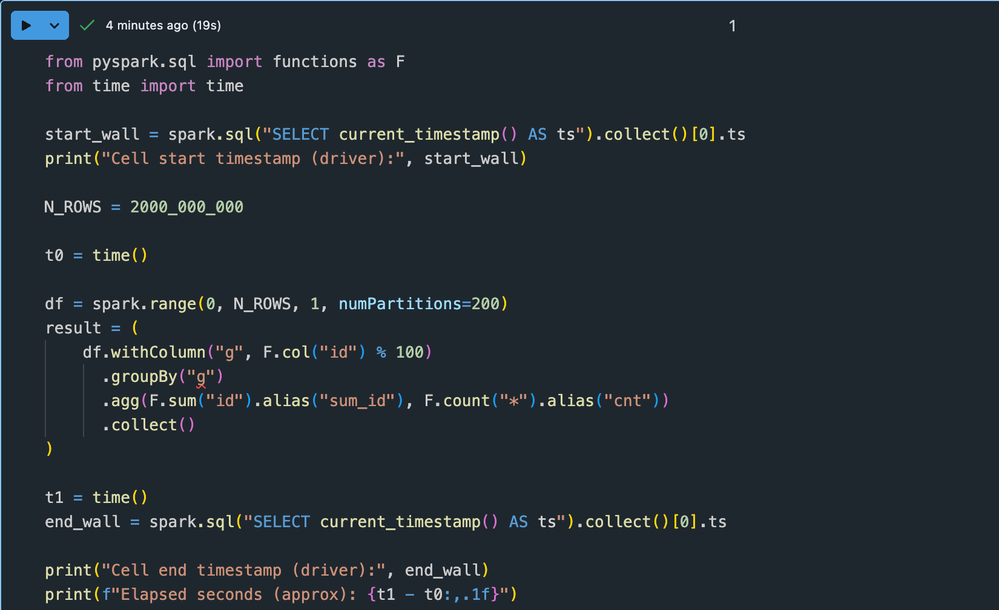
As explained before, it is likely that the notebook is considered attached to the compute resource even if it’s just sitting idle waiting for your next command. When it finally tears down (grey), billing stops. The light‑green fading state is likely the disconnect and cleanup phase on the way to full shutdown.
That time could be considered idle time, but how it translates to cost is not something I'm sure about. I'm fairly certain that there will be a threshold for that idle time rather than it being active for hours. I'll ask around internally, but I don't think this is unique to serverless. Even classic clusters and SQL warehouses work the same way, as far as I know. The difference with serverless is that you don’t see a cluster object with an explicit auto‑termination setting, you see the little status icon, which makes it a bit confusing.
As you can tell... this post has sparked my curiosity, so I checked the billing table to understand how it works. What is transparent, yet somewhat hidden, is the billing table itself. All actual charges for serverless notebooks are logged in system.billing.usage, with start and end timestamps for each metering period, the DBUs consumed during that window, and the notebook ID and product type.
I wrote a query to filter that table based on my notebook ID to check the DBU consumption. While the metering window might be somewhat misleading (or it could simply be my ignorance of how it works), the actual DBUs consumed were reasonable for the query I was running.
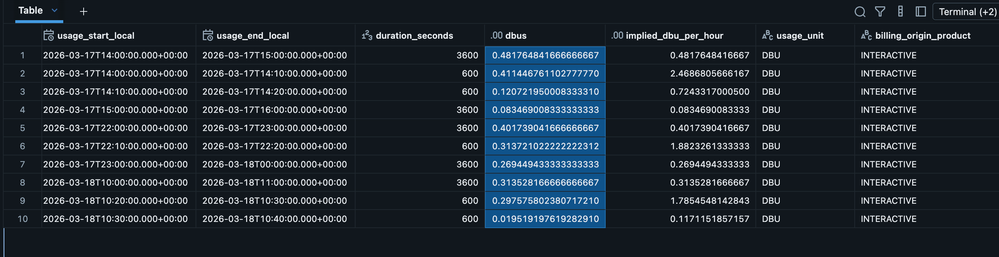
I agree it would be better if the UI made this clearer, such as by linking the notebook directly to the relevant billing records or by displaying a clearer "session idle, still billable vs fully terminated" status. However, I can see this transparency in the billing usage table. In other words, this table confirms that you are not being billed beyond what is shown there.
I appreciate this may not provide the exact outcome you were hoping for. I'm happy to share the query below if you'd like to explore further, but if you wish to raise this with Databricks, you can do so by submitting a support request.
%sql
-- Replace with your actual notebook_id
DECLARE OR REPLACE VARIABLE notebook_id STRING = '<insert your notebook id>';

SELECT
  usage_start_time,
  usage_end_time,
  FROM_UTC_TIMESTAMP(usage_start_time, 'Europe/London') AS usage_start_local,
  FROM_UTC_TIMESTAMP(usage_end_time,   'Europe/London') AS usage_end_local,
  unix_timestamp(usage_end_time) - unix_timestamp(usage_start_time) AS duration_seconds,
  usage_quantity     AS dbus,
  CASE
    WHEN unix_timestamp(usage_end_time) > unix_timestamp(usage_start_time)
    THEN usage_quantity * 3600.0 /
         (unix_timestamp(usage_end_time) - unix_timestamp(usage_start_time))
    ELSE NULL
  END AS implied_dbu_per_hour,
  usage_unit,
  billing_origin_product,
  usage_metadata.notebook_id,
  usage_metadata.notebook_path
FROM system.billing.usage
WHERE
  billing_origin_product = 'INTERACTIVE'            -- serverless notebooks
  AND product_features.is_serverless                -- only serverless usage
  AND usage_metadata.notebook_id = notebook_id
  AND usage_date >= current_date - INTERVAL 1 DAY   -- narrow to recent runs
ORDER BY usage_start_time;
Note that it can sometimes take 24 hours to populate this table, but so far I've been able to get it in a few minutes.
If this answer resolves your question, could you mark it as “Accept as Solution”? That helps other users quickly find the correct fix.
Ashwin | Delivery Solution Architect @ Databricks
Helping you build and scale the Data Intelligence Platform.
***Opinions are my own***

- Mark as New
- Bookmark
- Subscribe
- Mute
- Subscribe to RSS Feed
- Permalink
- Report Inappropriate Content
04-30-2026 11:55 AM
I have the same concern and feedback as OP. I wish there's a way to set auto-terminate after the serverless cluster has been idle for X minutes and not be billed if our users left their notebooks attached to serverless compute and forgot to hit "terminate".
