Metric views joins

- Mark as New
- Bookmark
- Subscribe
- Mute
- Subscribe to RSS Feed
- Permalink
- Report Inappropriate Content
10 hours ago
I am currently working on a migration project from power BI to ai bi dashboard in databricks . Now i am using the metric views to create all the measures and DAX queries which i have in my power BI report in YAML in the metric views but the main problem is as in power bi we ca select the columns from multiple tables but the same this i cant do in databricks as we can only select a single datasource while creating a chart .
Let me give you an example suppose i have sales table and a product table and there are two columns from the both the table in power bi but to do the same thing metric views i cant do it , as either i can select my sales table or my product table .
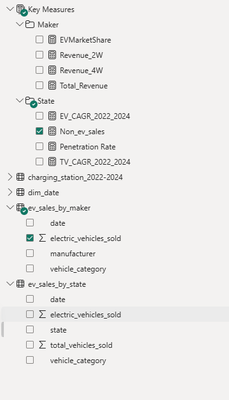
for example this you can refer to One is from sales by state one is from sales by maker .

- Mark as New
- Bookmark
- Subscribe
- Mute
- Subscribe to RSS Feed
- Permalink
- Report Inappropriate Content
7 hours ago
You can approach it in multiple ways
1. Unified Metric View
Build a single unified view by joining Sales and Product tables. It allows to expose State and Maker as dimensions within one metric view.
CREATE VIEW sales_product_view AS
SELECT
 s.state,
 s.sales_amount,
 p.maker
FROM sales s
JOIN product p
ON s.product_id = p.product_id;
2. Modular Metric Views with Joins
Create separate modular metric views based on purpose
- Sales by State - Metric View with a join between sales and state dimension
- Sales by Maker - Metric view with a join between sales and product dimension.
It aligns well with domain driven design and easy to manage
3. Star Schema Approach
Adopt a star schema (Fact & Dimension) design as it simplifies metric view creation with easier governance and extensibility if it supports the case.

- Mark as New
- Bookmark
- Subscribe
- Mute
- Subscribe to RSS Feed
- Permalink
- Report Inappropriate Content
6 hours ago
Hey @Akshatkumar69, welcome to the community.
You're not alone on this one, it is common with folks coming from Power BI.
The key thing to understand is that AI/BI charts do expect a single data source, but that source can be a metric view that already joins your tables together. You don't need to pick just one table.
For your Sales + Product example, this is a classic fact-to-dimension pattern, and metric views handle it natively through the joins block in the YAML:
version: 0.1
source: my_catalog.my_schema.sales

joins:
  - name: product
    source: my_catalog.my_schema.product
    on: product.product_id = source.product_id

dimensions:
  - name: State
    expr: state
  - name: Maker
    expr: product.maker

measures:
  - name: Total Sales
    expr: SUM(sales_amount)
Then in AI/BI, you point your chart at this single metric view. "Sales by State" and "Sales by Maker" both work from the same source because the join is already defined in the semantic layer.
One thing to be aware of. Metric view joins are designed for many-to-one relationships (fact to dimension). If you're joining two fact tables or dealing with a many-to-many relationship, the metric view join won't give you correct results. In those cases, create a pre-joined SQL view in Unity Catalog and use that as your metric view source instead.
The mental model shift from Power BI is this: instead of the tool resolving relationships at query time, you define them upfront in your metric view YAML. Once that's in place, the single-source constraint stops being a limitation.
Cheers, Lou
