
- Mark as New
- Bookmark
- Subscribe
- Mute
- Subscribe to RSS Feed
- Permalink
- Report Inappropriate Content
08-13-2024 01:35 AM
Hello everyone,
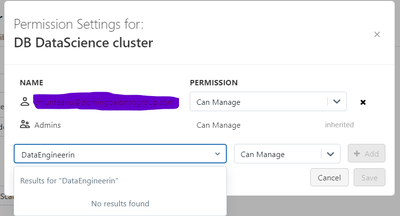
I have just setup a Workspace and metastore in Azure Databricks, that by default enables Unity Catalog. I have defined several groups of users in our Account but when searching for that groups in the compute permissions dialog (no matter if it is all-purpose compute, SQL warehouse, etc.) the groups don't show up, and simply cannot assign the required permissions. It works for individual users but not for groups. However, assign permissions for groups to catalog objects (tables, views), works fine.
I wonder if you encountered the same issue, and if somebody has an idea how to solve it.
Thanks,
Regards
- Mark as New
- Bookmark
- Subscribe
- Mute
- Subscribe to RSS Feed
- Permalink
- Report Inappropriate Content
08-13-2024 03:03 AM
Hi,
Sorry, I have already found the solution: from Databricks Account -> Workspaces -> open your specific workspace (Manage workspace) than add these already created groups with a role (User or Admin) in Permissions. Next, you'll be able to assign these groups to compute
Thanks!

- Mark as New
- Bookmark
- Subscribe
- Mute
- Subscribe to RSS Feed
- Permalink
- Report Inappropriate Content
08-13-2024 04:25 AM
@cmunteanu correct.
