Enable external data access on the metastore

- Mark as New
- Bookmark
- Subscribe
- Mute
- Subscribe to RSS Feed
- Permalink
- Report Inappropriate Content
09-26-2024 01:22 AM
Hello Everyone,
I have an AWS Databricks premium trial account and I’m trying to enable the configuration "Enable external data access on the metastore" for a metastore. I followed the steps in the official documentation (https://docs.databricks.com/en/data-governance/unity-catalog/access-open-api.html#external-data-acce...).
However, I couldn’t locate a setting named "External data access" under Catalog -> Metastore -> Configuration, as described in the documentation. I’ve attached a screenshot for reference.

Any assistance would be greatly appreciated. Thank you in advance!
Regards,
Praveen Kumar Bachu
- Labels:
-
Unity Catalog

- Mark as New
- Bookmark
- Subscribe
- Mute
- Subscribe to RSS Feed
- Permalink
- Report Inappropriate Content
10-01-2024 01:03 AM
Hi @Praveen Thank you for sharing your concern here.
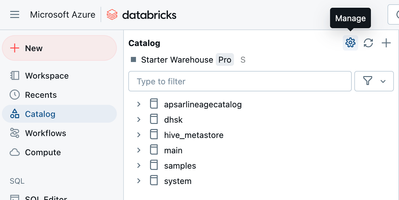
You are looking into the Catalog on the account console, but according to the document, you have to do this in the Workspace Catalog UI.
Please follow the below steps,
- Log into any of the workspaces that metastore is attached.
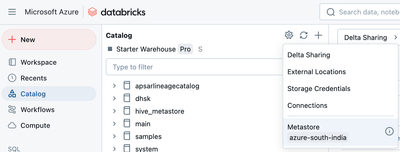
- Click the Gear icon gear icon at the top of the Catalog pane and select Metastore.
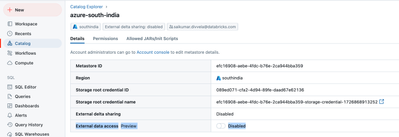
- On the Details tab, enable External data access.
I am also attaching the screenshots for your reference,
Please leave a like if it is helpful. Follow-ups are appreciated.
Kudos,
Sai Kumar
