- Subscribe to RSS Feed
- Mark as New
- Mark as Read
- Bookmark
- Subscribe
- Printer Friendly Page
- Report Inappropriate Content
The Challenge: Cross-Cloud Data Sharing is Expensive
Sharing data across cloud providers or even across regions in the same provider, egress fees can be quite high - in many cases orders of magnitude higher than the actual storage costs.
For organizations operating in multi-cloud environments or sharing data with external partners, these egress fees create a serious barrier to collaboration. Traditional data sharing approaches force you to choose between:
- High costs: Pay premium egress fees for every data transfer
- Vendor lock-in: Keep everyone on the same cloud provider
- Stale data: Share snapshots infrequently to minimize costs
The Solution: Cloudflare R2 as a Zero-Egress Bridge
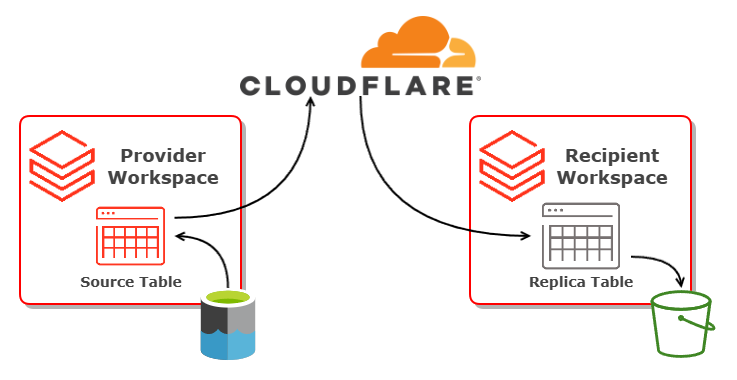
Use Cloudflare R2, an S3-compatible object storage service with zero egress fees, as an intermediary for cross-cloud data replication. The architecture is simple and elegant:
- the Provider maintains a managed Delta table in their Databricks workspace
- Data is replicated to an external Delta table stored on Cloudflare R2
- the Recipient(s) access the R2-hosted data from their own cloud/region and sync to local managed tables
Provider Setup: Publishing Data to R2
The provider workflow is straightforward. Here's how to set it up:
1. Create Cloudflare R2 Storage Credential
First, configure Databricks to access your R2 bucket using Cloudflare API tokens:
-- Verify your credential
DESCRIBE STORAGE CREDENTIAL r2_credential;
The credential setup is done through the Databricks UI (Catalog → External Data → Credentials), where you provide your Cloudflare Account ID, Access Key ID, and Secret Access Key.
2. Define External Location
Point to your R2 bucket using the S3-compatible URL format:
CREATE EXTERNAL LOCATION IF NOT EXISTS r2_location
URL 'r2://{bucket-name}@{account-
WITH (STORAGE CREDENTIAL r2_credential)
COMMENT 'Cloudflare R2 bucket for cross-cloud data replication';
3. Create a Replica Table
Create a replica table (external table on R2):
CREATE TABLE {source-catalog-name}.{source-schema-name}.{source-table- name}_r2_replica (
-- Same schema as source
...
)
LOCATION 'r2://{bucket}@{account}.r2.cloudflarestorage.com/{source- table-name}_r2_replica'
PARTITIONED BY (...) -- if the source data is partitioned
TBLPROPERTIES ('delta.autoOptimize.optimizeWrite' = 'true');
4. Replicate Changes with MERGE
Use a simple insert-only MERGE operation to synchronize new data:
MERGE INTO {source-catalog-name}.{source-schema-name}.{source-table- name}_r2_replica AS target
USING {source-catalog-name}.{source-schema-name}.{source-table- name} AS source
ON target.{primary-identifier} = source.{primary-identifier}
WHEN NOT MATCHED THEN INSERT *;
For production scenarios requiring updates and deletes, consider enabling Change Data Feed (CDF) on the source table for comprehensive change tracking.
Recipient Setup: Consuming Data from R2
Recipients can access the replicated data from any cloud provider or region:
1. Configure R2 Access
Recipients use the same credential and external location setup as the provider (requires read access to the R2 bucket). For best practice create a least privilege, read-only Cloudflare scoped API token for the recipient side.
2. Create a View
Important: Recipients should create a view pointing to the R2 location, not an external table, to avoid metadata corruption:
CREATE OR REPLACE VIEW {target-catalog-name}.{target-schema-name}.vw_{source-table- name}_r2_replica AS
SELECT * FROM delta.`r2://{bucket}@{account}.r2.cloudflarestorage.com/{ source-table-name}_r2_replica` ;
3. Create Local Managed Table
Set up a local table for synchronized data:
CREATE TABLE {target-catalog-name}.{target-schema-name}.{source-table- name} (
-- Same schema
...
)
PARTITIONED BY (...) -- if partitioned
TBLPROPERTIES ('delta.autoOptimize.optimizeWrite' = 'true');
4. Synchronize with MERGE
Pull new data from R2 into the local managed table:
MERGE INTO {target-catalog-name}.{target-schema-name}.{source-table- name} AS target
USING {target-catalog-name}.{target-schema-name}.vw_{source-table- name}_r2_replica AS source
ON target.{primary-identifier} = source.{primary-identifier}
WHEN NOT MATCHED THEN INSERT *;
This example is doing a simple insert only MERGE, for stateful sources you could implement type1 or type2 SCDs along with Change Data Feed on the source table as required.
Schedule this as a Lakeflow Job for continuous synchronization (hourly, daily, etc.).
Benefits
This cross cloud/cross region replication pattern can be used for contingency, business continuity or distaster recovery as well as data sharing. Key benefits of this cross solution include:
- Zero Egress Costs - Cloudflare R2 charges $0 for data egress
- Global Distribution - Leverages Cloudflare's global CDN for fast data access worldwide
- Hyper-scalar Independence - Maintain a durable replica which is independent of the cloud provider on the provider or recipient end
- Unlimited Scalability - Add as many recipients as needed without worrying about increasing costs
- Maintain Control - Providers keep full control over the source data