
- Mark as New
- Bookmark
- Subscribe
- Mute
- Subscribe to RSS Feed
- Permalink
- Report Inappropriate Content
06-01-2026 06:02 AM - edited 06-01-2026 06:03 AM
Hello @SantiNath_Dey 👋
Connecting a third-party tool to Databricks Genie AI is fully supported. While you can use the Databricks Managed MCP Server (which is perfect if your third-party tool is an AI agent framework like LangGraph or Claude Desktop), the simplest and most common way to execute queries programmatically is using the Genie Spaces REST API via the Databricks SDK.
Here is the simplest way to get it running without overcomplicating things:
1. Authentication
For third-party tools, the best practice is to use OAuth M2M (Service Principal). For quick local testing, you can use a Personal Access Token (PAT). Your tool simply needs to pass this token via the DATABRICKS_TOKEN environment variable or in the HTTP header as Authorization: Bearer <YOUR_TOKEN>.
2. The Execution Flow
Because Genie takes time to analyze data and generate SQL, the API is asynchronous. The flow always requires two steps:
Ask the question (Start the conversation).
Poll for the status (Loop until the status returns as COMPLETED).
You can find the direct reference for these endpoints in the Databricks Genie REST API Documentation.
3. Python Code Example (Using Databricks SDK)
Instead of manually wiring up raw REST requests or dealing with complex MCP protocols, you can use the official Databricks SDK (pip install databricks-sdk). See the full Databricks SDK for Python (Genie Modules) for detailed method details.
from databricks.sdk import WorkspaceClient
import time

# 1. Initialize client (Automatically picks up DATABRICKS_HOST and DATABRICKS_TOKEN from env variables)
w = WorkspaceClient()
space_id = "YOUR_GENIE_SPACE_ID_HERE" # (e.g., a 32-character hex string)
question = "What were the total sales last month?"

# 2. Ask the question to Genie
message = w.genie.start_conversation(
    space_id=space_id,
    content=question
)
conversation_id = message.conversation_id
message_id = message.id

print(f"Asked Genie! Conversation ID: {conversation_id}")

# 3. Poll until Genie is done thinking
while True:
    response = w.genie.get_message(
        space_id=space_id,
        conversation_id=conversation_id,
        message_id=message_id
    )

    if response.status.value == "COMPLETED":
        print("\nGenie Response:")
        print(response.content)
        break
    elif response.status.value in ["FAILED", "CANCELED"]:
        print(f"\nQuery stopped with status: {response.status.value}")
        break

    print("Waiting for Genie to finish...")
time.sleep(3) # Wait 3 seconds before checking againIf your third-party tool strictly relies on the Model Context Protocol (MCP) to discover tools, Databricks does provide a managed endpoint:
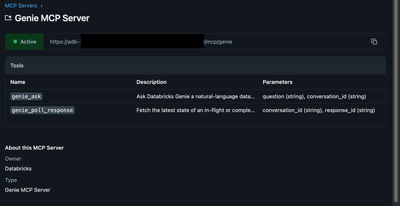
URL Pattern: https://<workspace-url>/api/2.0/mcp/genie
MCP Tools: It exposes genie_ask (to start the chat) and genie_poll_response (to fetch the results).
However, unless you are specifically building an agentic workflow that requires MCP tool-calling, sticking to the standard SDK/API approach highlighted above will save you a lot of development overhead!
Hope this helps!
